
Dtor
Participant
January 9, 2018
Answered

Great Preview Playback / Very Slow Lagfull Timeline Playback

  • January 9, 2018
  • 2 replies
  • 1332 views

I have always used PP 2015 (just updated to the cloud a week or so ago) My is when I first updated to PP 2018 was that I could preview clips with no lag at all but the moment I crop (in point out point) them and drop them in the timeline and play it back (space bar) I get the most annoying lag. So much so I basically have to scrub through and hope for the best.  The video play back is very choppy while the audio plays smoothly

I figured it was my system causing the problem (27-inch, late 2013 iMac, 8G ram, 1 TB HD, 3.5 GHz Intel Core) so I maxed the (32) Ram and swapped the internal HD for 1TB SSD and cleaned out all unwanted data (cleared my cache). After all of this nothing changed. I still get buttery smooth playback when simply previewing footage in the preview window (top left) But as soon as I drop anything to my timeline (top right) I get constant lag. (I'm so eager to edit using 2 timelines its the reason I finally ungraded).

I uploaded a quick one minute video showcasing my experience while preparing to edit a kids party recap video. You can see me watch a preview with ease then jump into lag lang which is my Selects timeline.

Note: when I check the activity monitor the %CPU dances between 120 - 377(max) for both actions

footage: Sony A7s ii (4k 24fps, 1080 125fps)

iMac (27-inch, Late 2013)

Processor: 3.2Ghz Intel Core i5

RAM: 32GB

Graphics Card: NVIDIA GeForce GT 755M 1GB

OS: High Sierra (10.13.2)

Can anyone help me with this issue? i would be greatly appreciated. Thanks

PS: If this has been asked and answered feel free to point me in the write direction.
    This topic has been closed for replies.
    Correct answer Kristian Gabriel

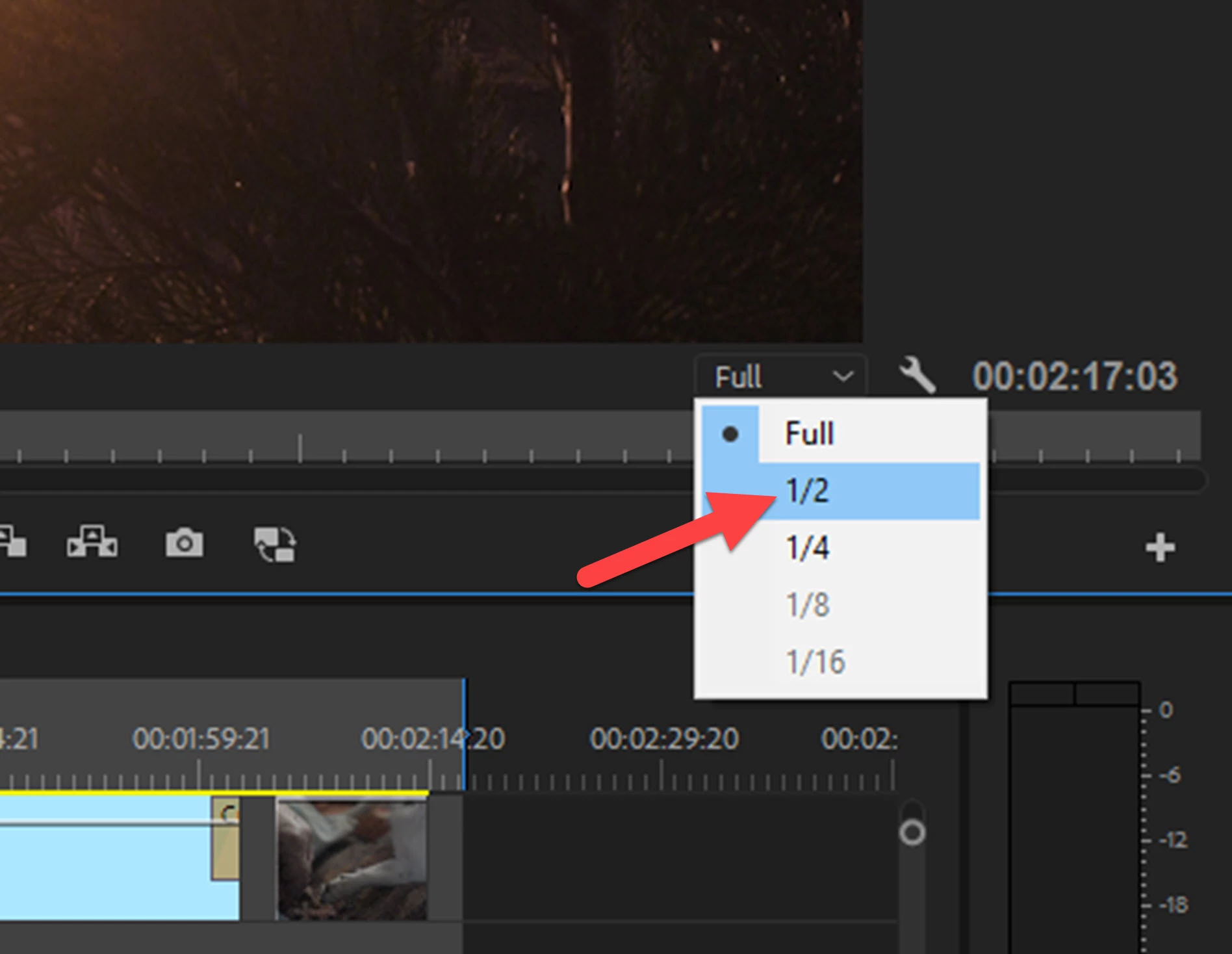
    I did notice on your video that the Source Monitor video Playback Resolution is set to 1/2 and your Program Monitor video Playback Resolution is set to Full. Try switching your Program Monitor to 1/2 resolution and see if that helps. Your Playback Resolution lowers the video resolution to give you a smoother playback. There are some other possibilities to your situation--but test this first.

    2 replies

    R Neil Haugen
    Legend
    January 9, 2018

    I don't know how many cores that old i5 CPU has, and that's relevant as the media you're using is long-GOP interframe which is some of the nastiest stuff for de-encoding then decompressing made.

    That process is incredibly CPU intensive for cores/threads/RAM. Less so just playing back whole original clips as PrPro isn't needing a lot of juice. That source monitor with untouched clips is just playback.

    As soon as you start combining clip bits & pieces on a timeline PrPro has much higher resource needs itself.

    Past Kristian's suggestions, I'd recommend using PrPro's create proxy process to make Cineform proxies for all your media. Use one of the included Cineform proxy presets.

    Then in the program monitor click the plus icon to the right, drag the Toggle Proxies icon to your program monitor controls, and toggle the proxies on for playback and off to original media to check quality when paused.

    Neil

    Everyone's mileage always varies ...
    Dtor
    DtorAuthor
    Participant
    January 9, 2018

    I tried the proxy thing before upgrading my hardware and it didn't work (saw the suggestion on a board). I cut the res in 1/2 on the play back and the lag lessoned significantly. Thanks for your input. I will need to upgrade my system before the years out as business/workload increases. Neil, Thanks again for your input

    Kristian Gabriel
    Kristian GabrielCorrect answer
    Participating Frequently
    January 9, 2018

    I did notice on your video that the Source Monitor video Playback Resolution is set to 1/2 and your Program Monitor video Playback Resolution is set to Full. Try switching your Program Monitor to 1/2 resolution and see if that helps. Your Playback Resolution lowers the video resolution to give you a smoother playback. There are some other possibilities to your situation--but test this first.

    Dtor
    DtorAuthor
    Participant
    January 9, 2018

    WOW, close it up we are done here. Can't believe it was that simple. Thank you so much. My stress level will soon been within normal range. There still a slight lag but I'll chalk it up to the old system I can work with this! Thank you Kristian