
Participant
April 2, 2024
Answered

Green/gray/purple/pink glitch on video preview

  • April 2, 2024
  • 2 replies
  • 1512 views

I am using AMD Radeon 6700 XT GPU (Premiere 2024, Windows 11) and this error happens unless I render sequence in and out and even then random frames of green/purple/pink remain. I have tried everything from reinstalling premiere to updating GPU drivers and restarting my pc a several times. 


Any and all support on this issue would be so helpful. Thanks.
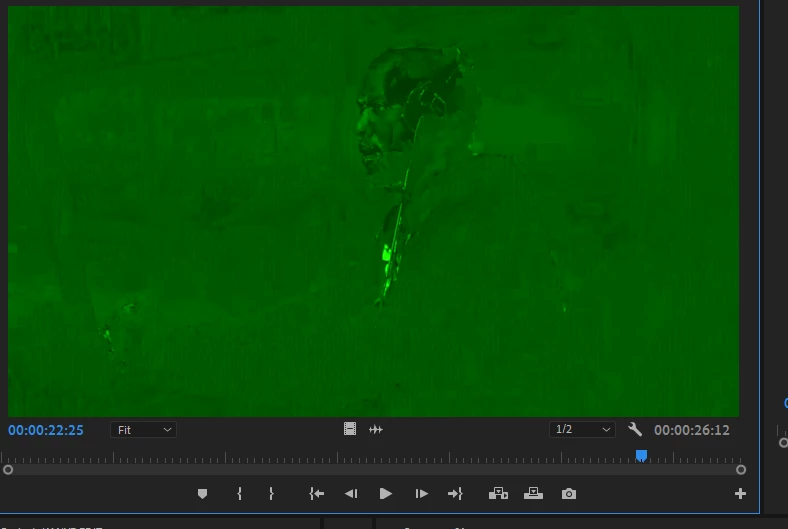
 

This topic has been closed for replies.
Correct answer Ben_McE

We actually figured out the issue. It turns out when screen sharing via discord that if another user watched the stream it caused the green colouring issue. We fixed it by turning off hardware acceleration in discord. Bizzare but it is what it is. Thanks for the help though

2 replies

Legend
April 9, 2024

It may be because AMD has depreciated support for the OpenCL API in newer driver versions in the transition towards a different open-source GPGPU API which none of the NLE video editing programs currently support at all. As a result of this depreciation, some upcoming versions of Premiere Pro may no longer support AMD GPUs at all, which may result in the MPE renderer becoming permanently locked to the software-only mode whenever an AMD GPU is installed.

Ben_McECorrect answer
Participant
April 9, 2024

We actually figured out the issue. It turns out when screen sharing via discord that if another user watched the stream it caused the green colouring issue. We fixed it by turning off hardware acceleration in discord. Bizzare but it is what it is. Thanks for the help though

Ishan Y
Community Manager
Community Manager
April 9, 2024

Hey Johnny_192,

Sorry for the poor experience. Have you also tried installing the PRO Edition Drivers? I see that they are pretty old, but installing them might help. As a workaround, please try transcoding your media to Prores using Shutter Encoder (if your media is encoded in a different codec). Let us know how it goes.


Thanks,

Ishan


Legend
May 30, 2024

The only way to install the newest PRO Edition driver that's compatible with the newer AMD GPUs is via the AMD Auto-Detect and Install utility, the latest of which offers the choice between the latest Adrenalin driver (24.5.1, default) and the latest PRO driver. (The latest PRO Edition driver that's compatible with the consumer cards is version 24Q1.1, released earlier this month.) If one downloads the PRO Edition driver directly from the AMD Web site, only a very outdated 22Q4 driver, which is now almost a year and a half old, is available. And that old driver version might not even install at all on some newer builds of Windows.


And forget about downloading a PRO Edition driver direct from AMD's Web site if one has a Radeon RX 7000 series GPU: There is none available. A PRO Edition driver that's compatible with the RX 7000 series GPUs is available only via the aforementioned Auto-Detect and Install utility.