


- Home
- Premiere Pro
- Discussions
- Thank you for posting this solution @alexl28211799...
- Thank you for posting this solution @alexl28211799...

Copy link to clipboard
Copied
help why are there weird lines on the preview?

even on after effects
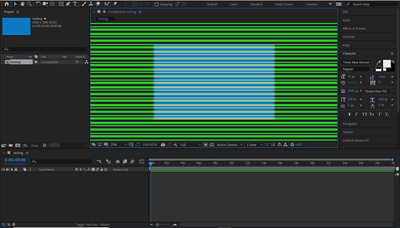
and when I press play, the green lines flickers
but when I render it, it's gone
It may be a GPU problem? I tried updating to the latest driver, didn't work
btw thanks if u tried to help me.


 1 Correct answer

I had the same issue just recently and I noticed quite a number of post with the same issue in the last few days. I did a bit of troubleshooting, it's not Windows 10 updates, but it's the video driver. In my case, I have an even weaker integrated Intel Graphic 520, I recently updated the driver through Intel and Premiere didn't like it. I downgraded my driver and used the Adobe baseline one:
https://helpx.adobe.com/x-productkb/multi/drivers-video-win-intel.html
Everything is fine after the down
...
 15
Replies
15
15
Replies
15


Copy link to clipboard
Copied
That is a GPU problem. Do you have a full GPU card, or does your computer use an internal graphics chip? What driver does the GPU use?
A card would be say an Nvidia 2080, or AMD Vega VII ... internal graphics would be like Intel 6300.
Neil
Copy link to clipboard
Copied
Sorry for the late reply, I use an Intel Hd Graphics 630 (GT2) Intergated GPU, and the driver is 27.20.100.8280


Copy link to clipboard
Copied
go to project settings - Renderer - and choose Software Only
Intel Integrated is not much compatible
Copy link to clipboard
Copied
thanks but it didn't work, I think I will upgrade my pc, so gl in your day.

Copy link to clipboard
Copied
This worked for me - version 14.9 - Project Settings, Render Software Only. Thanks a million.
Copy link to clipboard
Copied
I had the same issue just recently and I noticed quite a number of post with the same issue in the last few days. I did a bit of troubleshooting, it's not Windows 10 updates, but it's the video driver. In my case, I have an even weaker integrated Intel Graphic 520, I recently updated the driver through Intel and Premiere didn't like it. I downgraded my driver and used the Adobe baseline one:
https://helpx.adobe.com/x-productkb/multi/drivers-video-win-intel.html
Everything is fine after the downgrade on both Premier Pro 2019 v. 13.15 and 2020 v. 14.2. I'm assuming any version in between will be fine.
Copy link to clipboard
Copied
it works! you saved me, but I can't, I have to update the latest driver because some games don't work on that driver, but thank you so much! 🙂

Copy link to clipboard
Copied
Are you gaming on the Intel GPU or a discrete GPU (AMD or NVidia?)

Copy link to clipboard
Copied
Hello!
I'm having the same issue, every media I added to Premiere Pro I preview it whit green bars on it. I'm going to install the driver you suggested and I suppose it going to work as someone said. But it is almost two years old, I'm going to test another version in between. May be Intel is going to develop a new version that resolves that issue but, I 'm not so sure. Did you ask adobe support about this problem?
Copy link to clipboard
Copied
Well, I try to install february version driver (26.20.100.7870) and is working fine again.

Copy link to clipboard
Copied
I'm finding it impossible to downgrade. I've followed all your steps and extracted the igxpin.exe. I see the "do you want to allow this app to make changes on your device?" screen, clik yes, and this blank error message appears:
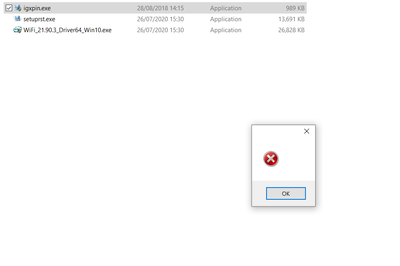
So I tried manually, and it won't let me choose this driver, it says "you alrady have the best driver".
Does anyone have a workaround?
Many thanks!

Copy link to clipboard
Copied
If you still have the issue, that's what fixed it for me:
- open device manager
- right click your Intel HD graphics and select "unistall device"
- perform the uninstall process (2nd monitors will stop working etc)
- reboot you PC
- open device manager
- make sure your graphics card is now called "Windows baseline graphics card" or something similar but not "Intel HD graphics..." anymore
- Now download the driver directly from Intel, I got the most recent one for my UHD 620: https://downloadcenter.intel.com/download/29988/Intel-Graphics-Windows-10-DCH-Drivers?product=97502
- double click the .exe file and install the driver
That's it.
Copy link to clipboard
Copied
Thank you for posting this solution @alexl28211799 The green stripes were driving me nuts and impacting my productivity!
I had also upgraded to the latest Intel DCH Drivers (27.20.100.8476, dated 28/Jul/2020 on the Intel UHD630, and got the green stripe error in Premiere 14.3.0 and 14.3.1 (build 45), plus clicking the "play" button didn't work in either the source or program preview windows.
I tried updating to the latest NVidia drivers 451.67 and 451.77 on the RTX2070 and neither of those fixed the problem.
Rolling the Intel Graphics driver back to the Adobe baseline (2018) makes Premiere work again!

Copy link to clipboard
Copied
yeah, i actually had two monitors and i went on display adaptors and changed it to one and now it is working,

Copy link to clipboard
Copied
How' bout we just tell Adobe to fix their SH**. This isn't a problem in ANY other editing software but theirs. Maybe the resolution is for them to fix their app instead of us tinkering with GPU setting which could mess with every other thing that uses the graphics card?


Find more inspiration, events, and resources on the new Adobe Community
Explore Now
 AdChoices