Participant
May 16, 2020
Question

greyed out timeline

  • May 16, 2020
  • 4 replies
  • 9447 views

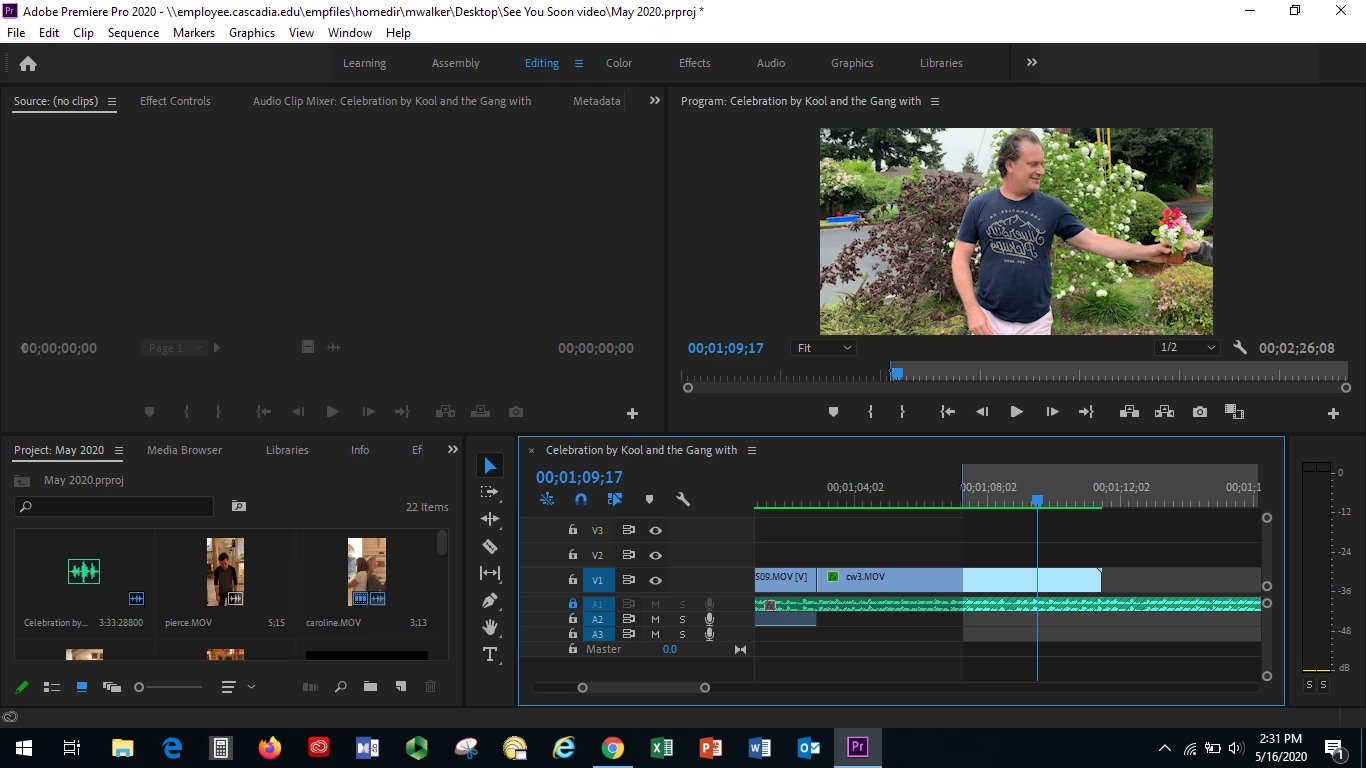
I am in the middle of an edit and a portion of my timeline has greyed out. I'm now unable to render. Help please! I'm under deadline.

4 replies

divinityrose
Participating Frequently
August 23, 2022

any solves for this that don't involve markers? my time line has just straight greyed out my clips. i can't clear markers any more than I have.  It happened when I copied the clips and pasted them into another sequence and now they are greyed out in both sequences

Peru Bob
Community Expert
Community Expert
August 23, 2022

Please post screenshots.

Peru Bob
Community Expert
Community Expert
January 25, 2022

You probably created the in point by accidentally pressing the shortcut for it.

Participant
January 24, 2022

You can clear In and Out points with Ctrl+Shift+I (Opt+I), Ctrl+Shift+O (Opt+O), and Ctrl+Shift+X (Opt+X) for both.

MyerPj
Community Expert
Community Expert
May 16, 2020

You're timeline looks pretty normal. You have an inpoint set where the 'grey' starts. Remove the in point (not sure if you have an outpoint set, but if not, PP takes it to mean the end of the sequence. Then it wont be grey anymore. Click in the timeline window and shift-x (I believe) is the default key to clear in and out. (I have mine mapped to alt-x).