Inspiring
August 26, 2021
Question

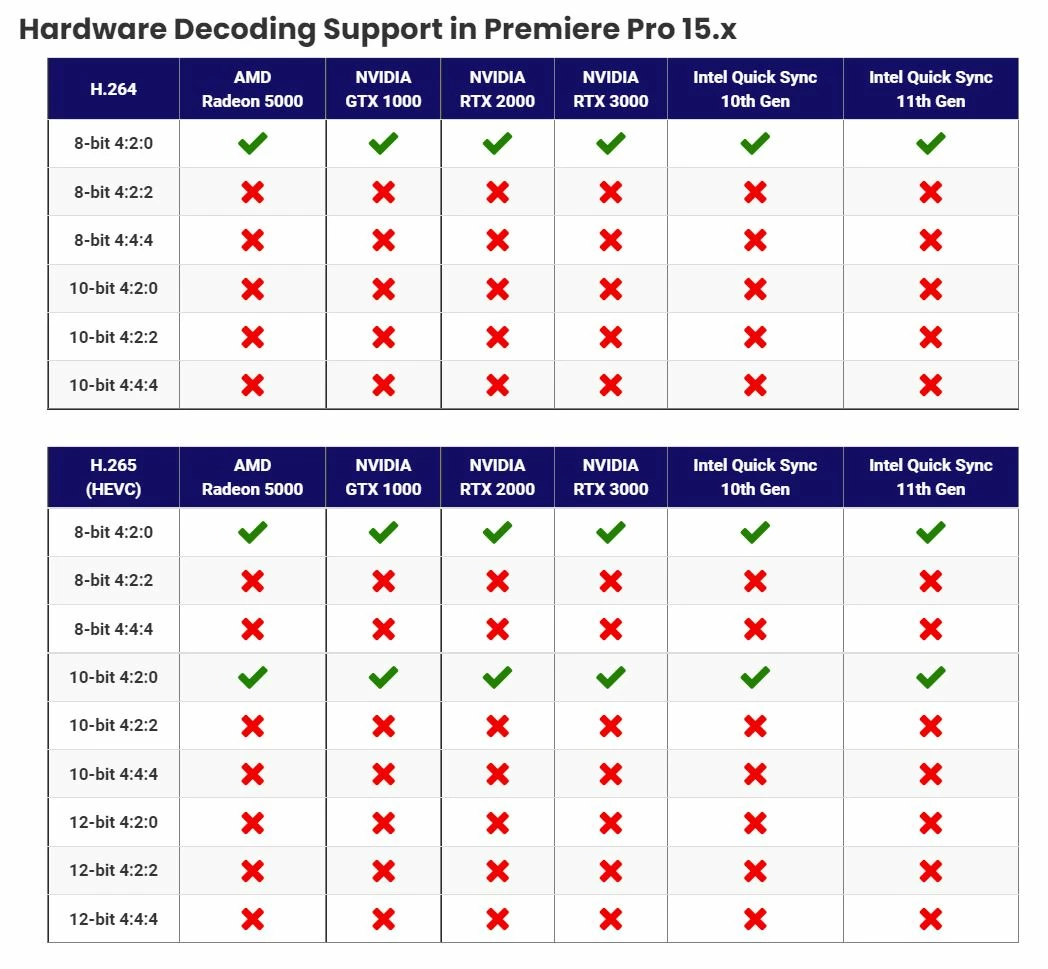
H.264/H.265 Formats that use hardware decoding in Premiere -

  • August 26, 2021
  • 6 replies
  • 6976 views

I found this on Puget systems site.  Full credit to them.  This explains alot of why my drone footage plays well, while my Canon R6 plays poorly. 
This topic has been closed for replies.

6 replies

R Neil Haugen
Legend
September 10, 2021

Adobe's engineers have just added some more to the HEVC support equation if you have the right Intel CPU. Details of the public beta HEVC additions in the following link to their public beta forum.


Neil


Discuss: Hardware Acceleration for HEVC on selected Intel CPUs


Everyone's mileage always varies ...
Inspiring
September 11, 2021

Neil, 

Thanks for posting the link. I have nothing aginst AMD but when it comes to Premiere Pro I have to recommend Intel CPUs with an IGPU because of the Quick Snyc features.  I don't doubt Abode has an M1X chip and Alder Lake CPU for testing purposes. I think we should see some benchmarks soon. I think Window 11 hits the stores next month. 

Inspiring
August 28, 2021

That chart should be a sticky that we can link to if people are having problems editing video from a drone or DSLR camera. Not all H.264/265 is edited the same. Having said that I would like to think Premiere Pro will take full advantage of the 10nm Adler Lake CPUs. Some leaked benchmarks suggest it will be a huge improvement over the old and wornout 14nm chips. 

Inspiring
August 28, 2021

I am sure most people are hip to the benefits of Nvenc and Quick Sync but if not the video below might be helpful. I think they both work great but I admit I would like to see more H.264/265 variations supported ASAP. 

https://www.youtube.com/watch?v=1L-erwmRxAU

Inspiring
August 27, 2021

That chart should be handy to have. I always post that Nvenc and Quick Sync cannot play all the odd variations of H.264/265. I don't doubt in another 2-3 years they will support even more variations of H.264/265. 

Andy UrtuAuthor
Inspiring
August 27, 2021

Go over to Puget systems and look at the codecs supported by Resolve. With Gen 11 Intel CPUs, quick sync suports ALL of the various codecs. 

I sure hope Adobe gets moving on this. 

Inspiring
August 28, 2021

I am definitely not missing the point.


H264/H265 are for delivery.  


I encourage you to learn about color sampling, color depth, interframe encoding, compression generation loss, and - perhaps most importantly - peak signal noise ratio.


Warren,

Your response is kind of harsh and incorrect. A lot of DSLR and mirrorless cameras record to H.264/265. It is OK to edit native H.264/265 if your system can do it. Transcoding to Pro Res is not going to make H.264 better. In fact it is kind of like skipping a generation. That being said John Mondo is 100% correct. If an H.264/265 video codec has support for hardware acceleration it will playback easier than ProRes, DNxHD, Cineform, AVD-Intra, XDCAM. I have posted several videos about this so we can all be on the same page. Perhaps you should watch my videos because I have mentioned to Kevin there is way to much miss information of these forums. Instead of encourage people to learn about color sampling, color depth, interframe encoding, compression generation loss, and - perhaps most importantly - peak signal noise ratio perhaps you should learn to accept reality. Premiere Pro should take full advantage of the latest technology and also accept the fact that H.264 is more than adeqaute for social media. Pewdie Pie and other content creaters don't need to learn about the things you suggested like color sampling, color depth, interframe encoding, compression generation loss. They just want to edit video from their camera without transcoding. If Premeire Pro cannot do they will find a NLE that can. Making excuses will not make Premiere Pro better. I use Premeire Pro but I am not a cheerleader because I no Premiere Pro could be better. 


Community Manager
August 27, 2021

Hi @Andy Urtu,


We have enabled Hardware Acceleration decode of HEVC/H264 4:2:2 10 bit on Mac ARM systems in the latest Premiere Pro Beta builds. We will also look into other platforms.

Please download the latest Premiere Pro Beta build from Creative Cloud --> Beta apps --> Premiere Pro (Beta)

https://helpx.adobe.com/x-productkb/global/creative-cloud-public-beta.html

You can have a look at the announcement here: 
https://community.adobe.com/t5/premiere-pro-beta/discuss-hardware-acceleration-decode-for-4-2-2-10-b...


Please let us know how it goes for you. 


Thanks,
Mayjain

Andy UrtuAuthor
Inspiring
August 27, 2021

Thank you the update on ARM 4:2:2 10 bit. 
can you share if there are plans to add this to the PC version?


Community Manager
August 30, 2021

Hi @Andy Urtu,


Yes.. there certainly is.. We are looking into it.  We will update you when it's enabled on windows also.


Thanks,
Mayjain

R Neil Haugen
Legend
August 26, 2021

Thanks for posting this .... very useful information.


Neil

Everyone's mileage always varies ...
