Inspiring
August 26, 2021
Question

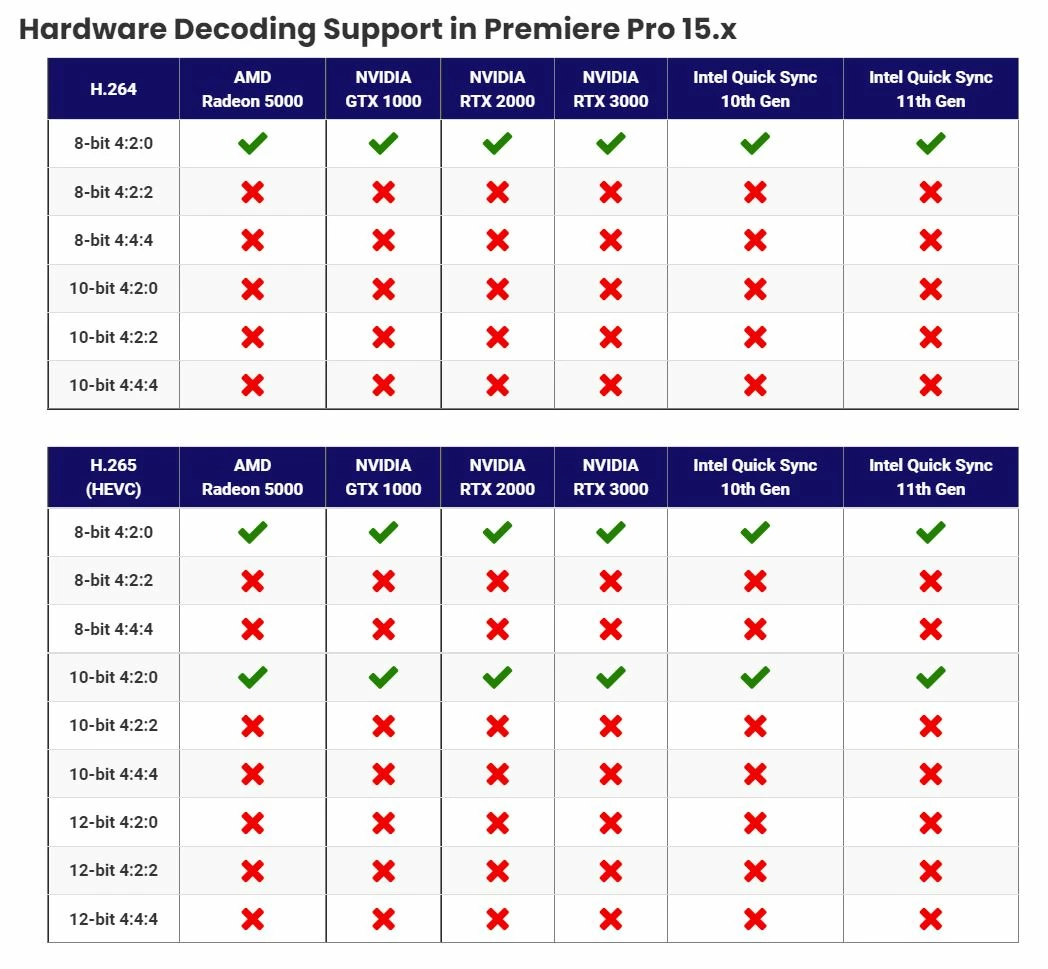
H.264/H.265 Formats that use hardware decoding in Premiere -

  • August 26, 2021
  • 6 replies
  • 7033 views

I found this on Puget systems site.  Full credit to them.  This explains alot of why my drone footage plays well, while my Canon R6 plays poorly. 
This topic has been closed for replies.

6 replies

R Neil Haugen
Legend
September 10, 2021

Adobe's engineers have just added some more to the HEVC support equation if you have the right Intel CPU. Details of the public beta HEVC additions in the following link to their public beta forum.


Neil


Discuss: Hardware Acceleration for HEVC on selected Intel CPUs


Everyone's mileage always varies ...
Inspiring
September 11, 2021

Neil, 

Thanks for posting the link. I have nothing aginst AMD but when it comes to Premiere Pro I have to recommend Intel CPUs with an IGPU because of the Quick Snyc features.  I don't doubt Abode has an M1X chip and Alder Lake CPU for testing purposes. I think we should see some benchmarks soon. I think Window 11 hits the stores next month. 

Inspiring
August 28, 2021

That chart should be a sticky that we can link to if people are having problems editing video from a drone or DSLR camera. Not all H.264/265 is edited the same. Having said that I would like to think Premiere Pro will take full advantage of the 10nm Adler Lake CPUs. Some leaked benchmarks suggest it will be a huge improvement over the old and wornout 14nm chips. 

Inspiring
August 28, 2021

I am sure most people are hip to the benefits of Nvenc and Quick Sync but if not the video below might be helpful. I think they both work great but I admit I would like to see more H.264/265 variations supported ASAP. 

https://www.youtube.com/watch?v=1L-erwmRxAU

Inspiring
August 27, 2021

That chart should be handy to have. I always post that Nvenc and Quick Sync cannot play all the odd variations of H.264/265. I don't doubt in another 2-3 years they will support even more variations of H.264/265. 

Andy UrtuAuthor
Inspiring
August 27, 2021

Go over to Puget systems and look at the codecs supported by Resolve. With Gen 11 Intel CPUs, quick sync suports ALL of the various codecs. 

I sure hope Adobe gets moving on this. 

R Neil Haugen
Legend
September 11, 2021

Warren, 

You wrote the following. 
Well, there's a lot more to consider than that when deciding if all H264/H265 is appropriate for your workflow.  I mean, most computers for the last decade can play (decompress) H264 - even an early i3 with integrated graphics.


What is your point? I agree a seven year old computer can play certain H.264 video codecs but not all of them. Keep in mind some H.264/265 variations can bring a sixteen core CPU to it's knees while the M1 chips from Apple can play it back with ease. The M1 chip has dedicated hardware for encoding and decoding H.264/265 the XEON CPUs do not. Neil left a link (down below) that states Premiere Pro will support more varaiations of H.264/265 but you need the newer Intel CPUs to do it. 

https://community.adobe.com/t5/premiere-pro-beta-discussions/discuss-hardware-acceleration-for-hevc-10-bit-now-available-on-windows-intel/td-p/12371495

You also wrote this. 
At CBS, for what it's worth, we use 3840x2160, 2160x2160, 1920x1080, 864x1080, 1920x1080, and 608x1080.  Again, 1080i is just one delivery type of many.  Camera original footage is whatever was used by the production (it's almost always high-end pretty high-end but across a variety of cameras with a wide range of settings - but not always) and the edit CODEC is always ProRes or DNxHD. 

Did anyone mention CBS? Has anyone stated CBS uses H.264? Stop talking about yourself for once and accept reality. Back in 1978 everyone seen video on their TV not the computer. As of 2021 there are millions of people who have DSLR cameras that use the odd varations of H.264/265. Those people do not care about CBS! They just want to edit the video from their camera on their computer not broadcast compliant hardware. Can you accept what I just wrote as fact? 

There is also this.
I remember HDV well and I remember what a headache it was to try to edit it natively.  I cannot remember it ever being as fast in post as an interframe CODEC.  I've seen film festival submissions missed because someone talked the producer into going all HDV for the workflow when a ProRes transcode was available all the while.

Who would  cut a film using HDV which is 1440 X 1080i or 720P? I have seen HDV be used for commercials, infommercials and it was also used by some of the cable channels. For the record a mediocre Core 2 Quad could edit HDV with ease. No need for Pro Res. Let me ask you this do you think transcoding H.264 to Pro Res will improve the image quality?

Last but not least.
How about I phrase it this way:  H264/H265 is not as good of a CODEC for editing as ProRes, DNxHD, Cineform, AVC-Intra, and XDCAM.

That statement is still incorrect for a multitude of reasons. H.264/265 will work just fine for editing provided your computer is up to the task. In fact my system can playback certain variations of H.264/265 more efficeint than Pro Res. What you could argue is that if your camera can make use of H.264, Pro Res, BRAW and R3D files, Pro Res would be the best option. Many people would disagree for a multitude of valid reasons. There are many YouTubers who have the RED Scarlet and 6K Blackmagic Pocket Cinema camera (Pro Res or BRAW).  They often admit when doing YouTube videos they use a Sony A7 III (H.264) because the image quality looks great for YouTube videos and it uses a lot less hard drive space. Some of them have also stated they have used the Sony A7 III (H.264) over the Red Camera and Blackmagic camera for professional work. I think you would have to admit your workflow represents a small minority not the majority. Having said that your workflow might be used more for broadcast and film projects but think of the million of people who create content for social media. They would out number you 1000 to 1. Would you agree with that?

I have an Intenisty Shuttle. I can drop sample R3D files, Pro Res files and even BRAW files into a Premere Pro sequence and the video quality I can get from my Sony A7 III looks just as good as any of those other video codecs when played on broadcast compliant hardware. The only limitation of the 8 bit H.264 video coming from the A7 III is that if you have to do heavy color manipulation the image can  degrade easier than some of the other video codecs. That being said many people can get a good white balance 95% of the time with minor tweaks. RAW files will allow you to save a bad shot better than H.264 but a lot of people are moving away from RAW to save time during editing. The needs required for a film or TV projects will be different from that of a 6 o'clock news segment or a YouTube video. No one is saying H.264 is always the best option but can you admit for millions of people H.264 will work just fine for editing and export? 


Haven't seen Warren say it couldn't ... his only points have been about the wisdom of using it at times. Especially for those where it's not flowing smoothly on their machine.


And from the constant complaints here and about that H.264/5 ain't a smooth experience on their machine, that's still a fair amount of users. Which seems pretty freaking obvious.


Yes, on some machines editing several tracks of H.264 is quite possible. You clearly have one. My 24-core/128GB of RAM/2080Ti with two Nvme and 6 internal SSDs handles it pretty well, I doubt as well as yours.


My 6-core laptop with a laptop's "RTX2080" ... no way. One stream of H.264 is ... ok. Do an H.264 multicam? You kidding me? And it's a beast of a machine compared to a lot of laptops listed by users here.


So ... like nearly everything in editing/video post: it depends. There's always a number of factors involved. And if one's machine ain't up to multiple streams of H.264 decoding plus adding effects ... other options are worth looking at.


And Resolve doesn't work with it any better on my laptop than PrPro does.


Neil

Everyone's mileage always varies ...
Participating Frequently
August 27, 2021

Hi @Andy Urtu,


We have enabled Hardware Acceleration decode of HEVC/H264 4:2:2 10 bit on Mac ARM systems in the latest Premiere Pro Beta builds. We will also look into other platforms.

Please download the latest Premiere Pro Beta build from Creative Cloud --> Beta apps --> Premiere Pro (Beta)

https://helpx.adobe.com/x-productkb/global/creative-cloud-public-beta.html

You can have a look at the announcement here: 
https://community.adobe.com/t5/premiere-pro-beta/discuss-hardware-acceleration-decode-for-4-2-2-10-b...


Please let us know how it goes for you. 


Thanks,
Mayjain

Andy UrtuAuthor
Inspiring
August 27, 2021

Thank you the update on ARM 4:2:2 10 bit. 
can you share if there are plans to add this to the PC version?


Participating Frequently
August 30, 2021

Hi @Andy Urtu,


Yes.. there certainly is.. We are looking into it.  We will update you when it's enabled on windows also.


Thanks,
Mayjain

R Neil Haugen
Legend
August 26, 2021

Thanks for posting this .... very useful information.


Neil

Everyone's mileage always varies ...
