
Hardware Encoded render is darker than the original, the preview or a Software Encoded render
Hi everyone,
I've been dealing with exports being too dark for the past few days, or at least: the colors are waaaay off from the original video. Since I now finally have a 100% sRGB monitor, I thought it might have to do something with that, so I went down a rec.709 / sRGB rabbit hole yesterday.... But corrrecting into either direction did not get me back to the image of the original. So that couldn't be the problem...
Then I thought it was just my new computer, so I tried my trusty laptop, and it has the same issue (apparently I've been exporting dark videos for a while now....).
Just today I decided to test the difference between Hardware Encoding (which I've been using for months, thank god for the 2.5x extra speed and a cooler overall computer in my case - meaning WAY less fan noise) and Software Encoding. Software encoding is so close to the original, I couldn't even tell Software and Original apart when putting them on 2 different tracks and switching between the 2. So the problem only arises with HW Encoding.
Here's 3 screenshots from the Premiere Pro preview window (of course, the problem is also there in VLC, on my phone, and other video players).
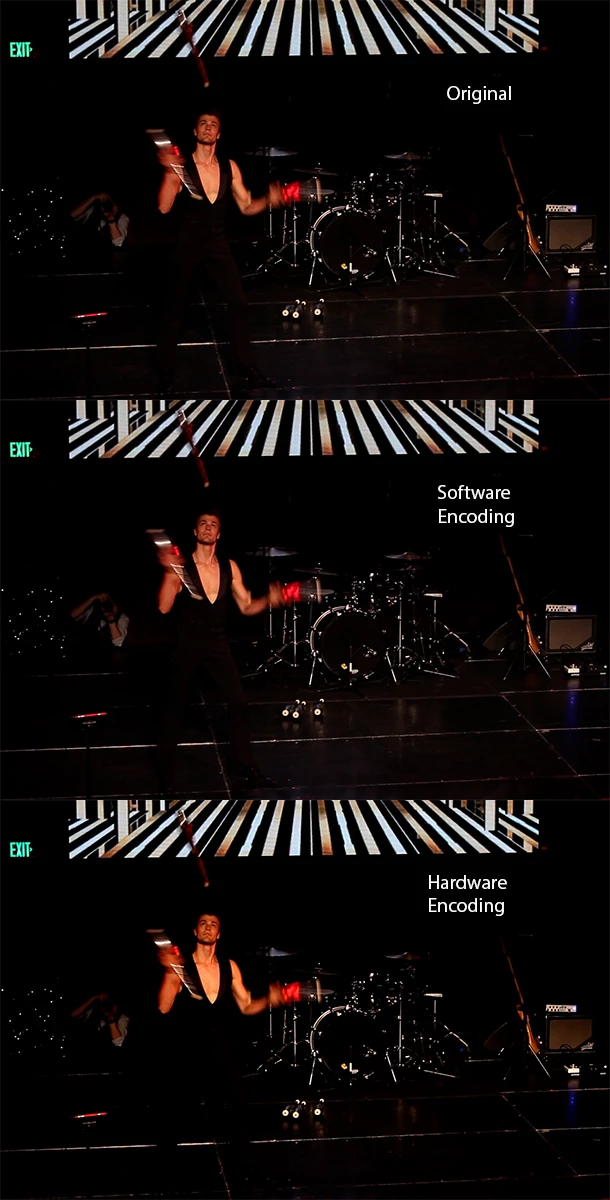
You can clearly see that in the bottom image the stage is darker, and I myself am more ?orangy? ...
System:
My desktop is an AMD Ryzen 3700x system with RTX 3060 Ti, latest CC version of Premiere Pro, latest version of Windows, latest version of Nvidia Drivers.
My laptop is an Intel 6700HQ system with GTX 960M (I guess you can see why I chose to upgrade 😉 ), also everything is fully updated on there, I made sure to double check.
I've played around with the export settings so much, I'm sure I've covered all the bases to rule out what's causing the problem. I normally export h.264, 1080p, hardware encoding, VBR 1-pass, 16 mbps.
Also just using "match source - high bitrate" gives me the same problem.
I've googled for so many hours now, I just don't know what to do.
Oh, I just wanted to hit "post", when I thought to test importing the SW and HW versions and rendering them again, and see if there are any extra changes being added...
Weird conclusion: re-exporting the SW render as HW or SW does NOT change the video. And re-exporting the HW render as HW or SW does NOT change the video. HOW??
This gives me the impression that it must happen when Premiere Pro interprets the original file. I just looked into the properties of all the clips in my now overcrowded Premiere project, and found out that the original is "Video Codec Type: MP4/MOV H.264 4:2:0 (Full Range)" while all the other ones are "Video Codec Type: MP4/MOV H.264 4:2:0".
Does this mean that it has something to do with my GPU interpreting the "Full Range" (I'm guessing that's the 0-255 vs 16-235 thing) footage differently from the non-"Full Range" stuff, while the CPU sees them both as being the same?
But how does Premiere Pro get that wrong only in the render, not in the preview window?
Also: incidently I just tinkered with the Nvidia Control Panel settings {"Adjust Video Colour Settings" - "With the Nvidia Settings" - "Advanced" - "Dynamic Range" - "Full (0-255)"} yesterday, because of a "Matt WhoisMatt Johnson" video about colours being wrong after the render, but that didn't change anything for me.
I just checked the Waveforms, and it looks like the HW version stretched the values out with a mid-point that stays in place around the 100 (out of 255) mark.
I can't find ANY settings that fix this. Not in "Interpret Footage", "Export Settings", "Sequence Settings", "Project Settings" or "Preferences".
Is there anyone who can save me? This shouldn't happen, right?
 AdChoices