

Hardware encoding export results in pixelated/glitchy image
Hello,
I know I'm going to need a bit of direction here on what information you might need in order to answer my question, as I am a beginner. I have been editing videos shot from my Sony a6400 in Premiere Pro. I have never had issues with this in the past, but suddenly when I export with hard encoding I get a video that starts out normal, and then after about 10 seconds starts to get really noisy and pixelated. I have tried switching to software encoding, and it does fix the issue, but when I do this export times for a 12-minute video go from an 8-minute export (using hardware encoding) to 40 minutes (using software encoding). This has happened in 3 different projects of mine now, so I need more than a 1 time fix. (I don't really have to use software encoding forever do I??)
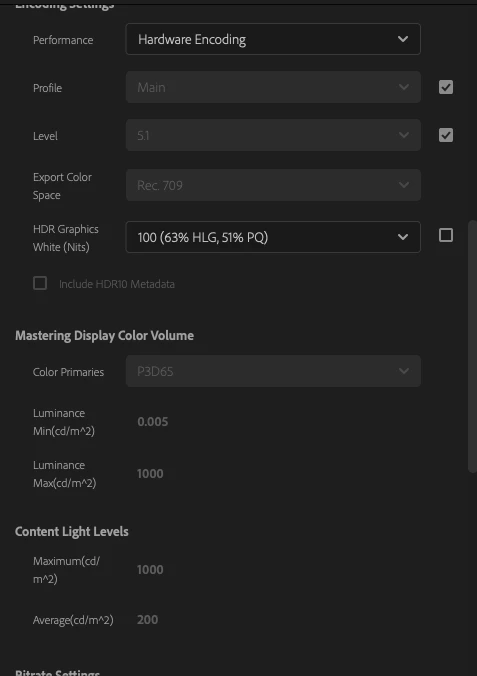
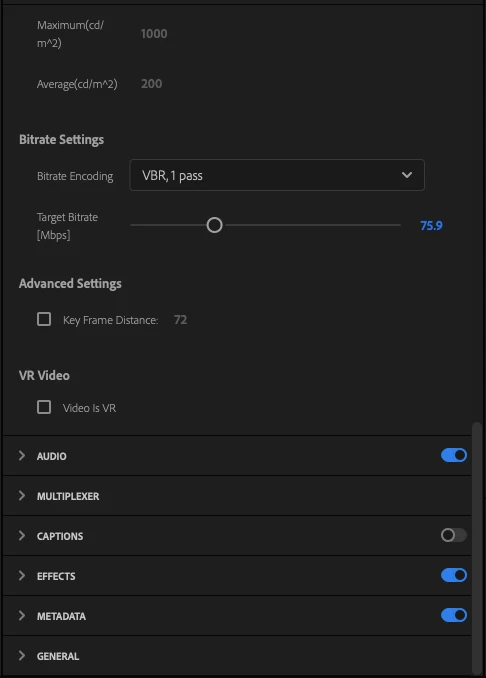
I'm not sure what information you need so I attached screenshots of my settings that I thought could be helpful. When I exported both times the settings were the exact same except hardware encoding vs. software encoding. I shot my video in XAVC S 4K (30 P 100 M)
Let me know if you need additional information!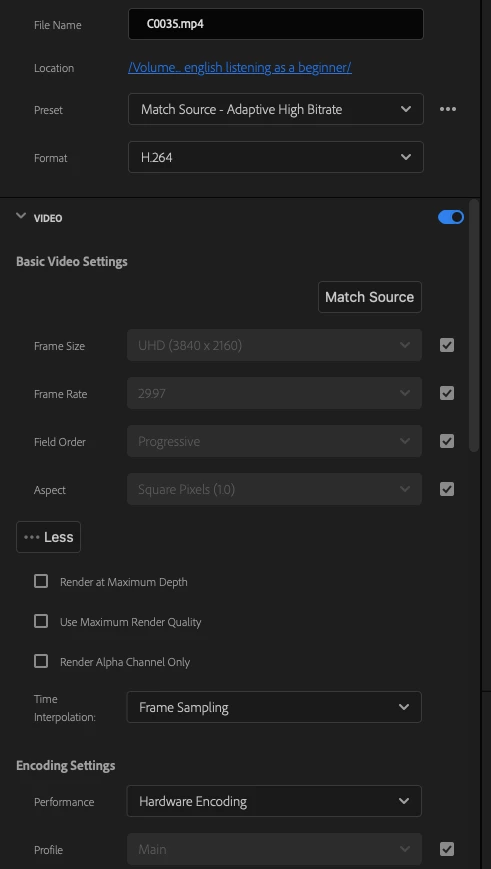
 AdChoices