
Participating Frequently
July 15, 2021
Question

HDR Exports look darker

  • July 15, 2021
  • 2 replies
  • 2041 views

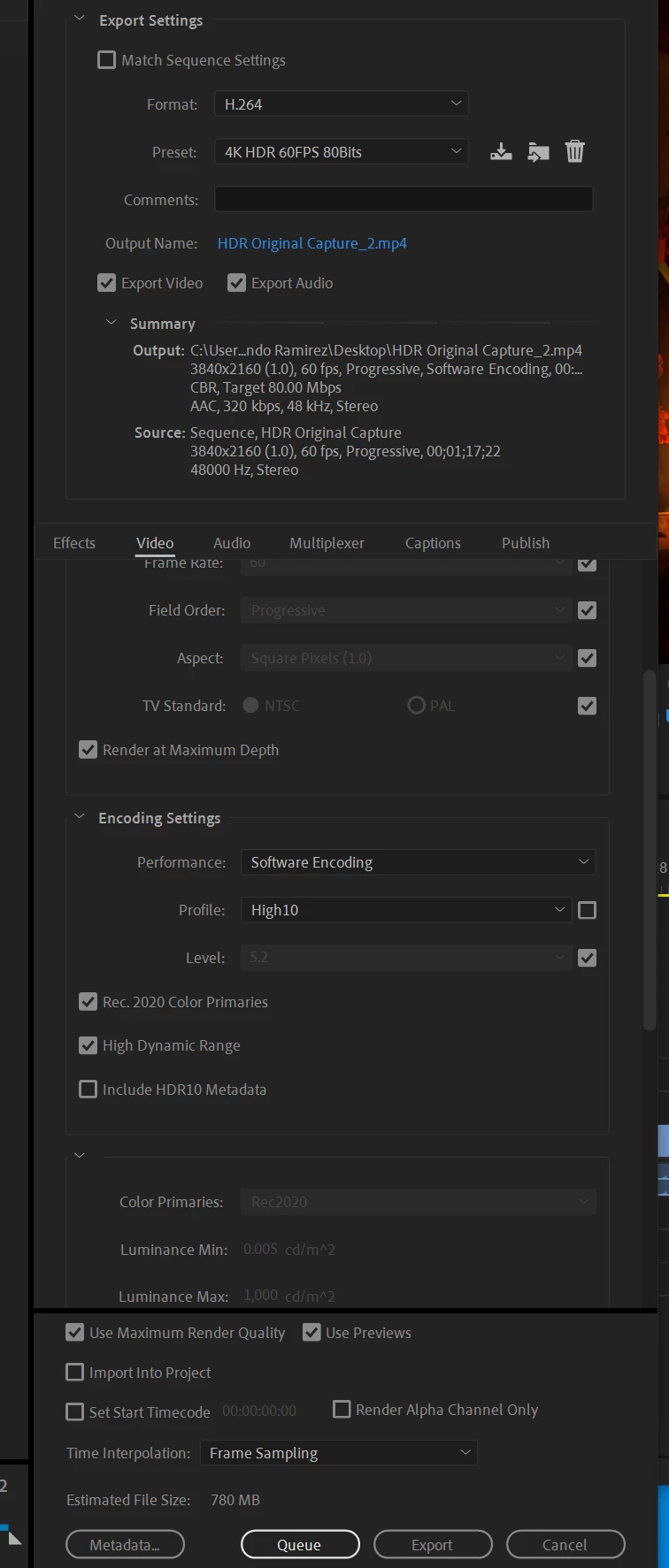
So I have this HDR video that I capture with Nvidia ShadowPlay. This is the original capture and it looks like this when I upload it to Youtube. This is how it looks when I finshed exporting it from Premiere Pro and upload it to Youtube. As you can see it looks way darker once it comes out of Premiere Pro, I just wanted to know why is this happening.


My Export settings look like this. 
 

This topic has been closed for replies.

2 replies

R Neil Haugen
Legend
July 16, 2021

 Ah, you're on a previous version of PrPro. They've had the sequence color space settings for a couple dot-upgrades now.


Neil

Everyone's mileage always varies ...
Luis5E8BAuthor
Participating Frequently
July 16, 2021

Thanks. So I just updated Premiere Pro to the latest update. Now I am able to see the the workspace color on the sequence settings. The export now looks like the original HDR capture. 


Also I changed the color space in the sequence settings to 2100HLG but this totally destroys the color on the preview. Here is a screen shot of what after changing it to 2100HLG.


How would I be able to fix this, cause when I export it looks just like this too.

Luis5E8BAuthor
Participating Frequently
July 16, 2021

Forgot to mention that the export looks like the original HDR capture only if I leave the workspace color to Rec 709 instead of 2100HLG.

R Neil Haugen
Legend
July 15, 2021

What is the color space for the sequence it's on? Check the Sequence settings for that ... the Working Color Space option at the bottom of the Video section of the Sequence settings dialog.


Did you adjust any tonality or hue, any color/brightness changes at all? If so, what did the Lumetri Scopes panel show? And was it set to an HDR color space?


There's a couple other things might be in play, but we'll start with those.


Neil

Everyone's mileage always varies ...
Luis5E8BAuthor
Participating Frequently
July 16, 2021

I can't find the working color space option in the sequence settings, this what I see.


I didn't mess with the colors at all, I just dragged it into Premiere Pro and exported. The only thing I changed in the Lumetri Scopes panel was these two things.


Change it from 8bit to HDR & change the colorspace from 709 to 2020. Im not sure if this is the same thing as the workspace in the sequence settings.


Also just wanted to say thanks for taking your time to help me with my problem. 🙂