
Participating Frequently
August 1, 2022
Answered

Help re import settings..... I have really mucked up!

  • August 1, 2022
  • 1 reply
  • 211 views

Hi All,

I have made a bit of an error and with a bit of research, it seems all is not lost.  So I imported my 1080 footage into premier but forgot to check the "change sequence settings to match clip" bit.

I didnt really realise what I had done until I had spent  at least 3 hours chopping up footage, then, oops!

My footage is now framed at 4:3 ratio.   I was going to go to "sequence settings" to try and change things  but the menue items in there  are all greyed out.  I cant change the settings it seems. 

The greyed out settings say  720x 576......

Can some kind person give me a hint on whether this is fixable or not?   I really dont want to have to start at the begining ....  it would drive me mad I think but its for a community organisation and I would like to do my bit.


Kind Regards,

Simon. 
This topic has been closed for replies.
Correct answer Richard M Knight

First thing 'save a copy' of your project then duplicate the faulty sequence in the project panel and work on the duplicate. That makes sure you not lose anything if you make a mistake.

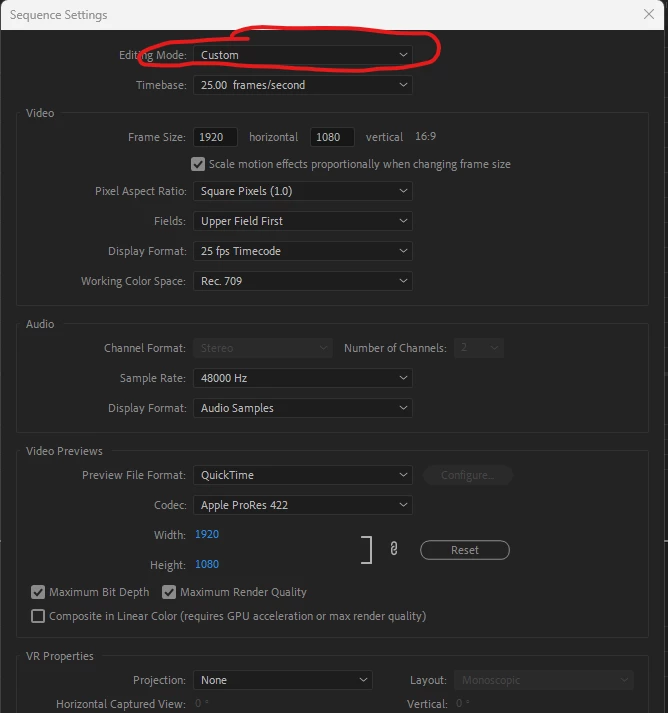
To alter the sequence size go to sequence settings and chose 'custom' then change the settings you want.

If none of the footage then fits the new sized sequence, lasso select all the clips in the timeline, right click and chose 'set to frame size, this should make the footage the right size.

1 reply

Richard M KnightCommunity ExpertCorrect answer
Community Expert
August 1, 2022

First thing 'save a copy' of your project then duplicate the faulty sequence in the project panel and work on the duplicate. That makes sure you not lose anything if you make a mistake.

To alter the sequence size go to sequence settings and chose 'custom' then change the settings you want.

If none of the footage then fits the new sized sequence, lasso select all the clips in the timeline, right click and chose 'set to frame size, this should make the footage the right size.

Participant
August 7, 2022

Thank you so much. I'm new and put myself in a corner. I almost punted and started over at the cost of many hours... This saved me.