
Participating Frequently
January 11, 2017
Question

HELP! Weird Diagonal Lines in half clip

  • January 11, 2017
  • 2 replies
  • 4675 views

Good afternoon!

I am working on a project from quite a while ago, I am trying to update and spruce it up. It is from about a year ago so I am sure the version of premier was different. When I open the project it has me convert it to the new updated premier that I have currently. When I look on the timeline, the clips are all still there but half of them have these diagonal lines through them. The clip plays fine up until the lines, the it is just black video and will not continue playing. I opened other projects from the exact same day that I created a year ago and all of those clips in all other projects are fine. It almost cuts the clips in half...I tried to open an older version of premier to try and read them, I tried copying the clips to a new file and re-importing them into a brand new project and it would only import the clips up until those diagonal lines start, so I am only getting half of the clips. I attached a picture to show you what it looks like. Please help!
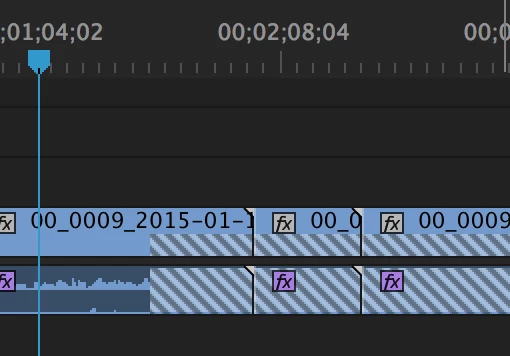
    This topic has been closed for replies.

    2 replies

    Participant
    March 29, 2023

    Ann Bens
    Community Expert
    Community Expert
    March 29, 2023
    Ann Bens
    Community Expert
    Community Expert
    January 11, 2017

    Delete all media cache like this:

    FAQ: How to clean media cache files |Adobe Community

    rename folder the footage is in and relink.

    MacLiveAuthor
    Participating Frequently
    January 11, 2017

    When I go to Mac: /Users//Library/Application Support/Adobe/Common

    I only get as far as Application Support. There is no Adobe then Common in that file but in the project settings that is where it says it is going to.

    I also tried the "Clean" in Media Preferences and then renamed and even copied the files to a completely different folder and opened a brand new project and it still is only bringing in half the clip.

    Ann Bens
    Community Expert
    Community Expert
    January 12, 2017

    You don't need to convert anything, but if you wanted to you have access to Adobe Media Encoder which works great. The main question is if you altered the folder structure of the footage. The way these cameras record footage is very specific, and if you alter the folder structure you can mess things up. Usually there will be a PRIVATE directory right inside the SD card. If you want to back up the footage then that entire directory, including the PRIVATE folder must be backed up into another folder. It must mimic the SD card structure. Can you reveal one of those messed up clips in Finder or Explorer and take a picture of your entire folder structure?


    I find this a bit odd. The camera is a hdv tape camera, must have had a recording unit attached. m2t is mpeg2.