

Gareth_Williams
Inspiring
September 6, 2024
Answered

Help With Urdu For An Idiot?

  • September 6, 2024
  • 1 reply
  • 2132 views

Hi everybody, I’ve spent hours trying to find the answer to this with searches in Google and Youtube but got absolutely nowhere! I need some help with pasting Urdu text in Adobe Premiere. I can’t get an exclamation mark at the right end of the word! It should be at the end, which is on the left, but when you paste this in (below), the exclamation mark just always goes on the right! Before the word. Like it has here!

مفت تجارت حاصل کریں!

This should mean “get free merch” or words to that effect but literally it’s “get free trade” which doesn’t make any sense because if it was a trade it wouldn’t be free! Anyway, that’s what it means. Any help would be great!
This topic has been closed for replies.
Correct answer Zaid Al Hilali

Yeah, that all works nicely. Thanks again!


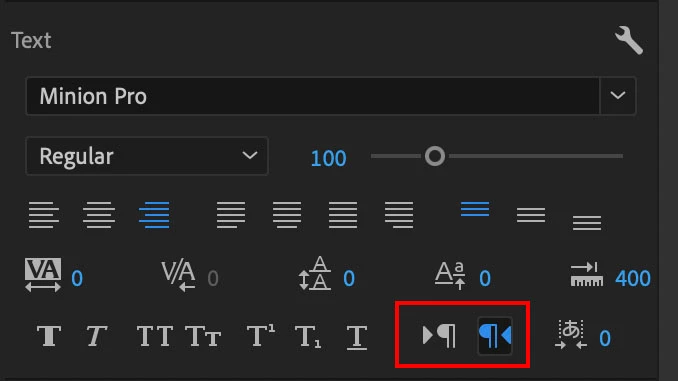
The "Paragraph Direction" buttons are the only options you need to set your punctuation markers at the end of your sentence.

For RTL text, just click on the right button to get this result… !كرين

1 reply

Participating Frequently
September 6, 2024

Create your text element, type an exclamation point first, then paste in the Urdu text, and lastly delete the exclamation point that's on the right (as in direction, not "correct"). Is this the desired look?

Gareth_Williams
Inspiring
September 6, 2024

I had to type two exclamation marks because with one you can’t see where the curser is. Anyway, now I can’t delete the space between the exaltation mark and the last Arabic letter. In a text file you just press the delete key and it deletes backwards removing the space. In Premiere, when between the two, it deletes forwards and removes the exaltation mark. If you place next to the Arabic letter it deletes backwards and removes some of the word. What is going on here?

Gareth_Williams
Inspiring
September 7, 2024

The paragraph direction setting will only apply to text elements that you create after changing that setting - it won't retroactively impact anything. If you haven't done so already, try changing the setting and then creating a new text element.

In theory, the paragraph direction setting should solve the exclamation mark being on the wrong side by default. On my end, I can change the paragraph direction, paste in the urdu text, then add an exclamation mark and it adds it to the correct side.


Regarding the "space" between the exclamation point and the last Urdu character - that appears to be just how this particular font looks. It previews similarly to your image on Google Fonts. I can guarantee I did not add a space in the sample text box:


You can make that gap smaller by selecting the exclamation point, and adding/changing the tsume value. Increasing it should slide the exclamation point to the right:


I don't speak/read any arabic languages, so big disclaimer that this may not be the best approach... but hopefully works for you!


Massive thanks for that Hutch. It sounds like that should work. I’ll try that stuff after work today or at my first opportunity and update the thread with the results. Thanks again!