Known Participant
October 28, 2018
Question

HEVC (H.265) exports with wrong bitrate

  • October 28, 2018
  • 3 replies
  • 2903 views

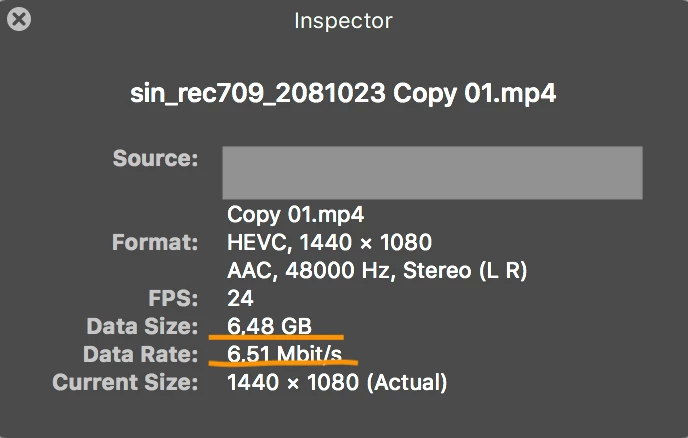
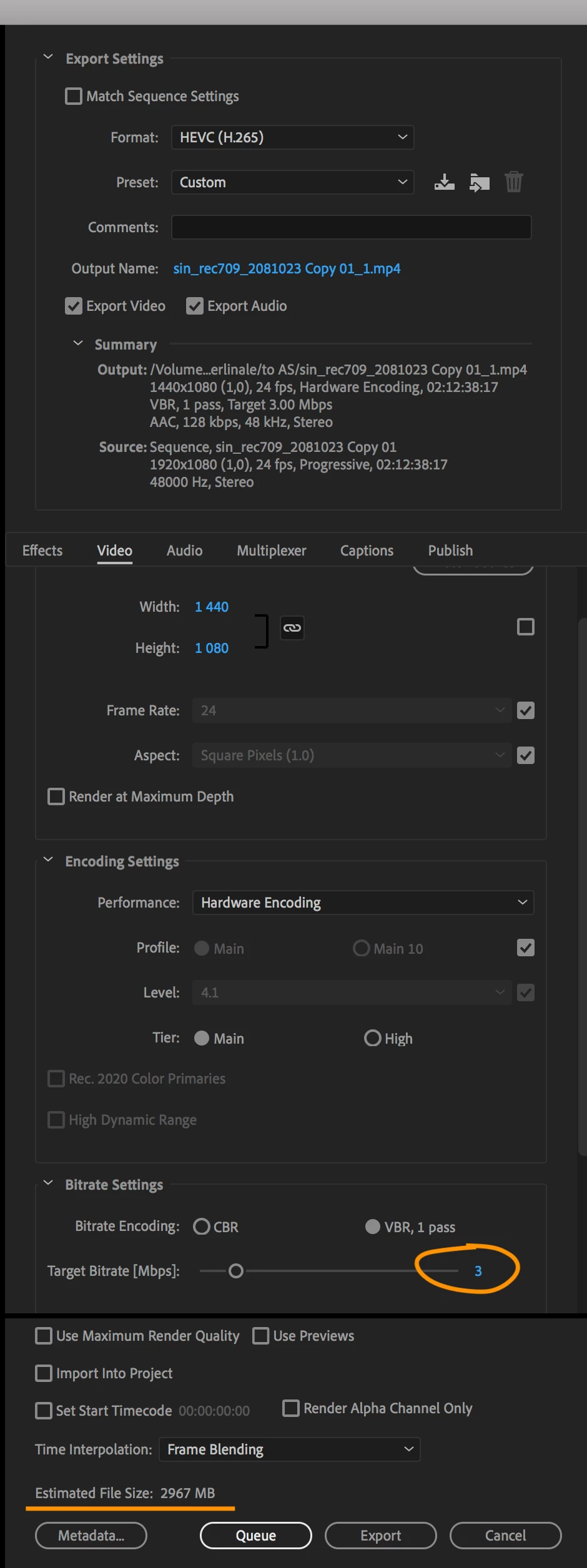
To put is short: I preset bitrate to 3 Mbps, and exported file has 6.51 Mbps (screenshots).
    This topic has been closed for replies.

    3 replies

    Kevin-Monahan
    Community Manager
    Community Manager
    October 30, 2018

    Hi brain_away,

    Just circling back here to see if you solved your problem based on info you got from megacinn. Let us know.

    Thanks,

    Kevin

    Kevin Monahan - Sr. Community and Engagement Strategist – Adobe Pro Video and Audio
    Known Participant
    October 31, 2018

    Hi Kevin,

    In general - no. I rendered 9 60-secongs length HD files with different target bitrates. Here's what I found out:

    1. I could not get desired bitrate lower that 7 Mbps using Hardware encoding; in general you can not get the desired bitrate at all and can not trust Estimated file size;
    2. I am always getting desired bitrate using Software encoding
    3. I assume real bitrate is content-dependent, which means if you take a different clip fragment, bitrate would be different

    Endoder settings, resulting statistics attached. Number in the end of the file name indicates the Target bitrate. File sizes apparently could be grouped:

    20 Mbps = 13.3 Mbps

    13 Mbps = 8 Mbps

    10 Mbps = 6.8 Mbps

    8 and 7 Mbps = 5.818 Mbps

    5 and 3 Mbps = 5.150 Mbps

    Software 3 Mbps = 3.075 Mbps

    Legend
    October 28, 2018

    I've found the QuickTime Inspector an unreliable source.

    Play the file in VLC.  You can display the statistics, including a running bitrate.

    Known Participant
    October 28, 2018

    Well, apparently file size is twice as much comparing to Media Encoder has promised. Which means bitrate is 2x higher.

    At least in this case, QT info is correct for bitrate.

    Legend
    October 31, 2018

    file size is twice as much comparing to Media Encoder has promised.

    That's also a very unreliable source of information.

    megacinn
    Inspiring
    October 28, 2018

    ..is it a MAC ?

    OSX 10.13 ?

    I have exactly the same issue since version 12.1 until 13.0 and reported it repeatedly here and official to adobe...no result /response ...until 2 weeks ago when some "official ?" gave me an answer (another thread in this forum) and confirmed that "they" could reproduce the problem and tracked it down to something only happening with OSX 10.13.

    It would not occur in case of 10.14 (....they discuss it with apple .... he said)

    But in another thread 2 days ago (other problems with gpu-accelaration) officials gave the advice that 10.14 is not supported yet and therefor causes problems.

    So what can one believe ?

    If you are an IMACPro user , like me.... my repeatedly given advice ....think about changing the editingsoftware.

    If you are on PC... I would be extremely interested in your hardwarespecs especially the CPU (XEON ?) (have to make a highly important decision in my company for a different department then the one using ImacPros).

    Known Participant
    October 28, 2018

    I am on an iMac Pro running 10.13.6

    I remember getting some proper bit rates earlier. Basically nothing changed in the recent render, except acceleration could have been set to OpenCL instead of Metal.

    I will check tomorrow wether it's Metal produces these issue or not.

    megacinn
    Inspiring
    October 29, 2018

    ..IMac Pro  .. 10.13.6

    exactly as I have described it....

    I assume it is the "hardware acceleration" ... not the mercury playback (cuda or merury should make no difference).

    ....proper bitrates earlier .....

    I assume this was in a version 12.0.1 or earlier.

    ..try switching off the "hardware accelaration" in the export window...that will work for the cost of exploding export-times