
Inspiring
October 6, 2021
Answered

Horizontal lines in my footage

  • October 6, 2021
  • 4 replies
  • 5711 views

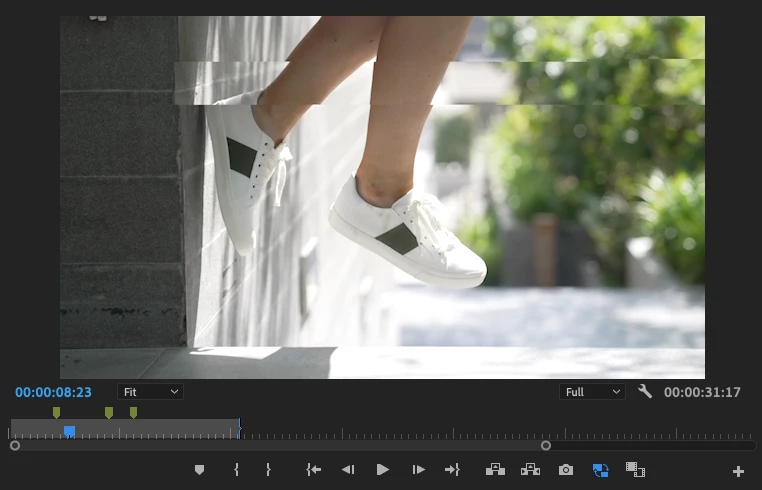
Hey, Ive been having this issue where my footage has a horizontal line in certain frames when editing (please see attached). I have checked the original media and it is not the problem. I have done everything I can think of to resolve the issue like clearing media cache, re-importing all footage, rendering the sequence updating premier and taking all effects off the footage but the issue is still there. I believe it is a problem with premier pro as has never happened to me before but since upgrading my mac to a new m1 chip the issue has been a constant problem. Please can someone help! 
This topic has been closed for replies.
Correct answer defaultzq533pwump6j

Hi Kevin, 

Yes i shot these on sony...

I'll try installing 15.4, see if that fixes.

Thanks 


I Just tried opening on Intel version within creative cloud on the more menu. 

Just rendered and turned out fine.

I suspect is a problem with the Silicone version of PP.

Thanks so much guys for the help really saved me here!


4 replies

Peru Bob
Community Expert
Community Expert
October 7, 2021

Windows or Mac?

Inspiring
October 7, 2021

Mac M1 16gb Ram

Kevin-Monahan
Community Manager
Community Manager
October 7, 2021

Hi D,

Sorry about this. If this is a Sony Camera you are using, then this is a bug. You can install an earlier version of Premiere Pro, try the Beta version, or trancode the footage to another codec. 


Thanks,
Kevin

Kevin Monahan - Sr. Community and Engagement Strategist – Adobe Pro Video and Audio
Peru Bob
Community Expert
Community Expert
October 6, 2021

Temporarily turn off GPU acceleration and see if it is OK.

Inspiring
October 7, 2021

I've tried and still no luck...

Inspiring
October 6, 2021

Hi, Thanks for getting back to me. 


I followed all the steps you reccomended and im still having the same problem. Importing the sequence into a new project reduced the problem but just caused it to occur in different places in the video.


Do you have anything else you would reccoment?

Peru Bob
Community Expert
Community Expert
October 6, 2021

Try resetting the preferences:
https://community.adobe.com/t5/premiere-pro/faq-how-to-reset-trash-preferences-in-premiere-pro/td-p/8236158?page=1

If that doesn't work, try resetting the Workspaces:
Reset a workspace
Reset the current workspace to return to its original, saved layout of panels.
1. Do one of the following:
• Click the Workspace menu icon and select Reset to Saved Layout.
• Choose Window > Workspace > Reset to Saved Layout.
from here:
https://helpx.adobe.com/premiere-pro/using/workspaces.html

If that doesn't work, try Preferences > Audio Hardware and set Input to None.

If that doesn’t work, try updating or rolling back your graphics driver directly from the video card manufacturer’s site. If NVIDIA, do a clean install of the latest Studio Driver (NOT the Game Driver)

If that doesn't work, try creating a new project and import the old one into it.

Also, please help us help you:
https://community.adobe.com/t5/premiere-pro/faq-what-information-should-i-provide-when-asking-a-question-on-this-forum/td-p/3929027?page=1