
How can I add/export audiobook chapter markers (audio-only file)?
I am working on an audiobook and I need to export the audio track as a single file with all the chapters labeled correctly so that it can be used in the table of contents.
*I found a youtube video that explains how to do exactly what I'm looking for but it only works for Quicktime videos and I need to do this with an audio-only file. Video Link
Is it possible to mark where each chapter starts and then have that chapter information embedded in the file so that each chapter name and timecode gets added to the audiobook's table of contents?
For example, the below image is a screenshot of an audiobook's table of contents from within Apple's iBooks app. I need a way to be able to mark where each chapter is within a single audio-only file so that I can have my audiobook's table of contents broken out by the preface, introduction, chapter 1, chapter 2, etc.
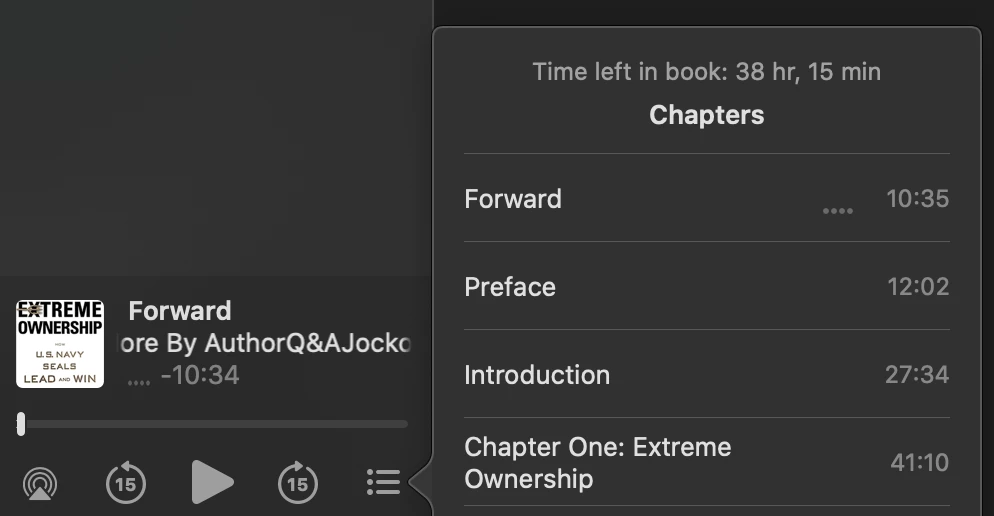
Currently, I have to cut the audio where each chapter starts and ends and then move it to a separate audio track. Then I export each audio track so that I have a separate file for each chapter. When that's done, I have to use a special tool to combine all the chapters back together again into one file. It's a pretty difficult process and I'm running into issues with how I'm doing it so I need to look for a better way.
Any ideas?
 AdChoices