
jeffery wright
Inspiring
November 4, 2019
Question

How can I get Frame Hold to engage Opacity?

  • November 4, 2019
  • 6 replies
  • 5513 views

The graphic on this timeline should be only 15% opaque at the playhead... but it isn't. 

How come? Can anyone explain why this very common video editing feature is more complcated than just this, in Premier?
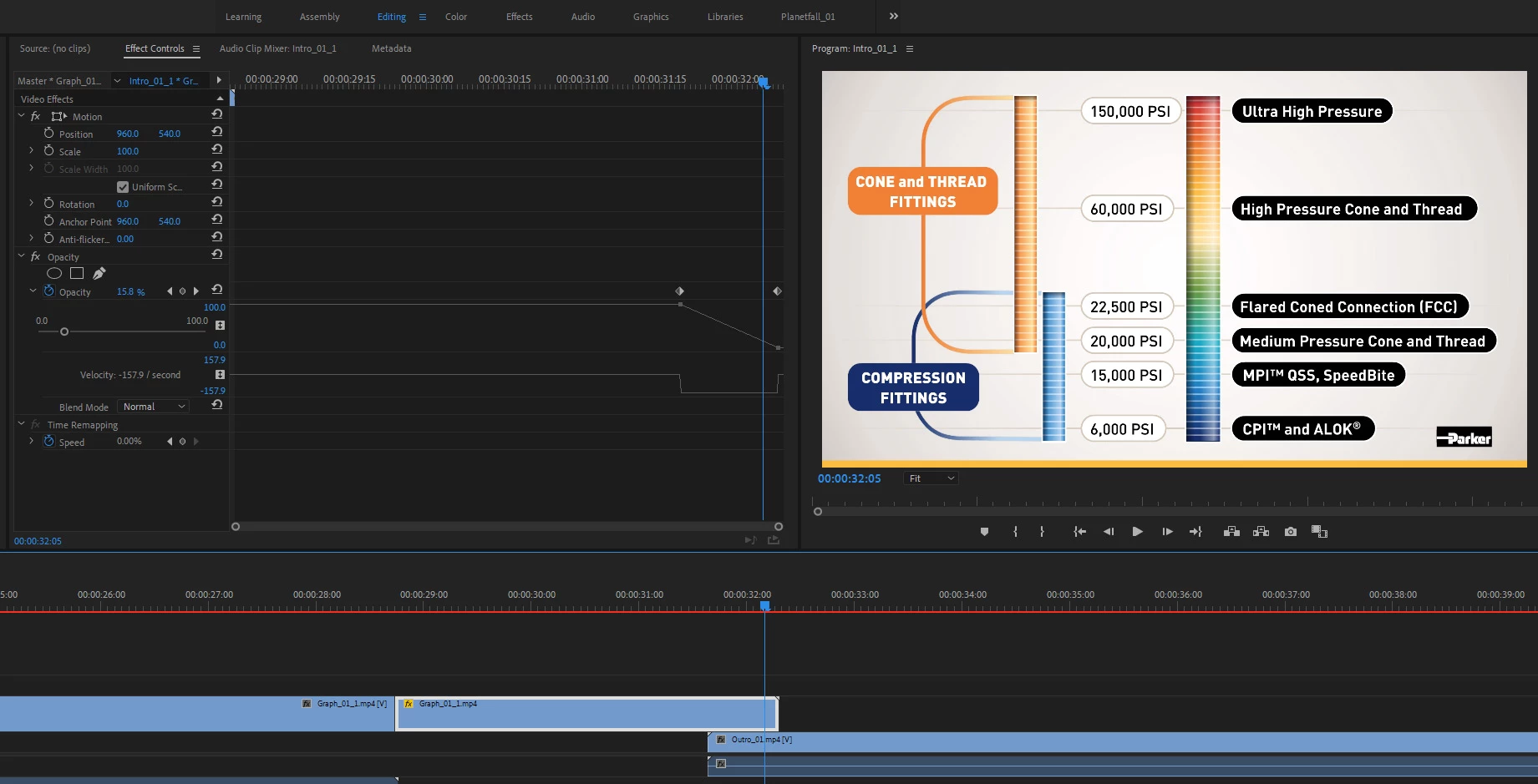


Thanks!


- As a side note, what is up with this irritating "feature" just to post a question? These have Nothing to do with my issue, but I have to choose one? Again, why? And why can't I just paste an image into this editor... but have to save the image as a file and then upload it here? 



6 replies

eroock
Participant
November 7, 2020

Another option is to nest the frame-held part and apply opacity to that event.

Areiva
Participant
January 12, 2022

1 year later and this is still a great work around for an problem that still exists in CC 2022! Thanks!

PXLpainter1990
Participant
October 21, 2022

Yep! Happening to me now in the latest update of PrePro 2023. Why can't it work like it does in AE? 

David__B
Adobe Employee
Adobe Employee
October 7, 2020

Hi Jeffrey,

Looking at your screen shot it appears the portion of the timeline which you're not seeing the opacity is one which hasn't been rendered (indicated by the red bar below the time code). Depending on your hardware (GPU accelerated or not), the effects used, and the source files in question these can all affect how the preview appears. It may not be possible to get a preview of what the output will look like without first rendering in some cases. I suspect you would simply need to render this portion of the timeline to see the opacity.

Here are some related links
https://helpx.adobe.com/premiere-pro/using/rendering-previewing-sequences.html
https://blog.adobe.com/en/publish/2011/02/20/red-yellow-and-green-render-bars.html#gs.i4luxm


eroock
Participant
November 7, 2020

Another option is to nest the frame-held part and apply opacity to that event.

Peru Bob
Community Expert
Community Expert
March 18, 2020

You can try unchecking Composite in linear color in the sequence settings and see if that works for your frame hold.

jeffery wright
Inspiring
July 29, 2020

Thanks, yeah, it's a no go...


I wonder why this simple operation is unsupported by Adobe's product? 

Legend
March 18, 2020

and thinking about this, it's possible that there's some opacity built in to the graphic file.  This is known as an alpha channel and it could explain why you're having issues adjusting the opacity.  Can you tell us what program the graphic was created in?  

jeffery wright
Inspiring
July 29, 2020

Thanks, it's not a graphic file, it is a Frame Hold on the last frame of a video file.


I simply want to be able to do a dissolve revealing the footage beneath this layer, it's hard to believe I'm the first to run into this issue. 

I wonder why Adobe has an Opacity slider at all for Frame Holds if it is completely ignored? No effects can be applied to it, either. This is confounding. 

Legend
March 18, 2020

well I've been editing in film and video for many years and "freeze frame" is a common term and I agree the frame hold options are not particularly intuitive, but a frame hold is a freeze frame.   And I've learned learning avid, fcp1-7, davinci resolve and premiere that you can beat your head against the wall til it's a bloody pulp, or you can work the way the software wants you to work.   so spend 10 seconds exporting the graphic file (which you can set up to automatically import back in to the project and editing it in to your timeline, or spend 30 seconds complaining about it.  sorry for the snark.  

Legend
November 4, 2019

Might be better to use the "export frame" option rather than a freeze frame.  the export frame option maintains opacity so if you bring the frame back in and place it over other footage it will be supered over that footage with the opacity that you applied.  

jeffery wright
Inspiring
March 18, 2020

Thanks for the response, I don't know what 'freeze frame' is, and do not see any options for that, I am specifically referring to Frame Hold. Why don't the Opacity parameters work on Frame Holds? Why is that parameter an option if it does not work?


More importantly, why wouldn't it work for frame holds? This seems like a far more simple, streamlined and more intuitive operation than exporting a BMP then re-importing it, putting it on the timeline and then setting up the opacity. 

Are there answers for these questions? Maybe Adobe should give this a think? Thanks again.