
Participating Frequently
June 9, 2025
Answered

How can I make the colors in Premier match my video source?

  • June 9, 2025
  • 2 replies
  • 568 views

Premier Pro 25.1.0

2023 Mac Studio with an Apple M2Max Chip and 64GB Memory running Sequoia 15.5


I've been using Premier Pro since 2019 learning basics in college and from there I am self-taught. I use Premier almost daily in my full-time position for simple video edits and have encountered an issue with color that came along with the 2025 update. I've been "limping" through the last 6 months trying different solutions I could find in these forums (at least what I could understand) and nothing seems to fix the issue. They seem to look okay once exported, but this issue has drastically slowed my editing process down as I am using a 3rd party app to edit color in the video then importing it in (this has been the best workaround for my needs and knowledge base). 


Today, I pulled an iphone video in and was flabbergasted, see the image below to see a side by side (left is in my video player and right is in Premier).
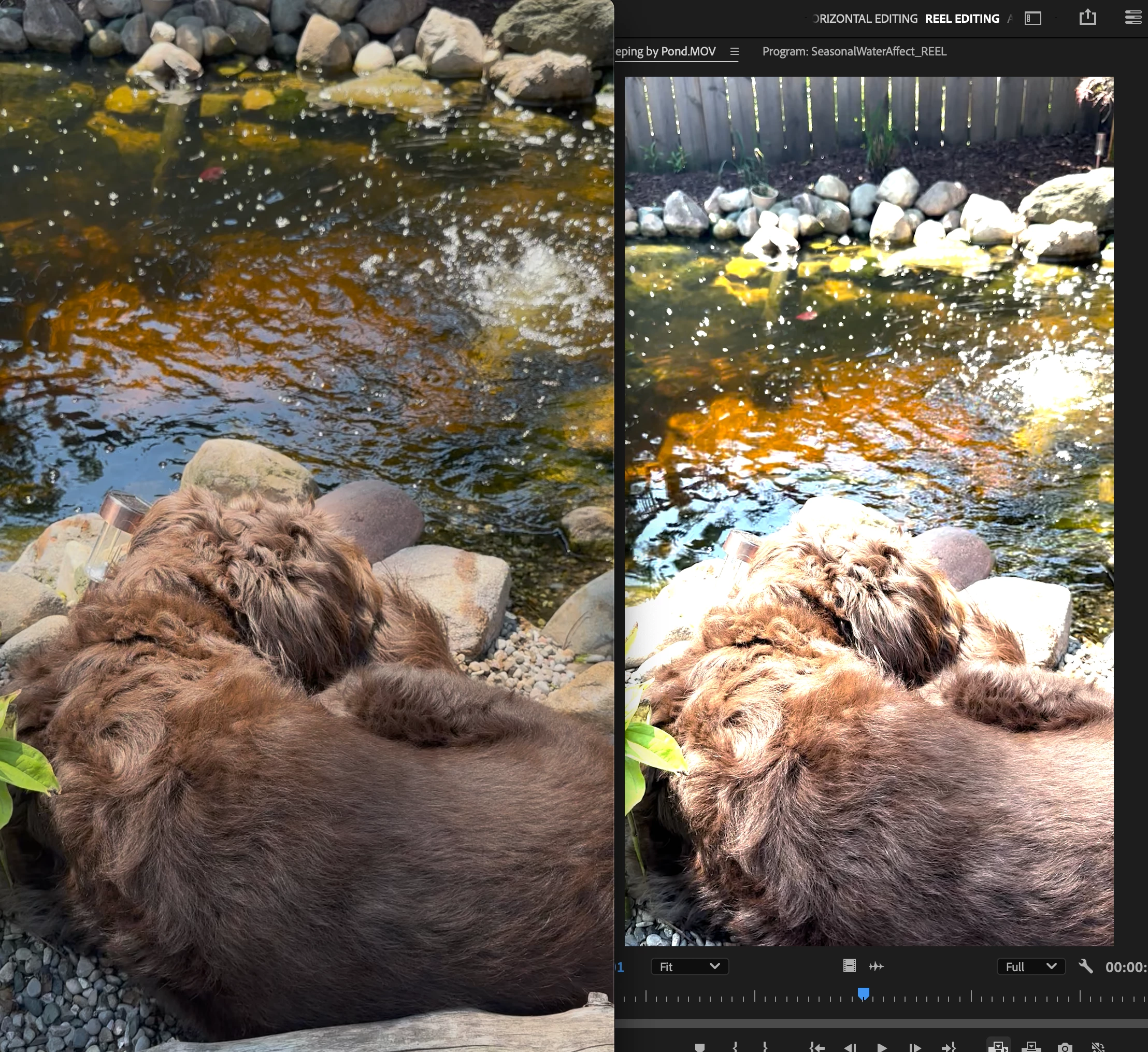
 

I'm hoping this is total user error and there's an easy solution. Please understand, I am not a pro and I'm not looking to be one, I am just looking for a fix to the horrible colors that are being shown by Premier.

Correct answer Ann Bens

Its all about color management.

2025 Premiere Color Management V25 2 - YouTube

Color management in Premiere Pro

2 replies

R Neil Haugen
Legend
June 9, 2025

Ann is right, it's all in proper user handling of the color management. Which is more complicated because we don't work in only one standard color capture setup anymore.


Your iPhone by default uses a form of HLG, hybrid log gamma, which is a form of "HDR", high dynamic range video capture and display.


That uses both different color primaries and has a greater range of brightness values than the older 'standard' SDR did.


So you need to pick whether you want to output from Premiere in HDR, probably HLG, or in SDR, the standard Rec.709. And then set Premiere's color management to map tonal (luminance) and color (chrominance) values to whichever you want to use.


That's what that information she gives, and "we", can help with.


Pick something, and ask. I and others can give specific help then.

Everyone's mileage always varies ...
Participating Frequently
June 10, 2025

I appreciate your help. I switched over to the "Rec. 709" and it helped tremendously with the video colors and I can play with them from here.


I've got a couple other questions that this has stirred up:

  1. Previously, I could pull all of my clips (15+ different sources) in and they would look the same as the original source clip. Am I correct in understanding that I will have to individually set the color space for each of these clips every time I use them into the project?
  2. For future shoots, I am reading online that its better to shoot with HDR toggled off on the iphone. Is this true? I have a few large shoots coming up and would like to make sure my iphone content is easier to use if it can be.


Thank you!

R Neil Haugen
Legend
June 10, 2025

Great, thank you! This clarifies things for me.

While it's frustrating, I guess it gives me a good reason to really dive into learning more about video color management. I appreciate the help!


Most people don't realize how bizarre image color ... film or digital capture... is.


NO camera or device ever actually "sees" color. All they do, both film and digital sensor, is record brightness. In film, three layers of light-sensitive stuff were involved, each with a dye-based 'filter' to let mostly light of one color strike it ... but wait, it has to go through the top two layers to get to the bottom one, right? Yep ... it was a complicated workaround ... to then get reversed in printing to create a "color" print.


Digital capture uses an electronic sensor of tiny capture devices ... "pixels" ... and most commonly, a layer of filters places over them in a pattern of red/green/blue, twice as many green squares as red or blue.


And some high-end math work then calculates what 'color' that pixel is seeing, at what brightness level. By looking at several other pixels around it, and comparing captured light levels.


Then ... it is impossible to make the response of all pixels on any one sensor identical in response. They're pretty close most of the time, but how close is "close" varies a lot. They're tested after making, and the more close they are, the higher price they sell to the camera makers.


The electronic parts that do all the computational work are not going to be identical either, and so even though two cameras can technically use the same sensor, the resultant images will not be the same.


Monitors are the same thing, essentially... just reversed. No two monitor screens are identical off the manufacturing line, and especially after the eventual monitor maker adds their own hardware to the screen itself, then add in OS settings and such.


So there isn't any such thing a the only totally accurate color. We users have to first do our own work at setting our gear close to "the standards" ... and then accept that no one else will ever see exactly what we saw. It is impossible ... via any deliverable process ... to do so.


You set as close to the standard as possible to get your outputs as close to the visual middle of professionally produced media on any screen. That's all a high-end colorist can do, and we cannot exceed that if they can't.


Yea,  color is not what people think.

Everyone's mileage always varies ...
Ann Bens
Community Expert
Ann BensCommunity ExpertCorrect answer
Community Expert
June 9, 2025