

OritL-YeshAvira
Participant
April 24, 2018
Answered

How can I mute audio on source panel?

  • April 24, 2018
  • 9 replies
  • 29490 views

I'm going through rashes source panel & need to view many clips & fast.

Sound is not important at this moment & I wish to mute premier all together (still don't have timeline) and listen to music from other source along side - Thus muting computer is not an option.

How can I do it???

Thank you

Orit 
Correct answer Averdahl

@Edwon wrote:

unticking  "Play audio while scrubbing" only disables audio while scrubbing! I want to disable ALL audio coming from the source panel. How do you do this?


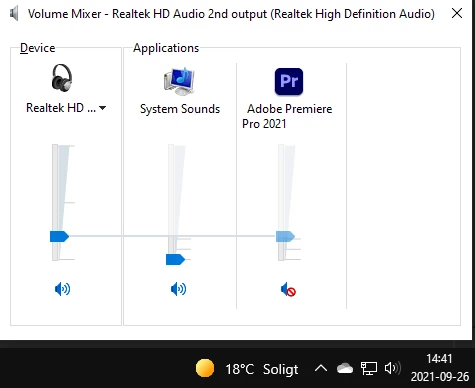
If Windows, right click on the speaker icon down right and open the Volume Mixer and click the Mute button for Premiere Pro. I imagine that it should be able to do on a Mac as well.


9 replies

Participant
January 13, 2023

I know this is possibly a non-helpful answer, but honestly, the simplest solution I have found is just to listen to your music on your phone and mute your computer. When you're ready for the sounds of the footage, switch your headphones to your computer and you're good to go. 


This works for me at least!

Raj Jain
Participant
October 10, 2022

Just found another way to do this. Select all your source media. Right Click > Modify > Audio Channels > Tick off L & R. Done! I was going to bang my head on the desk if I didn't find this.

Participant
July 6, 2022

Shift + S to toggle Audio playback when scrubbing.

Participant
March 23, 2022

On OSX I do it by going to Audio Midi Setup and creating a new multi-output device, name it 'silent' or something and uncheck the audio outputs. In Premiere go to preferences > audio hardware and select the silent output you just created.


Not sure how you'd do this in Windows, but it's such a basic and useful request Adobe - give us a mute button!!!

Participant
November 9, 2021

Select all the clips you want to silence in the bin, right click; select Modify > Audio Channels, uncheck the media source channels, click OK, this mutes the clips until you check them back on again, make sure you click L under L and R under R, you'll understand when you see it.

Participant
January 23, 2022

THANK YOU!

The fastest and easiest way to mute everything.

Participant
January 29, 2022

Just to Add in this , 
Instead of right clicking on footage - modify - select audio channel 
You can select the footage and use shortcut key - (SHIFT +G)to go directly into Modify audio channel pannel and then you can uncheck L and R.
Cheers!!

emilyk99262850
Participant
November 3, 2021
Known Participant
June 16, 2022

This works PERFECTLY! Mutes the source window only, not the timeline. Would be more intuitive if the control was in the Source window instead of the Audio Clip Mixer window, but hey, it still solves the problem quickly and easily. Thank you, emilyk99262850!

Peorthyr
Participant
October 14, 2021

Good day, actually I right click on the source panel, and select audio gain, then set a -99db

this is painfull, but I actually use only the video from the videos I import... 

Participant
October 25, 2021

Ya your totally right, this is literally the only way I have found.  Its not hard and takes 5 seconds, you just have to remember to change the audio gain back when its time to edit the clips in timeline

Participating Frequently
October 1, 2021

this has been a feature request for 3 years already going on 4, my guess, Adobe will NEVER add it, and continue to ignore it's tenants (oops I mean customers) who hand over the money to their f-ing monopoly every month, F ADOBE

https://adobe-video.uservoice.com/forums/911233-premiere-pro/suggestions/33847612-mute-source-audio-button

Inspiring
April 26, 2018

From the preferences panel, (Edit>Preferences>Audio) select Audio and untick the box "Play audio while scrubbing".

Participating Frequently
September 26, 2021

unticking  "Play audio while scrubbing" only disables audio while scrubbing! I want to disable ALL audio coming from the source panel. How do you do this?

Participating Frequently
September 30, 2021

What you're asking for is not easy to achieve. There are two ways - highlight all your source clips you want to mute, right click, choose modify>audio and create a preset with zero tracks and that will kill audio. The negative with this method is you'll have to reverse this process if you want audio.


The second method would be to lay all clips on a timeline that you want to preview and simply mute the audio on that timeline when you load it into the source window. This is faster but the negative of this method is you're not referencin gthe actual source clip, but rather timeline. However you can still lay clips down as source clips, so not a major problem.


Yes I'm aware of both of those methods they are written in other threads, both methods have their issues and are both a pain in the a$&


So we could keep going through this pain or Adobe could add one button, just one button. A mute button on the source panel is all we need.