Participant
February 16, 2018
Answered

How do I author a blu ray disc from Premier Pro?

  • February 16, 2018
  • 2 replies
  • 17778 views

Please help, I have tried for 2 weeks to find how to author a blue ray disc of my movie in Premier Pro.

This topic has been closed for replies.
Correct answer Ann Bens

Alas they are old instructions.

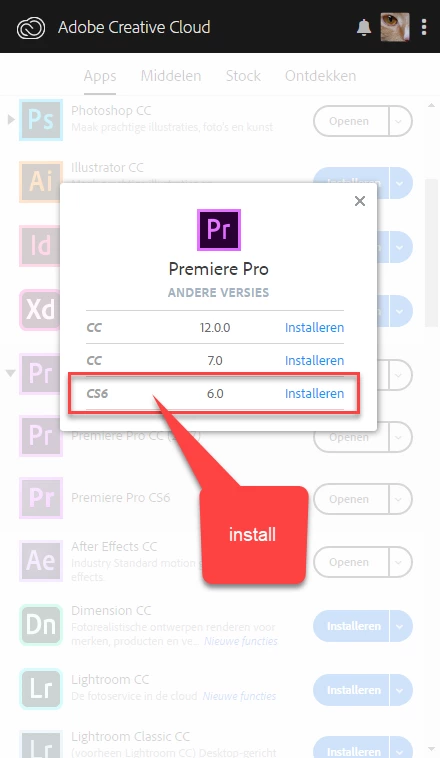
Click in Premiere Pro CC triangle and open other versions.

Install CS6 which also will install Encore CS6.
Export from Premiere with H.264 bluray preset

Import the audio and video file into Encore

Make menu and burn to disk.

2 replies

Legend
February 16, 2018

I like this for Blu-ray authoring.  It's not cheap, but it is more powerful than Encore.

Blu-Disc Studio - Blu-ray authoring software

Ann Bens
Community Expert
Community Expert
February 17, 2018

Can you make menu's like you can in PS?

Community Expert
February 17, 2018

This one is $50 at Amazon US and used to be a Sony software product.  Sony invented Blu-Ray.  It does menu's. 

If I was still making Blu-Rays I think I would be using it.

Amazon.com: VEGAS DVD Architect [Download]: Software

ACP Steve Grisetti has a four part Basic Training series on YouTube.

Basic Training for DVD Architect, Part 1 - YouTube

Another demo here:

VEGAS DVD Architect Demonstration - YouTube

Bill

Peru Bob
Community Expert
Community Expert
February 16, 2018

You will need Encore or another authoring application:

Re: How do I access Encore?

Ann Bens
Community Expert
Ann BensCommunity ExpertCorrect answer
Community Expert
February 16, 2018

Alas they are old instructions.

Click in Premiere Pro CC triangle and open other versions.

Install CS6 which also will install Encore CS6.

Export from Premiere with H.264 bluray preset

Import the audio and video file into Encore

Make menu and burn to disk.

Peru Bob
Community Expert
Community Expert
February 16, 2018

Thanks for the correction, Ann.