Participant
February 16, 2018
Answered

How do I author a blu ray disc from Premier Pro?

  • February 16, 2018
  • 2 replies
  • 17778 views

Please help, I have tried for 2 weeks to find how to author a blue ray disc of my movie in Premier Pro.

This topic has been closed for replies.
Correct answer Ann Bens

Alas they are old instructions.

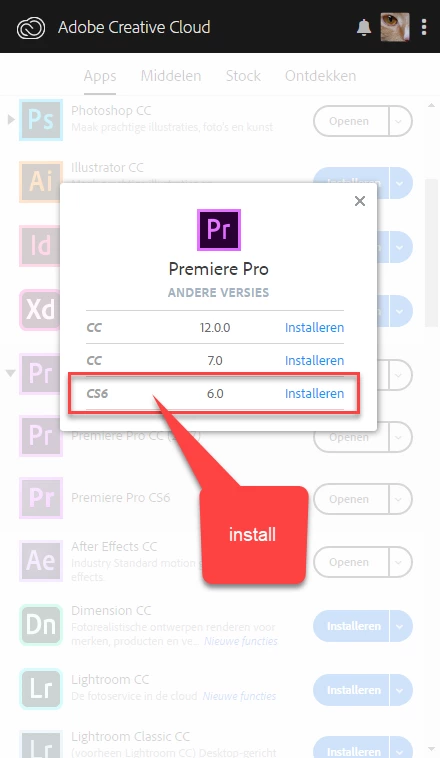
Click in Premiere Pro CC triangle and open other versions.

Install CS6 which also will install Encore CS6.
Export from Premiere with H.264 bluray preset

Import the audio and video file into Encore

Make menu and burn to disk.

2 replies

Legend
February 16, 2018

I like this for Blu-ray authoring.  It's not cheap, but it is more powerful than Encore.

Blu-Disc Studio - Blu-ray authoring software

Ann Bens
Community Expert
Community Expert
February 17, 2018

Can you make menu's like you can in PS?

Kona_Bob
Inspiring
February 18, 2018

https://forums.adobe.com/people/Kona+Bob  wrote

What are you using for a workaround?

Ann posted her workaround above involving installing an old Premiere version that puts Encore on you computer. 

This may be a useful reference:  How to download and install Adobe Encore CS6

Good luck!

Bill


Well, certainly if you wanted to make a BR Disk you could use Encore, which I do have installed.

My problem is that there is apparently no way to produce a BR .m2t file from a PPro 2018 timeline.

Why on earth has Adobe deleted the multiplexing function for BR h264 output??

Peru Bob
Community Expert
Community Expert
February 16, 2018

You will need Encore or another authoring application:

Re: How do I access Encore?

Ann Bens
Community Expert
Ann BensCommunity ExpertCorrect answer
Community Expert
February 16, 2018

Alas they are old instructions.

Click in Premiere Pro CC triangle and open other versions.

Install CS6 which also will install Encore CS6.

Export from Premiere with H.264 bluray preset

Import the audio and video file into Encore

Make menu and burn to disk.

Peru Bob
Community Expert
Community Expert
February 16, 2018

Thanks for the correction, Ann.