
Inspiring
September 13, 2019
Answered

How do I convert an .MOV video to MPEG4 using Adobe Premiere Pro?

  • September 13, 2019
  • 1 reply
  • 3139 views

I have a video saved as a .MOV file. I imported it into Adobe Premiere Pro and made the edits I wanted to it. I saved it as a prpoj along with the folders Adobe Premiere creates.  The export is where I get lost.


What steps do I take  in order to export the .MOV files as an MP4 file?  I thought it did t his but I see a .3gp file.

I'm obviously missing steps.

Thanks
    This topic has been closed for replies.
    Correct answer Averdahl

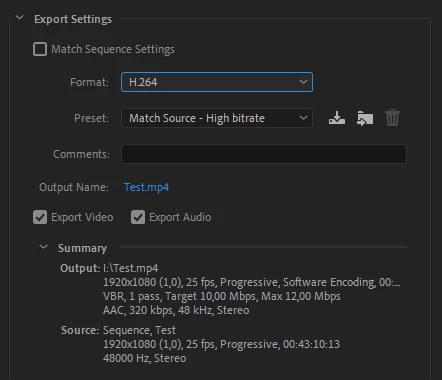
    Choose H.264 as format.

    1 reply

    Averdahl
    Community Expert
    AverdahlCommunity ExpertCorrect answer
    Community Expert
    September 13, 2019

    Choose H.264 as format.

    AnotherMeAuthor
    Inspiring
    September 14, 2019
    Why H.264? It was a MOV file.
    Averdahl
    Community Expert
    Community Expert
    September 14, 2019
    "Why H.264? It was a MOV file." What do you mean?