- Home
- Premiere Pro
- Discussions
- How do I curve/bend text in Adobe Premiere Pro? 20...
- How do I curve/bend text in Adobe Premiere Pro? 20...

Copy link to clipboard
Copied
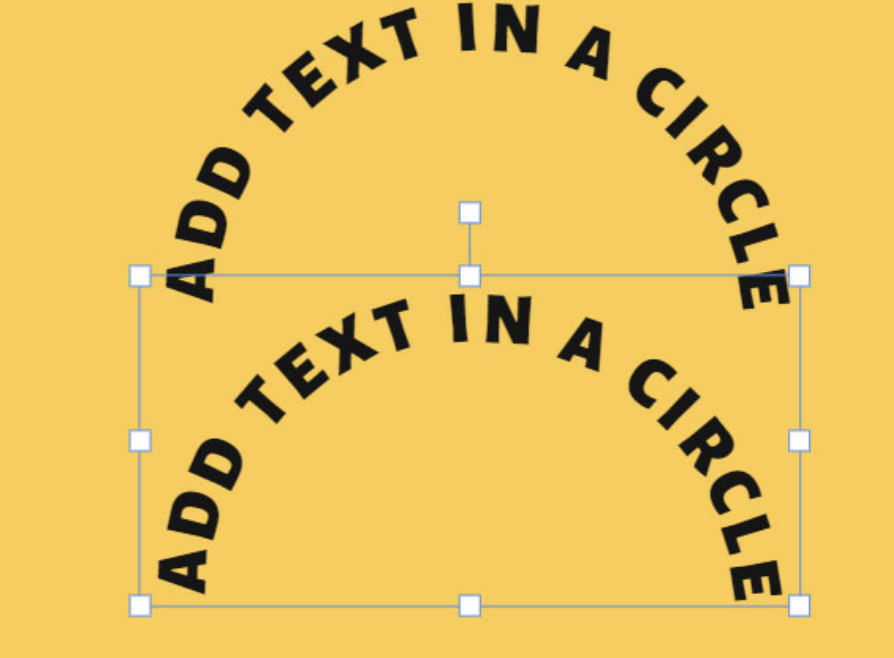
I am struggling to figure out how to curve text (see example attached) in premiere!
I've seen quite a few tutorials saying to use Adobe Legacy Title but that function is no longer available. I would appreciate any insight.
If unable to do it on premiere, whats another method? Thank you in advance!


 1 Correct answer

It's really easy to do it in Photoshop or Illustrator if you have the full CC subscription. You can't do it with Premiere Pro easily, and the result's quality in Pr isn't that good. If you need to animate characters, then you have to go into AE.

 9
Replies
9
9
Replies
9


Copy link to clipboard
Copied
You can always use After Effects, it works really well. Many tutorials available to do that.

Copy link to clipboard
Copied
@Ann Bens has a good few comments on how to achieve this in Premiere. But she's I think outta the 'shop' at the moment, so search the forum for curved text and look for Ann's posts on this.
Neil

Copy link to clipboard
Copied
If you want exactly the same as in your screenshot AE is the way.
With some fiddling, you can achieve some curving with spherize and corner pin.

Copy link to clipboard
Copied
Have you found the solution, i am looking for it, plz guide me if you can. Thanks
Copy link to clipboard
Copied
It's really easy to do it in Photoshop or Illustrator if you have the full CC subscription. You can't do it with Premiere Pro easily, and the result's quality in Pr isn't that good. If you need to animate characters, then you have to go into AE.
Copy link to clipboard
Copied
Yes, easy to do in After Effects. Check out some tutorials on Youtube, etc. Here's a couple that seem good!


Copy link to clipboard
Copied
Hey Myer, good tutorials.
Many users find it hard to work within AE, so working with PS or Illustrator is much easier for a user if he wants only to do the design of that curved text.
Copy link to clipboard
Copied
Yes, good point Ali. I'm better at AE then Photoshop, so good idea if they can do it in PS or AI and don't want the text to move. 🙂

Copy link to clipboard
Copied
You can try using a Wave Warp effect to get this! Just mess with the parameters and you can make some funky warped (and therefore curved) text! I use this often when I can't just curve it in photoshop or something.


Get ready! An upgraded Adobe Community experience is coming in January.
Learn more
 AdChoices