Inspiring
April 28, 2025
Answered

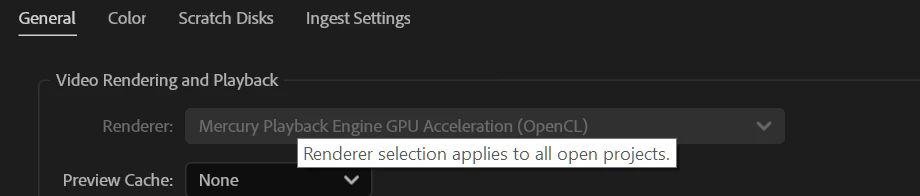
How do I disable GPU acceleration here? Premiere won't let me switch to "software only".
  • April 28, 2025
  • 2 replies
  • 2082 views

How do I disable GPU acceleration here? Premiere won't let me switch to "software only".

Correct answer RjL190365

It's not set to Software only. It's set to 'Mercure Playback Engine GPU Acceleration (Metal) - Recommended' and I can't change it.


Are you running an Apple Silicon Mac (as opposed to an Intel Mac)? If so, then you're permanently locked to the Metal GPU acceleration mode. Apple Silicon-native versions of Premiere Pro never offered software-only rendering at all no matter what.

2 replies

JonesVid
Community Expert
Community Expert
April 28, 2025

Adobe have disabled Software rendering option on 25.2 and all you see is a greyed out rendering option.

GPU is selected by default

To enable Software rendering only you just hold down <SHIFT> key whilst starting Premiere

The attached dialogue box comes up where you can select a number of options.

Software Render as one off is the last option.


This greyed out Render infomration has confused a lot of users


Participant
July 20, 2025

Not working as of 20/07/25 apparently. I see the first four options, but the 5th option is invisible ("Use Software Rendering only (one-time only)").


Am I the only one with this problem?

Ann Bens
Community Expert
Community Expert
July 20, 2025

If your rendering is set to Software only you wont get the option.

Ann Bens
Community Expert
Community Expert
April 28, 2025

You cannot disable the option. Software only has been removed with 25.2

If you want to use Software only you will have to restart Premiere while holding down Alt.

Then you can use the option.

https://community.adobe.com/t5/premiere-pro-beta-discussions/now-released-software-rendering-option-removed/m-p/15075725#M10958

Known Participant
March 23, 2026

Not working. I’m having serious crashes importing footage in Premiere26.02 and I’m trying to disable graphics card and use softwrae option only. The crashes just started happening out of the blue and occurs with Premier 25 and Rush.

Community Manager
March 27, 2026

Hi jasonr1988068,

We’re sorry to hear about this. Please let us know system specs (OS, CPU, GPU & RAM) & the specifications of the media (format, frame rate & frame size) with which you are experiencing this issue in Pr. Is this happening with any specific media/project or all of them?


Thanks,

Sumeet