Participant
October 10, 2018
Answered

How do i export dual mono?

  • October 10, 2018
  • 1 reply
  • 7502 views

I am on a premiere pro project which has 6 tracks, all mono. The sequence is a stereo sequence, and the export is for TV. I exported the audio as stereo, but it has been rejected. They seem to be wanting dual mono, not a single stereo track. How do I export dual mono?

Thanks

This topic has been closed for replies.
Correct answer Kib

Hi Kib, thank you so much for your quick answer. I think I understand now. I was trying to export audio only because that's all the client needed. But I'm assuming there's no way to export dual mono for a WAV file [No video] then?


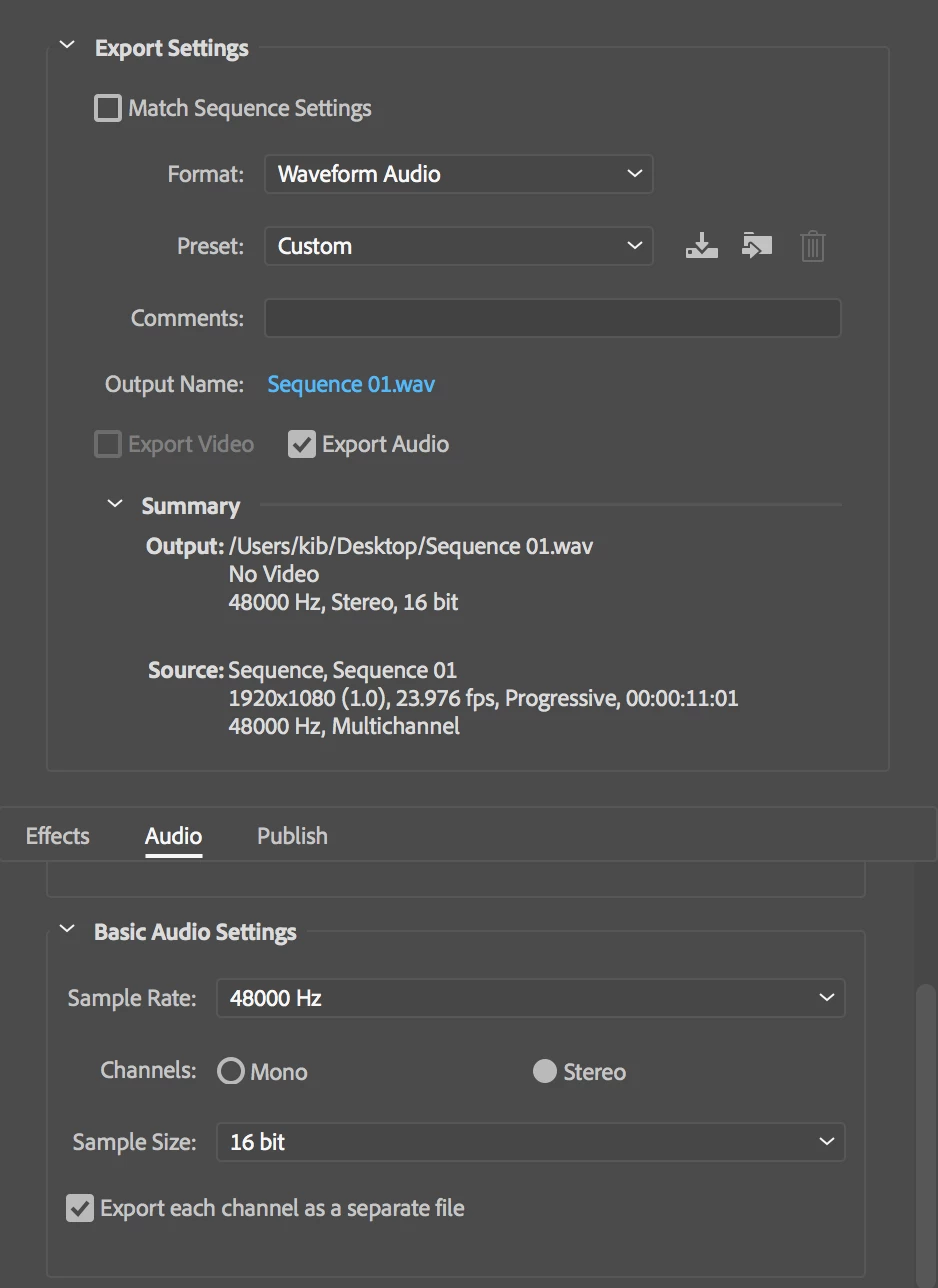
I don't believe so but there may be a work around someone else knows about.   The best I know right now is exporting to WAV and ticking Export each Channel as a Separate File.  This will give you 2 Mono WAV files on output which essentially is your dual mono.

You may wish to double check your delivery is in fact not a  stereo WAV  within which you panned your Mono Tracks so the Left channel has certain sound and the Right Channel has other sound.  In this case do not tick Export each Channel as a Separate File.

So yes, either you produce two mono WAVs or a Stereo WAV formed from a multichannel mono track sequence with judicious panning

1 reply

Participating Frequently
October 10, 2018

You'll have to start a File>New>Sequence

Visit the Tracks tab and change the Master to Multichannel &  2 Channels

Edit your audio tracks to 6 Mono and set the pans left and right: Left goes to the 1st Master Mono channel, right goes to the 2nd Master Mono channel in the multichannel pair.

Then select all your clips in the "wrong" sequence and copy and paste them over to this new sequence.

Participating Frequently
October 10, 2018

Your pan settings will be governed by your delivery specification ie you must know Mono Track 1 is meant to export to the first channel of the dual mono export pair etc

KibCorrect answer
Participating Frequently
October 11, 2018

Hi Kib, thank you so much for your quick answer. I think I understand now. I was trying to export audio only because that's all the client needed. But I'm assuming there's no way to export dual mono for a WAV file [No video] then?


I don't believe so but there may be a work around someone else knows about.   The best I know right now is exporting to WAV and ticking Export each Channel as a Separate File.  This will give you 2 Mono WAV files on output which essentially is your dual mono.

You may wish to double check your delivery is in fact not a  stereo WAV  within which you panned your Mono Tracks so the Left channel has certain sound and the Right Channel has other sound.  In this case do not tick Export each Channel as a Separate File.

So yes, either you produce two mono WAVs or a Stereo WAV formed from a multichannel mono track sequence with judicious panning