
Participant
March 9, 2020
Answered

how do i fix blue skin

  • March 9, 2020
  • 2 replies
  • 542 views

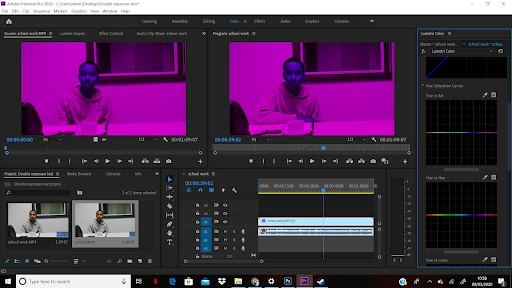
Okay so on my laptop when ever i import anything to edit everything is turned purple except for the skin. when the video is playing the purple background is gone but the blue skin is left. It cant be the video files them selves as they are fine when i place them onto premiere on other computers. if anyone has any idea how to fix this issue i would greatly appreciate it.


This topic has been closed for replies.
Correct answer Jeff Bugbee

Take a look at this page please: https://helpx.adobe.com/premiere-pro/kb/green-purple-streaks-premiere-pro.html

2 replies

Jeff Bugbee
Community Expert
Jeff BugbeeCommunity ExpertCorrect answer
Community Expert
March 9, 2020
Participant
March 9, 2020

Thank you so much 

Ann Bens
Community Expert
Community Expert
March 9, 2020

Start with updating video drivers.

Participant
March 9, 2020

I tried updating my drivers. unfortunatly it didnt work