
Inspiring
September 30, 2025
Answered

How do I go to a specific timecode using the keyboard?

  • September 30, 2025
  • 2 replies
  • 439 views

I'm trying to find a way to navigate to a specific timecode in my timeline using only the keyboard.


I'm aware that I can type in digits using the numpad and they will automatically be typed in the "Playhead Position" field in the timeline, but when I do this I can't also enter colons or semicolons, so I can't enter a valid timecode.


What am I missing?
Correct answer Averdahl

That did it! Thank you. Do you know if this is documented somewhere? Shouldn't be this hard to discover.


I almost gave up but found it here after a while: Welcome to the Premiere Pro User Guide


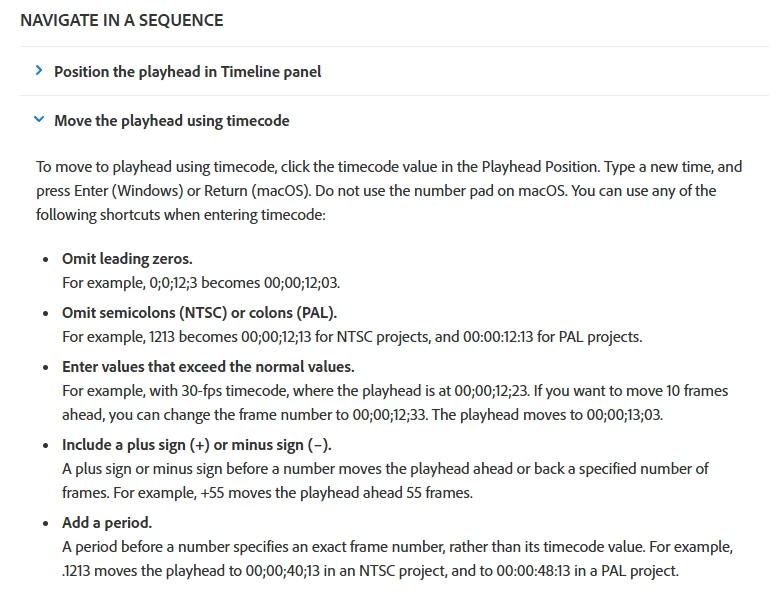
Then, go to Editing > Sequences > Create and change sequences and then scroll down a bit to NAVIGATE IN A SEQUENCE and click on Move the playhead using timecode. (See the attached image below)

Using + and - when working with timecode and keyboard is really good. 🙂


I also found this video from Larry Jordan that describe it good: How to Use Timecode to Navigate Timeline or Media in Adobe Premiere Pro - YouTube


That did it! Thank you. Do you know if this is documented somewhere? Shouldn't be this hard to discover.


By @jackbrannen_pl

2 replies

Inspiring
September 30, 2025

You don't need to enter the colons, it will automatically recognize them.

So for example for 07:14:23:17, you just need to type 07142317 and it will take you to that specific time.

If, for example, you enter a timecode without the hours and minutes, it will consider them as 00:00... so if you enter 2317, it will take you to 00:00:23:17

Makes sense?

Inspiring
October 1, 2025

@Sami Succar What to I to do enter my selection? Pressing return just moves to the beginning of the timeline and starts playback.


So to clarify, what's happening is I enter my digits via numpad—either an 8-digit string or something shorter, as you suggested. But then, no matter what I type, I have to hit some button to confirm my entry. But hitting enter moves the playhead to 00:00:00:00 and starts playing from there.

Averdahl
Community Expert
AverdahlCommunity ExpertCorrect answer
Community Expert
October 2, 2025

That did it! Thank you. Do you know if this is documented somewhere? Shouldn't be this hard to discover.


I almost gave up but found it here after a while: Welcome to the Premiere Pro User Guide


Then, go to Editing > Sequences > Create and change sequences and then scroll down a bit to NAVIGATE IN A SEQUENCE and click on Move the playhead using timecode. (See the attached image below)

Using + and - when working with timecode and keyboard is really good. 🙂


I also found this video from Larry Jordan that describe it good: How to Use Timecode to Navigate Timeline or Media in Adobe Premiere Pro - YouTube


That did it! Thank you. Do you know if this is documented somewhere? Shouldn't be this hard to discover.


By @jackbrannen_pl
Stan Jones
Community Expert
Community Expert
September 30, 2025

@jackbrannen_pl,


Click on the timecode: all will be selected. Do not deselect it and type the numbers only. The colon/semicolons will be added.


I don't recall a way to get to that box without the mouse. Anyone?


Stan


Stan Jones
Community Expert
Community Expert
September 30, 2025

Ah: just start typing in the KEYPAD - it goes to the timecode box.


Stan