Participant
June 6, 2018
Answered

How do I remove/fix Burn image in video?

  • June 6, 2018
  • 2 replies
  • 5071 views

Hello

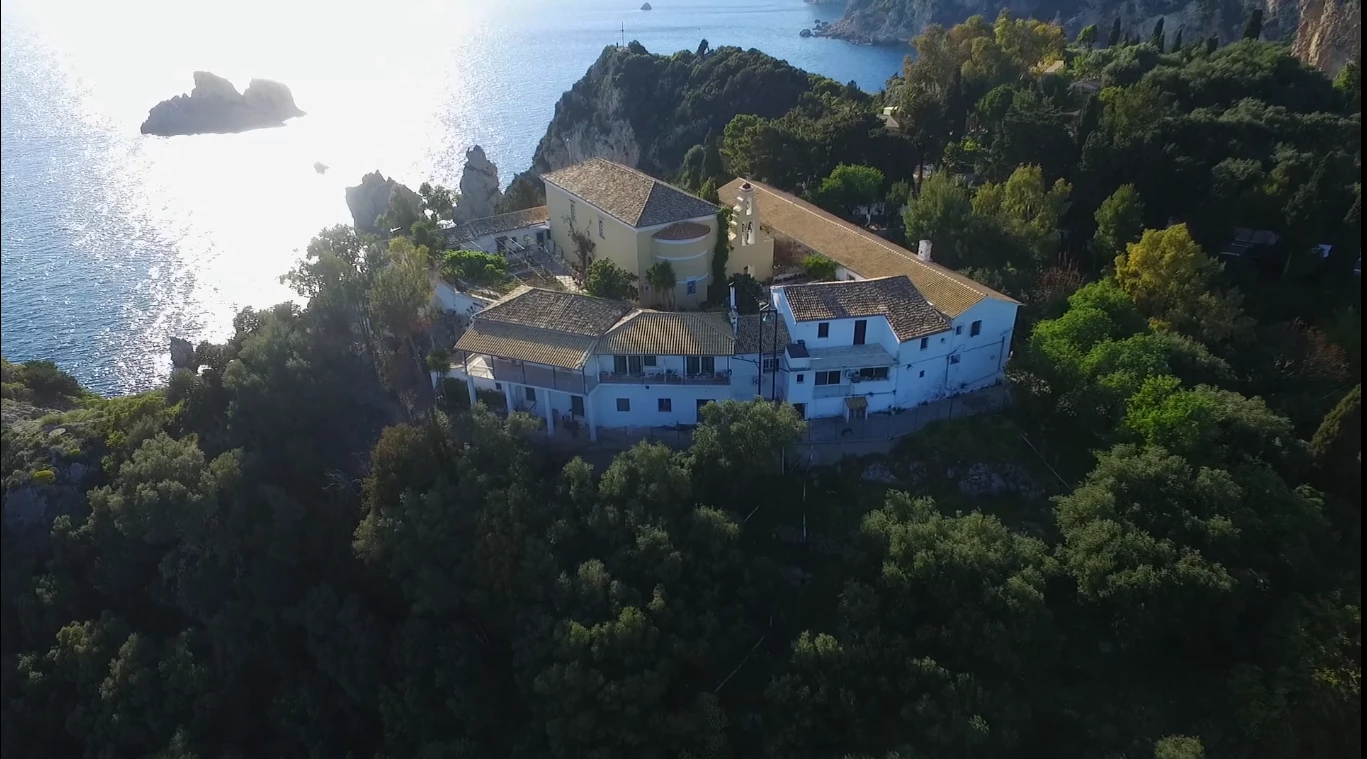
I have capture video my drone and at a part up left is burn from the light.

How to fix that in Adobe Premiere Pro CC or Adobe After Effects CC?

    This topic has been closed for replies.
    Correct answer SAFEHARBOR11

    Can try color correction and bring down Whites/Highlights, might help a little bit - but in reality the detail is going to be mostly gone in those areas that are all white.

    EDIT: Took your image into Premiere and no luck fixing at all. Sometimes like with a wedding dress that is overly bright, I can pull down the white to bring back some detail of lace and such, but nothing happening with your still, white area is pure white with zero detail unfortunately.

    2 replies

    Legend
    June 6, 2018

    Unless you're shooting RAW, you can't recover those lost highlights.

    Kevin-Monahan
    Community Manager
    Community Manager
    June 8, 2018

    Jim,

    You can clip overbrights even in RAW in my experience.

    Cheers,

    Kevin

    Kevin Monahan - Sr. Community and Engagement Strategist – Adobe Pro Video and Audio
    Legend
    June 10, 2018

    Very true.  But as often happens with RAW, it's the way the image is displayed that shows the clipping.  Change that, and the highlights are back.

    With non-RAW, what you see is generally what you get.

    SAFEHARBOR11Correct answer
    Participating Frequently
    June 6, 2018

    Can try color correction and bring down Whites/Highlights, might help a little bit - but in reality the detail is going to be mostly gone in those areas that are all white.

    EDIT: Took your image into Premiere and no luck fixing at all. Sometimes like with a wedding dress that is overly bright, I can pull down the white to bring back some detail of lace and such, but nothing happening with your still, white area is pure white with zero detail unfortunately.

    Participating Frequently
    June 6, 2018

    I created a Color Matte using a color close to the water and put that on V1, with your clip on V2 and applied Luma Key effect to punch out the white area to reveal blue beneath. Perhaps you have some footage of flying over the water that you could use as a more realistic background on V1?

    Just tried Color Replace and can achieve results similar to above more quickly and easily with that tool.