
Participating Frequently
January 10, 2018
Answered

how do I view a clip's time starting from 0?

  • January 10, 2018
  • 4 replies
  • 9503 views

I have individual video clips that need to be edited at certain timings. The clips were all viewed separately outside of Premiere so the timings are all based on each clip starting at 0.When I put all the clips together on the timeline I only see the time the clip lands on the sequence. The info tab only seems to tell me the start, end and duration of the clip on the timeline.
    This topic has been closed for replies.
    Correct answer Ann Bens

    4 replies

    Ann Bens
    Community Expert
    Ann BensCommunity ExpertCorrect answer
    Community Expert
    January 12, 2018

    Legend
    January 12, 2018

    Ann's on the money there!

    Legend
    January 12, 2018

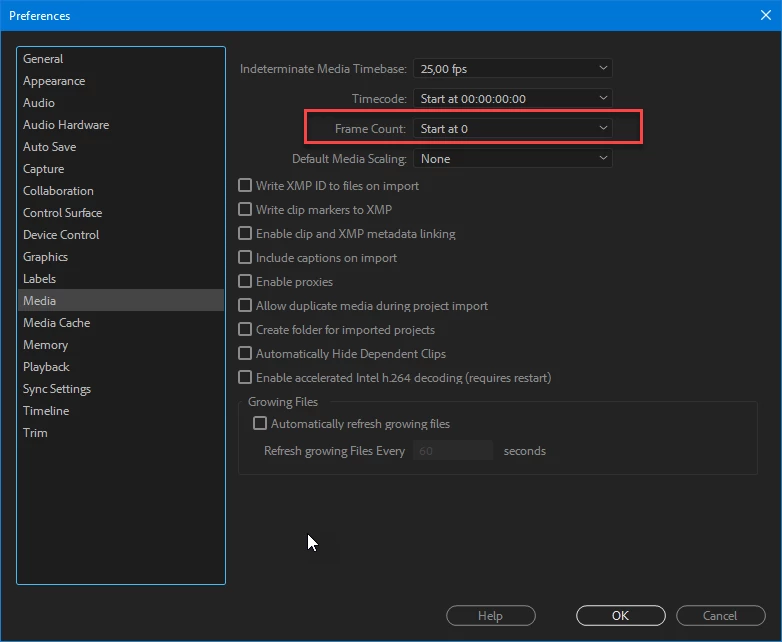
    Mind you that is now a big gotcha if you forget you changed it... no indication that you are not seeing media timecode.

    Legend
    January 12, 2018

    If you load the clips into the Source Monitor, do they all start at 00:00?

    Legend
    January 11, 2018

    In PP I think you can only modify the timecode for the source clip to 0 to get that functionality (like using aux TC in Avid). You can reset to file TC when done. Painful.

    Or, when you want to go to a timecode, use the shortcut to go to the start of the clip and then + the TC you are looking for

    Consider filing a feature request for Adobe (adobe.com/go/wish) to implement better timecode display, with a choice of what numeric entry  references (source/sequence/counter/aux etc)

    For example I’d like to be able to enter source, rather than sequence, timecodes for navigating selects sequences- as can be simply acheived in Avid.

    Inspiring
    January 10, 2018

    If you want to see the timecode of the clip in the timeline, you can turn on a Heads Up Display of that info the will appear in the Program Monitor (and only in the Program Monitor - it won't be exported with your video).

    Click on the wrench icon in the lower right corner of the Program Monitor and in the drop down menu toggle on Overlays and select the Editing Overlay:

    which will give you a supered display of the timecodes of the clips on the timeline tracks:

    MtD

    m0rr1s3Author
    Participating Frequently
    January 12, 2018

    I checked editing overlay and it doesn't appear.