This topic has been closed for replies.

4 replies

Richard van den Boogaard
Community Expert
Community Expert
June 18, 2021

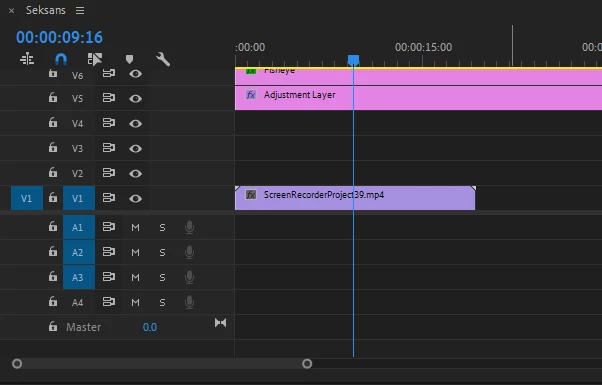
I see that you don't have any audio tracks "armed". Please tick the icon below V1 in the audio section, until A1 appears.

Peru Bob
Community Expert
Community Expert
June 18, 2021

Delete the Media Cache and Media Cache files:
https://community.adobe.com/t5/premiere-pro/faq-how-to-clear-your-media-cache-in-30-seconds-in-premiere-pro-2020/m-p/11017257/thread-id/260446?page=1

If that doesn't work,try resetting the preferences:
https://community.adobe.com/t5/premiere-pro/faq-how-to-reset-trash-preferences-in-premiere-pro/td-p/8236158?page=1

If that doesn't work, try resetting the Workspaces:
Reset a workspace
Reset the current workspace to return to its original, saved layout of panels.
1. Do one of the following:
• Click the Workspace menu icon and select Reset to Saved Layout.
• Choose Window > Workspace > Reset to Saved Layout.
from here:
https://helpx.adobe.com/premiere-pro/using/workspaces.html

If that doesn't work, try Preferences > Audio Hardware and set Input to None.

If that doesn’t work, try updating or rolling back your graphics driver directly from the video card manufacturer’s site. If NVIDIA, do a clean install of the latest Studio Driver (NOT the Game Driver)

If that doesn't work, try creating a new project and import the old one into it.
Also, please help us help you:
https://community.adobe.com/t5/premiere-pro/faq-what-information-should-i-provide-when-asking-a-question-on-this-forum/td-p/3929027?page=1

Peru Bob
Community Expert
Community Expert
June 18, 2021

What needs fixing?

Shivangi_Gupta
Community Manager
Community Manager
June 18, 2021

Hi there,


We're here to help. Could you share details about the issue you're getting here?

Also, please share your system info(OS, RAM, GPU, etc).


Regards,

Shivangi