Participant
November 5, 2020
Answered

How is everyone making DVD's in Premiere Pro without Encore?

  • November 5, 2020
  • 5 replies
  • 9449 views

Hey Folks,

It's been more than a little while since I've edited video. I'm doing a project for Veterans for out church in Premire Pro. About 20 years ago, I would send it to media encoder then Encore. I have Creative Cloud but no Encore. How do you do it theses days?

Thanks,

Art
This topic has been closed for replies.
Correct answer Averdahl

I don't need Adobe Rush but I do need Adobe Encore. 


You can still get it:

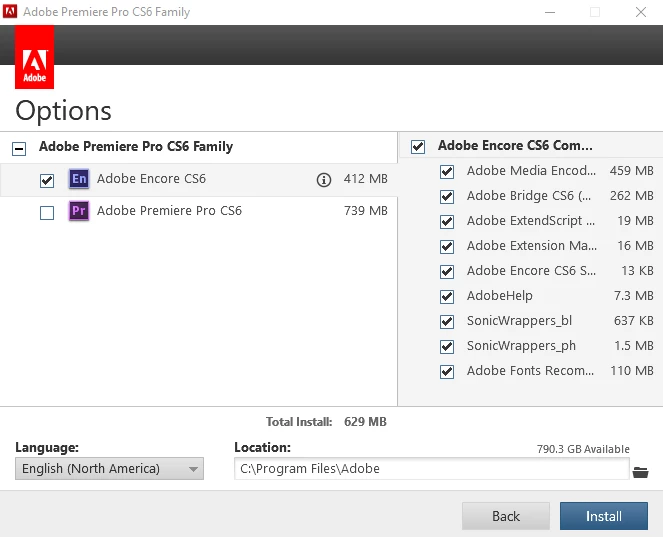
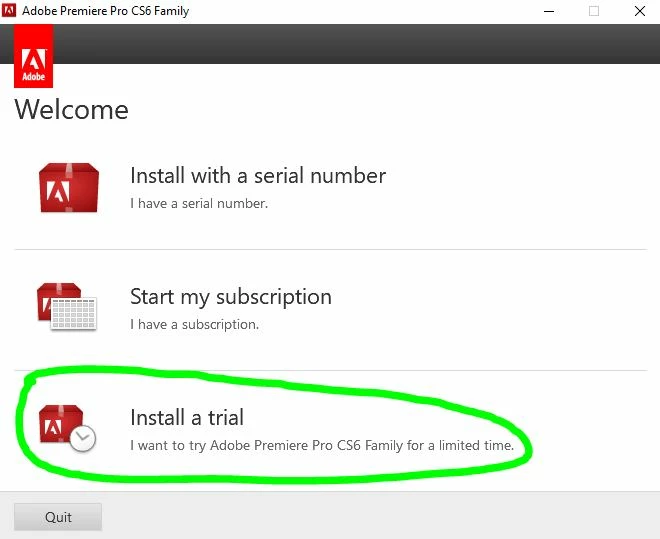
Go to ProDesignTools - Adobe CS6 Trial Downloads: Direct Links and download Premiere Pro CS6 (File 1+File2). Double click on PremierePro_6_LS7.exe and follow the instructions. During install you will be promted to give a serial number but you should choose to install it as a Trial. Installing it as a Trial is important.


Since you install it as a Trial it will activate the license via Creative Cloud when you launch Encore CS6.


All files are legit.


5 replies

graemec31829350
Participant
January 1, 2021

Keep pestering Adobe Support to provide a key for Encore! When I first approached Adobe for help for using Adobe Encore again after restoring my computer from a system HDD failure where all my apps had to be reinstalled, I was told that they no longer supported Encore and that the only way was using a CS6 license, which I did not have as I was a new CC subscriber that used Encore on that platform since 2015. Just today I received a email with download links to Premiere Pro CS6 along with a serial key. I had already installed CS6 from earlier interactions with Adobe over this problem and voila. Encore started working again!! Im putting it here as a matter of record. I acknowledge that there isnt any further updates but as most are saying here Encore did what I wanted with it and so am happy to still use it.

Participant
November 21, 2020

I tried as you suggested and installed Encore as a Trial version.  It is still asking me for a serial number.

Help!

Alison

Averdahl
Community Expert
Community Expert
November 21, 2020
Participant
November 21, 2020

Even the Trial version of Encore still isn't working for me.  Could this be that Adobe has removed even that option?

It continues to ask for the serrial number.

Inspiring
November 5, 2020

A lot of us had Encore for several years and now Adobe took it away for legal reasons. Adobe has to know we need a replacement. I don't need Adobe Rush but I do need Adobe Encore. 

Averdahl
Community Expert
AverdahlCommunity ExpertCorrect answer
Community Expert
November 5, 2020

I don't need Adobe Rush but I do need Adobe Encore. 


You can still get it:

Go to ProDesignTools - Adobe CS6 Trial Downloads: Direct Links and download Premiere Pro CS6 (File 1+File2). Double click on PremierePro_6_LS7.exe and follow the instructions. During install you will be promted to give a serial number but you should choose to install it as a Trial. Installing it as a Trial is important.


Since you install it as a Trial it will activate the license via Creative Cloud when you launch Encore CS6.


All files are legit.


Randune23
Inspiring
November 25, 2020

Nope, rendered from PP in HD and quality of video was great when I brought it into Encore.


DVD is per definition standard definition (SD) so you should render out SD from Premiere Pro, not HD.


For example, if you render out HD and choose to use H.264 it will look good when you look at it. But, H.264 uses hard comprerssion and when you bring that into Encore it will be re-transcoded to SD but now as MPEG2 that is hard compressed as well. Even if you bring in a high quality codec into Encore, Premiere Pro do downscale the footage way better than Encore do.


If doing DVD, only bring in SD assets into Encore. Use the MPEG2-DVD as Format in the Export Settings dialog and pay attention to the Field Order. If you use interlaced HD it´s always Upper while Premiere Pro for some reason year 2020 still wants to export it to Lower though it will look like crap, so make sure to change that manually.


And, downscaling HD to SD will always degrade the footage and Adobe apps are not the best ones when it comes to scale down video.

This image is just an example, so make sure to use frame rate, etc that matches your source footage.


Thanks for the file format suggestions.  I always thought H.264 was the best quality available in PP.  I will have to try that when I finish with my 2018 video.  2017 was already created in the Pegasys program and I was very happy with the results (even when I created the exported individual files in H.264).


I want the footage to be as clear and as high-quality as I can when I make the DVDs.  It seems pointless to shoot on an HD video camera and edit in PP for it only to look like VHS (not that bad but you get what I mean) when we are viewing the DVD on our Blu-Ray player.


Randy

Participant
November 5, 2020

Thanks for replying. I searched this forum right after I posted and found this answer. I was hoping something changed.

Thank you!

Art

Ann Bens
Community Expert
Community Expert
November 5, 2020
@mj
Community Expert
Community Expert
November 5, 2020

Hi @Flex Media LLC ,

The last version of Encore was CS6.

You can no longer istall it from the CC Desktop App.

Here is a link to older versions if you bought from Adobe directly.

https://helpx.adobe.com/download-install/kb/downloaded-older-app.html

Should that not work, you will need to look at another application. Pinnacle Studio is an option if you can't download Premiere Pro CS6. (Encore is a part of that install).

Good luck

mj