andrewg27158248
Participant
March 16, 2022
Question

How to add shadow to motion graphics lower thirds?

  • March 16, 2022
  • 3 replies
  • 4325 views

Hey guys, hope you're all well!


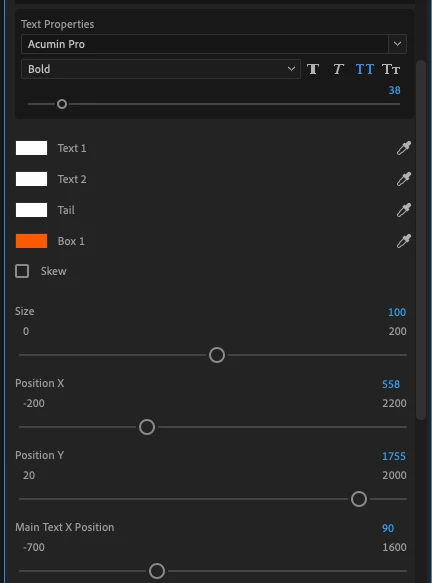
I wondered if you might know how to add shadow to lower thirds? I downloaded a template that I really like. And I can't find 'shadow' anywhere for the fonts. Which makes it hard to show up on certain backgrounds. Is it possible to make the shadow button pop up, or something like that? Anything to be able to add a little line of black around the white words!


Thanks,

Andrew



This topic has been closed for replies.

3 replies

R Neil Haugen
Legend
March 16, 2022

You may not have that ability with a mogrt like this ... this was created in AfterEffects, and the maker only gave you certain options. You can contact the maker, request a change to the mogrt, or you can perhaps change it yourself.


To change ... you would go into AfterEffects, load the mogrt on a "comp" (what an AfterEffects timeline is called), go to the Essential Graphics workspace.


You should see a panel with the settings for the mogrt as shown in your Premiere, and the full things done to it down below to the left of the comp.


You would need to add a drop shadow in those controls by the comp, then drag that up to the EG options box, then save the mogrt. It's not too complicated but might be a bit rough for a first time Ae user.


Jarle's ebook "Making Mogrts" is a downloadable pdf with easy examples to follow, and it would guide you through the whole process ... including creating your own mogrts from scratch. I was the proofreader/grammarian/spellchecker and  a chief tester. It's a great book, all the greater because it's so clear and easy to follow. There's a link to the pdf of the book on this Adobe blog post.


Jarle’s Making Mogrt’s ebook on Adobe blog


Neil

Everyone's mileage always varies ...
marliton
Community Expert
Community Expert
March 16, 2022

Hi. Make sure to select the text (or another element) in the Essential Graphics panel before applying the Drop Shadow. Also, you can use the Drop Shadow effect.


Marlon Ceballos
Jqke
Legend
March 16, 2022

Just use the Drop Shadow effect in the Effect Controls panel.

~Jake