Inspiring
June 26, 2018
Answered

How to add tools to the toolbar

  • June 26, 2018
  • 2 replies
  • 31440 views

There are some tools missing from my toolbar such as the TRACK SELECTION BACKWARD TOOL  among others.   How do I add more tools to the tool bar ?

Thanks.

    Correct answer Meg The Dog

    At this time, I don't believe that is a user option.

    To reveal associated tools, click on any tool with your mouse that has a small triangle in the lower right corner and hold.
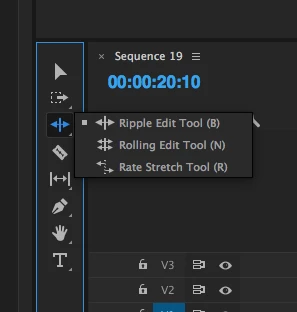
    More associated tools will be revealed.

    MtD

    2 replies

    Kristian Gabriel
    Participating Frequently
    June 26, 2018

    What version are you on? It is true that the tools were re-grouped like Photoshop. The tools with a little white triangle on them will expand revealing more tools in 2017+. Left-Click and hold your mouse button down on the TRACK SELECT FORWARD TOOL and it should reveal the TRACK SELECT BACKWARD. Do this on the RIPPLE EDIT TOOL and it will reveal the ROLLING EDIT TOOL and the RATE STRETCH TOOL. Missing Tools Premiere CC 2017

    Inspiring
    May 21, 2022

    We can customize the toolbar in almost every other Adobe app, just not Premiere Pro. The lack of consistency across Adobe apps is really astounding. Just imagine how much faster we could get things done, if all apps followed the same principles. It would make for a much better learning curve, higher efficiency aso.

    To let all developer teams do as they like in the various apps makes switching between apps a chaotic experience. Seems like Adobe is still following the wild west principle in development; it may be convenient for developers, but it's a nightmare  for users.

    I hope Adobe rethinks its developer liberalism and starts focusing more on improving the overall user experience (across apps). Lay down some consistency guidelines that dev teams have to follow!

    R Neil Haugen
    Legend
    May 21, 2022

    Everyone's mileage always varies ... remember that!


    There are posts on here like yours that lament that X doesn't work the same way in Premiere as in some other Adobe app.


    And then when the Adobe M&E people do demand a UI re-tooling job of the app teams to make something more uniform across apps, the howls here are ginormous!


    Any change like that will "break" some user-set's workflow processes. It will improve things for others. It won't be a universally approved change.


    The reality is the app teams are quite independent from each other in general. The DVA teams ... digital video apps, PrPro, Ae, Audition, are getting somewhat re-aligned more by task/process than programs at this time. So the Graphics team is less Ae-centric and more "of the DVA apps" than before. The Audition team works nearly within the Pr team these days.


    But say Lightroom and its variants are rather separate as teams from the Photoshop team. InDesign and Illustrator are pretty closely aligned, and both pay a lot of attention to how well their stuff and processes integrate with Photoshop. Not so much with the DVAs. Or even Lightroom, at least not as much as they worry about Photoshop integration.


    Neil

    Everyone's mileage always varies ...
    R Neil Haugen
    Legend
    June 26, 2018

    If you're talking about tracking a mask backwards, that is in the controls for the mask in the Effects Control Panel ... unless I'm mistaking what you're trying to do.

    Neil

    Everyone's mileage always varies ...
    duggartsAuthor
    Inspiring
    June 26, 2018

    I am talking about the toolbar panel on the left side of the timeline, I would like to add more tools to the toolbar panel.

    Meg The DogCorrect answer
    Inspiring
    June 26, 2018

    At this time, I don't believe that is a user option.

    To reveal associated tools, click on any tool with your mouse that has a small triangle in the lower right corner and hold.

    More associated tools will be revealed.

    MtD