Inspiring
June 26, 2018
Answered

How to add tools to the toolbar

  • June 26, 2018
  • 2 replies
  • 31866 views

There are some tools missing from my toolbar such as the TRACK SELECTION BACKWARD TOOL  among others.   How do I add more tools to the tool bar ?

Thanks.

    Correct answer Meg The Dog

    At this time, I don't believe that is a user option.

    To reveal associated tools, click on any tool with your mouse that has a small triangle in the lower right corner and hold.
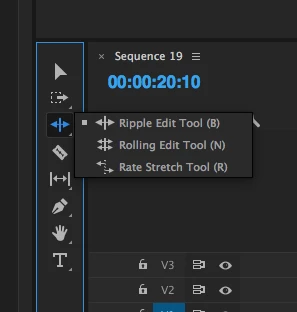
    More associated tools will be revealed.

    MtD

    2 replies

    Kristian Gabriel
    Participating Frequently
    June 26, 2018

    What version are you on? It is true that the tools were re-grouped like Photoshop. The tools with a little white triangle on them will expand revealing more tools in 2017+. Left-Click and hold your mouse button down on the TRACK SELECT FORWARD TOOL and it should reveal the TRACK SELECT BACKWARD. Do this on the RIPPLE EDIT TOOL and it will reveal the ROLLING EDIT TOOL and the RATE STRETCH TOOL. Missing Tools Premiere CC 2017

    Inspiring
    May 21, 2022

    We can customize the toolbar in almost every other Adobe app, just not Premiere Pro. The lack of consistency across Adobe apps is really astounding. Just imagine how much faster we could get things done, if all apps followed the same principles. It would make for a much better learning curve, higher efficiency aso.

    To let all developer teams do as they like in the various apps makes switching between apps a chaotic experience. Seems like Adobe is still following the wild west principle in development; it may be convenient for developers, but it's a nightmare  for users.

    I hope Adobe rethinks its developer liberalism and starts focusing more on improving the overall user experience (across apps). Lay down some consistency guidelines that dev teams have to follow!

    R Neil Haugen
    Legend
    August 12, 2022

    @R Neil Haugen 


    It's possible to have one's cake and to eat it. The word is "Customisation".


    I would like the ability to add more tools to the toolbar.

    This could easily be done via a new section under Edit > Preferences > "Toolbar".

    And it wouldn't break anyone else's existing workflow. 

    I could customise Premiere Pro to suit myself.


    Don't you remember that we use to have more tools on the toolbar in Premiere Pro CS6? (see image).

    Therefore things have changed in the past and we managed.

    So it's possible for them to change again and for the better.


    Best Regards.


    Actually, all the tools are still there ... the little triangles indicate more if you hover.


    And yea, no problem with customization. Which is something that drives me nuts in Resolve, as that app doesn't allow much of any customization. I've got what, 7 custom workspaces in Premiere?


    So I'm all in for allowing customization. I do recognize that any change, no matter how good overall, is gonna get howls and protests ... as we all are very different people.


    Neil

    Everyone's mileage always varies ...
    R Neil Haugen
    Legend
    June 26, 2018

    If you're talking about tracking a mask backwards, that is in the controls for the mask in the Effects Control Panel ... unless I'm mistaking what you're trying to do.

    Neil

    Everyone's mileage always varies ...
    duggartsAuthor
    Inspiring
    June 26, 2018

    I am talking about the toolbar panel on the left side of the timeline, I would like to add more tools to the toolbar panel.

    Meg The DogCorrect answer
    Inspiring
    June 26, 2018

    At this time, I don't believe that is a user option.

    To reveal associated tools, click on any tool with your mouse that has a small triangle in the lower right corner and hold.

    More associated tools will be revealed.

    MtD