
Participant
October 28, 2024
Answered

How to adjust the graphic's background settings?

  • October 28, 2024
  • 3 replies
  • 750 views

To help me clarify, this is my default "look" of the graphic's backgrounds:
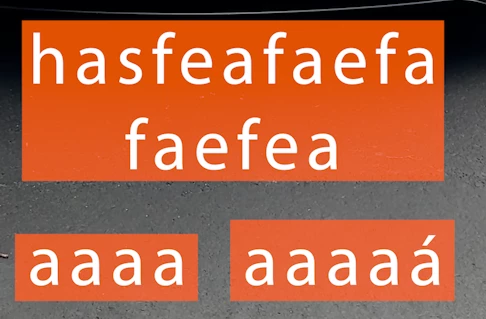
The features being:

-When writing a second line, the size of such line's background matches the longest line's background that same text has.

-Size of background changes if it has an accent or an apostrophe, or if some letters are uppercase and, others, lowercase.


This is how another text style that has been shared to me looks:
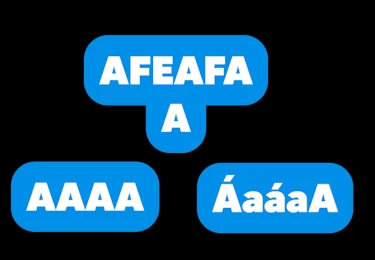
-Short lines have short backgrounds, indifferent of other lines' lenghts.

-Background's size remains the same, indifferent of upper/lowercase, accent or no accent.


How can I achieve such settings?


Thanks in advance.

This topic has been closed for replies.
Correct answer R Neil Haugen

Probably by creating them in AfterEffects. The 'responsive' controls of Ae are much more powerful for graphics design. 


After making it work in Ae, you add the controls to the editor's control panel in Ae, then export as a mogrt, perhaps via shared library.


Jarle Leirpoll wrote a very useful, easy to read e-book on making mogrts in AfterEffects for deployment in Premiere, including to teams of workers. Easy to read, a lot of great examples. Much you  can simply copy into your own projects.


Jarle’s Making Mogrt’s ebook on Adobe blog


3 replies

Ann Bens
Community Expert
Community Expert
October 28, 2024

fill out the bottom line the same width as the first line.

Select extra letters and uncheck Fill.


Same goes for rounded corners.


Harold Silva
Community Expert
Community Expert
October 28, 2024

Cuando tengo que editar como en el tipo de graficos (azul) lo que hago es crear dos lineas, no hay otra opcion ya que como comenta Neil, tendrias que hacerlo en After Effects
Saludos

Harold Silva B.
R Neil Haugen
R Neil HaugenCorrect answer
Legend
October 28, 2024

Probably by creating them in AfterEffects. The 'responsive' controls of Ae are much more powerful for graphics design. 


After making it work in Ae, you add the controls to the editor's control panel in Ae, then export as a mogrt, perhaps via shared library.


Jarle Leirpoll wrote a very useful, easy to read e-book on making mogrts in AfterEffects for deployment in Premiere, including to teams of workers. Easy to read, a lot of great examples. Much you  can simply copy into your own projects.


Jarle’s Making Mogrt’s ebook on Adobe blog


Everyone's mileage always varies ...
Participant
November 12, 2024

Sorry for the long wait. This was exactly the case. Couldn't thank you enough for that ebook you referenced.

Again, thanks!