
Exit
  • Global community
    • Language:
      • Deutsch
      • English
      • Español
      • Français
      • Português
  • 日本語コミュニティ
  • 한국 커뮤니티
0

How to change an Image resolution in Premier Pro?

Guest
Mar 07, 2020 Mar 07, 2020

Hello.

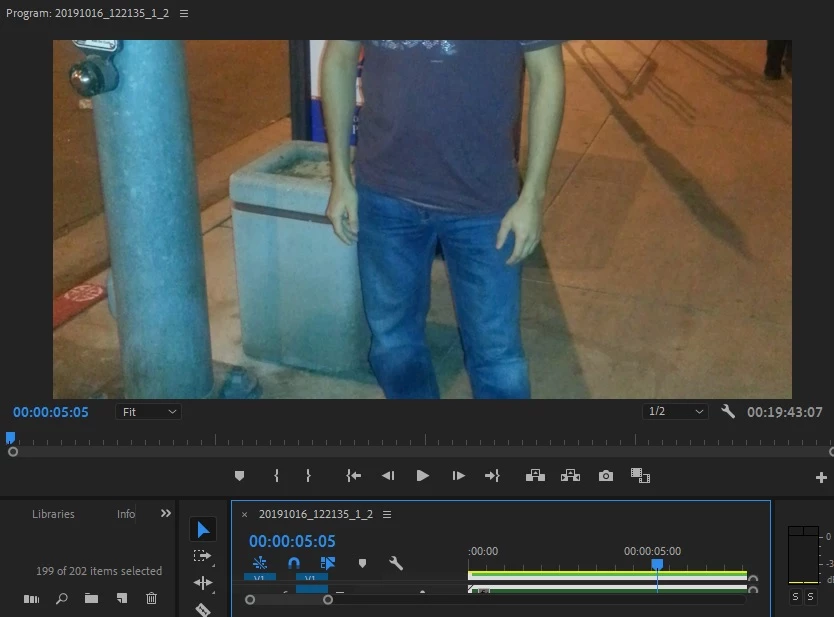
I'm doing a project using Premiere Pro 2019 and I'm trying to make some photos smaller because I'm combining video with pictures. Here is a screenshot.

As you guys can see the picture is blocking the video. ( There is a video in the back).Me.jpg
 

Thank you in advance

1.4K
Translate
Report
Community guidelines
Be kind and respectful, give credit to the original source of content, and search for duplicates before posting. Learn more
community guidelines

correct answers 1 Correct answer

Community Expert , Mar 07, 2020 Mar 07, 2020

Click on the photo track on the timeline, open up the 'effects control' window and adjust the scale and position.

Translate
Community Expert ,
Mar 07, 2020 Mar 07, 2020

Click on the photo track on the timeline, open up the 'effects control' window and adjust the scale and position.

Translate
Report
Community guidelines
Be kind and respectful, give credit to the original source of content, and search for duplicates before posting. Learn more
community guidelines
Guest
Mar 07, 2020 Mar 07, 2020
LATEST

That fixed my issue. Thank you

Translate
Report
Community guidelines
Be kind and respectful, give credit to the original source of content, and search for duplicates before posting. Learn more
community guidelines