
Participant
January 6, 2025
Answered

How to change the UI scale(it's REALLY big)

  • January 6, 2025
  • 2 replies
  • 2330 views

I have checked the other posts but my problem is the opposite, my display is not larger than 1920x1080 but smaller:

HP ProBook, Windows 11

What ends up happening is this:
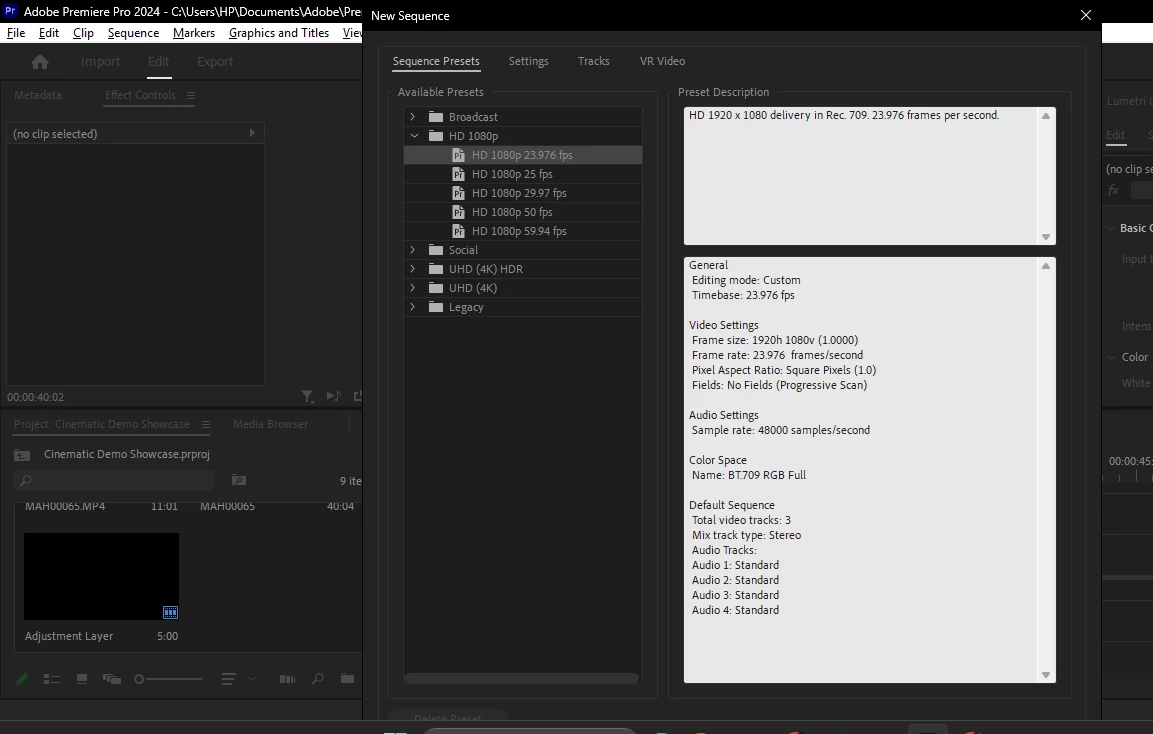
The UI scale is really big and I cannot the see the options at the footer. This happens for all the windows. How can I change it?

Correct answer Ann Bens

Unfortunately, the required screen resolution is 1920x1080 to properly use Premiere.


2 replies

Community Manager
January 6, 2025

Hi Marvin,


Welcome to the community. As Ann Bens mentioned, the minimum screen resolution required to display all the UI elements properly is 1920x1080. You may refer to this link to know more about the system requirements for Premiere Pro. Hope you find it useful. Let us know if you have any questions.


Thanks,

Sumeet

xQ98_2Author
Participant
January 7, 2025

Isn't there a way around it? Something like we have developer options on android, something for Windows? Please help, I can't afford a monitor or pc, that's why I learnt editing in the first place to monetize it.


Regards,Marvin
Kevin-Monahan
Community Manager
Community Manager
January 7, 2025

Hi @xQ98_2,

Get an HDMI cable and plug it into your flat screen TV. Hopefully that's HD. I run my PC that way with Premiere Pro!


Cheers,
Kevin


Kevin Monahan - Sr. Community and Engagement Strategist – Adobe Pro Video and Audio
Ann Bens
Community Expert
Ann BensCommunity ExpertCorrect answer
Community Expert
January 6, 2025

Unfortunately, the required screen resolution is 1920x1080 to properly use Premiere.


xQ98_2Author
Participant
January 7, 2025

Isn't there a way around it? Something like we have developer options on android, something for Windows? Please help, I can't afford a monitor or pc, that's why I learnt editing in the first place to monetize it.

Regards,Marvin