Participating Frequently
October 24, 2018
Answered

How to choose Blu-ray 1080p24 with Encode CS6?

  • October 24, 2018
  • 1 reply
  • 2090 views

According to this Encode CS6 FAQ  about supported export formats, Encore should be capable of producing a Blu-rays with 1920×1080 24p 16:9 settings.

According to the Blu-ray article on Wikipedia, 1920×1080 24p in a 16:9 aspect ratio is a mandatory format. So every consumer Blu-ray player should be able to play it.

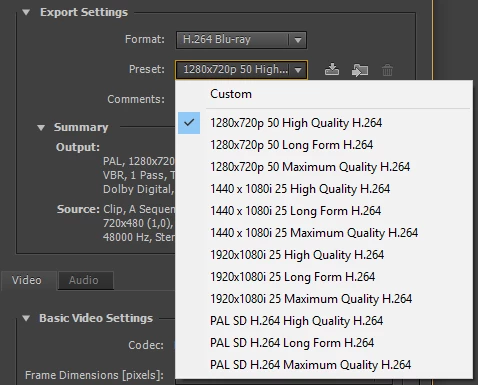
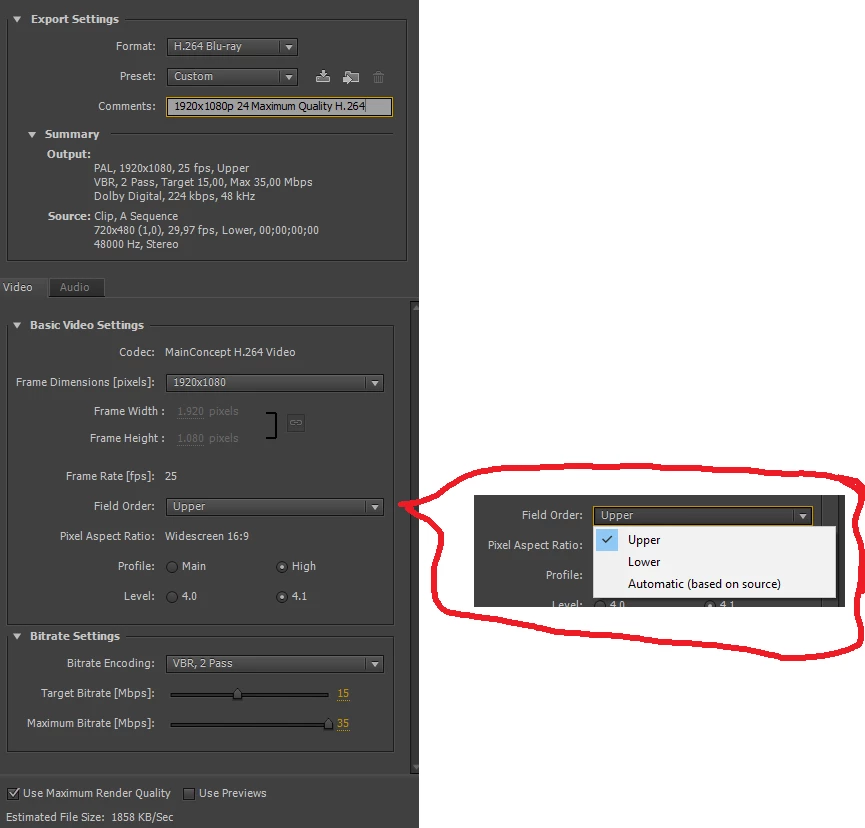
However, that format is not selectable with my Encore CS6 installation (version 6.0.2.004 - no further updates where found):

When I try to create a custom preset, progressive mode is not selectable ("None") with "Field Order".

How do I export/author a Blu-ray with the following settings?

  • Resolution: 1920×1080
  • Frames per second: 24 (progressive)
  • Aspect ratio: 16:9
  • Codec: H.264
This topic has been closed for replies.
Correct answer Averdahl

Hi Averdahl,

1080p25 is, according to the Wikipedia Blu-ray article about what the standard describes, only a mandatory format for UltraHD Blu-Ray. A cite on that goes even further:

Only supported on UltraHD Blu-Ray with HEVC video compression standard

So I would extremely reduce my potential audiences, and receive bad reviews due to customers buy the Blu-ray and cannot play it back with their non-UltraHD or UltraHD without HEVC support Blu-ray player. This is why I will not author Blu-rays in that format.

And more important: As you can see from the screenshots, there are none p25 options available, only i25.

And for all: Do I lose anything when I go with i25 when the source material is p25?


And for all: Do I lose anything when I go with i25 when the source material is p25?

No, but you do loose quality when exporting 25p straight to 24p. My experience is that 25p comes out as 25PSF (Progressive Segmented Frame) and will display as a full frame/second.

Unfortunately Adobe software is not so good in frame rate conversions. There are a reason to why there are dedicated hardware converters for such jobs.

You are doing a Blu-ray and not an UltraHD Blu-ray so no need to worry about "Only supported on UltraHD Blu-Ray with HEVC video compression standard". Encore is not capable of doing a UltraHD Blu-ray. When Blu-ray came along this rigid PAL/NTSC-thing dissapeared. A Blu-ray player can playback both PAL and NTSC as can the televisions that are connected to those players. That´s one of the biggest advantages Blu-ray have besides HD, that you can mix PAL and NTSC on the same disc without issues.

At the end, use whatever frame rate you are satisfied with but bear in mind that it will be visible, depending on content, that one frame per second is missing.

1 reply

Stan Jones
Community Expert
Community Expert
October 24, 2018

Did you mean to create a PAL project? I ask because it looks like NTSC in the background of your screenshots.

You can put 24/23.976 on a PAL BD, I think. But it appears to me that Encore will not transcode it that way in a PAL project.

Yes, 6.0.2 was the final update (for PC; 6.0.1 for Mac).

Caltan0Author
Participating Frequently
October 24, 2018

You can ignore (hopefully) the source summary. My intention was to setup the export settings in a empty project. So I can use the export quality preset in actual Encore projects.

But yes, I have chosen PAL when creating the project. All my target regions would be European. So I always use PAL.

The actual source material is 1920x1080p25 16:9 H.264 90 Mbit/s.

Averdahl
Community Expert
AverdahlCommunity ExpertCorrect answer
Community Expert
October 24, 2018

Hi Averdahl,

1080p25 is, according to the Wikipedia Blu-ray article about what the standard describes, only a mandatory format for UltraHD Blu-Ray. A cite on that goes even further:

Only supported on UltraHD Blu-Ray with HEVC video compression standard

So I would extremely reduce my potential audiences, and receive bad reviews due to customers buy the Blu-ray and cannot play it back with their non-UltraHD or UltraHD without HEVC support Blu-ray player. This is why I will not author Blu-rays in that format.

And more important: As you can see from the screenshots, there are none p25 options available, only i25.

And for all: Do I lose anything when I go with i25 when the source material is p25?


And for all: Do I lose anything when I go with i25 when the source material is p25?

No, but you do loose quality when exporting 25p straight to 24p. My experience is that 25p comes out as 25PSF (Progressive Segmented Frame) and will display as a full frame/second.

Unfortunately Adobe software is not so good in frame rate conversions. There are a reason to why there are dedicated hardware converters for such jobs.

You are doing a Blu-ray and not an UltraHD Blu-ray so no need to worry about "Only supported on UltraHD Blu-Ray with HEVC video compression standard". Encore is not capable of doing a UltraHD Blu-ray. When Blu-ray came along this rigid PAL/NTSC-thing dissapeared. A Blu-ray player can playback both PAL and NTSC as can the televisions that are connected to those players. That´s one of the biggest advantages Blu-ray have besides HD, that you can mix PAL and NTSC on the same disc without issues.

At the end, use whatever frame rate you are satisfied with but bear in mind that it will be visible, depending on content, that one frame per second is missing.