

Question
How to Combine Tools Panel with workspace panel in the shown way?
Once/Accidentally I happened to drag adjust my Toolbox Panel into Workspaces panel of Premiere Pro in such a way that they both show across the horizontal bar (in the top area of the application). All tools and workspaces names show without clicking any arrow or drop down arrow. Yet both panels occupy single horizontal strip only.
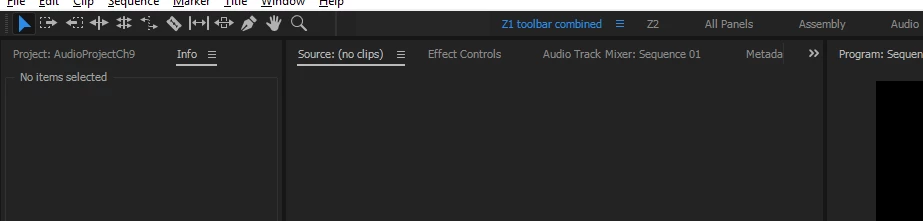
After this happened (as shown in the accompanying SS), I couldn't recreate this. So, if I wanted to readjust this I only have to reset my workspace to saved layout. There is no way I can readjust these two in the same (shown) way.
Can anybody pls tell how to combine any 2 panels in this way?
 AdChoices