Inspiring
January 8, 2024
Answered

How to delete default LUTs

  • January 8, 2024
  • 1 reply
  • 2448 views

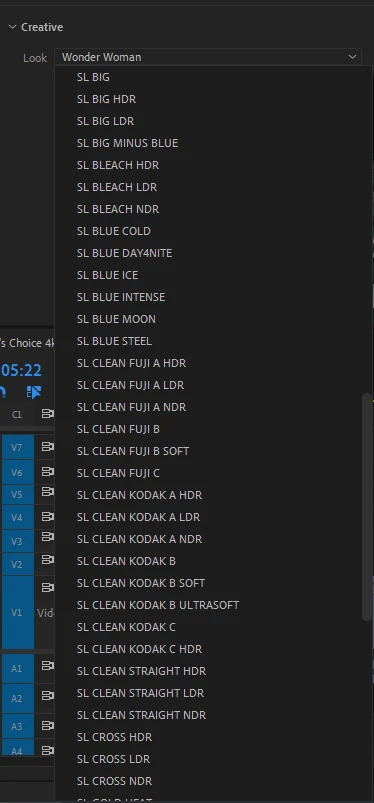
Hi all, I cannot for the life of me find the folder path to remove these default LUTs that I had installed. Is there any route or method I can use in order to locate them and remove? Taking up a bunch of space scrolling through 50-60 of them just to use the 10-20 that I actually use.


This topic has been closed for replies.
Correct answer Ann Bens

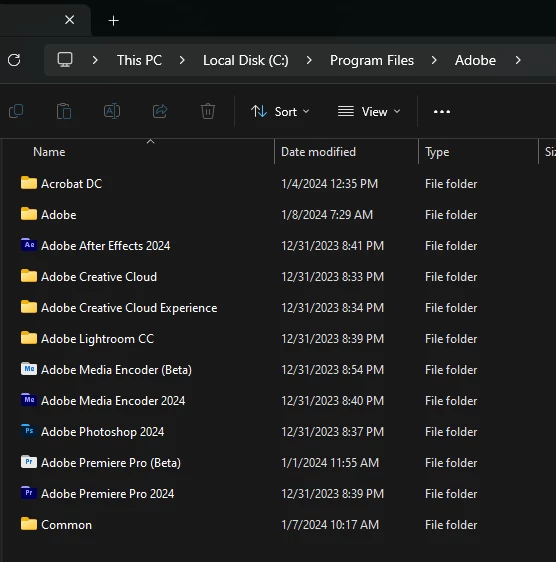
I believe my downloads and files are all out of whack, as seen on the screenshot I dont even have a folder for Premiere Pro! The Common folder down below is where I was able to import my personal LUTs but other than that, no luck.


A folder that happens to have a PrPro icon..................

1 reply

R Neil Haugen
Legend
January 8, 2024

First, I hope you don't add anything to that folder. Nothing but pain can occur.


Because Premiere accesses those by relative sort order in the folder. NOT BY THE FILE NAME!


So you apply a LUT that happens to be the 15th LUT via computer alphanumeric sorting. Maybe it's called BlueMonday.


Premiere only sees it as the 15th LUT down.


Now add a LUT to that folder, that sorts previous to it, say AlphaBlue.


Now Premiere still applies the 15th LUT, but it's not the BlueMonday LUT anymore, is it?


And anyway, even if you hadn't added another LUT sorting earlier than BlueMonday, but exported from MediaEncoder?


Unless you added BlueMonday to the same folder of Me, you'll get the 15th LUT in Me's folder.


So do not mess with those folders! They have a chart in the documentation that tells you the location users can add LUTs to so that Premiere uses them correctly across all three apps, Premiere, AfterEffects, and Me.


Use those locations. Period.

Everyone's mileage always varies ...
Inspiring
January 8, 2024

I have the new folders created following the instructions for importing new LUTs so it's seperate from those already in there, from the chart like you said.


My problem is I want to remove the ones in the library but I don't know how. I am newer to this side of things so forgive me, I just don't want those LUTs that I will never use to be in there taking up space

Ann Bens
Community Expert
Ann BensCommunity ExpertCorrect answer
Community Expert
January 8, 2024

I believe my downloads and files are all out of whack, as seen on the screenshot I dont even have a folder for Premiere Pro! The Common folder down below is where I was able to import my personal LUTs but other than that, no luck.


A folder that happens to have a PrPro icon..................