



How to delete mogrt from Essential Graphics panel
Windows 10 Pro
Premiere Pro version 24.3.0 Build 59
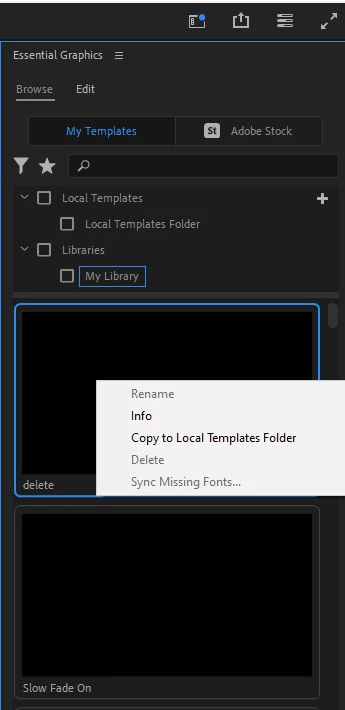
I want to delete the mogrt named "delete" from the Essential Graphics panel. As you can see in the screenshot, Delete is not available. I can click on the Edit tab and rename it, but there is no option to delete.
The mogrt doesn't appear in Windows Explorer in any of the locations that mogrts exist, and I did a search for .mogrt and could not find it.
It is not located in my library of assets when I go to my account online.
I don't have sync enabled, and the computer is disconnected from the internet.
Backstory:
It was originally named Slow Fade On, but when I created it in After Effects, I forgot to allow a few properties to be modified in Premiere Pro, so I opened it in After Effects, added the properties I needed, and saved it. Instead of writing over the existing mogrt, it just created a new one of the same name.
So, how can I remove it?
 AdChoices