
Participant
September 18, 2024
Answered

How to disable(?) draggable line on clips in timeline

  • September 18, 2024
  • 3 replies
  • 877 views


Ever since the 2024 update, I've been frustrated with these draggable white lines on any video/audio clip that enters my timeline. I always end up dragging them up/down while trying to move the clips themselves, and it's annoying. Is there a way I can get rid of the lines? If they were present in prior versions, they were much less conspicuous.
This topic has been closed for replies.
Correct answer MyerPj

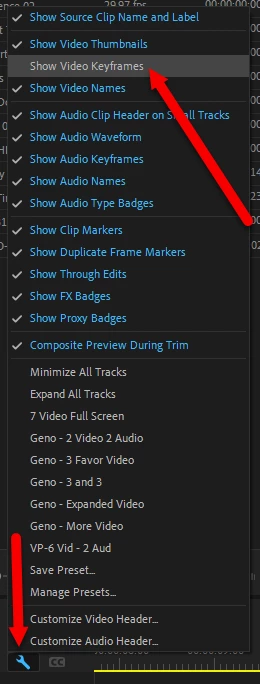
yes, it does seem I'm clicking that more than previously. You turn it off by deselecting 'Show Video Keyframes' from the Timeline wrench menu.


3 replies

MyerPj
Community Expert
Community Expert
September 18, 2024

You're welcome!

BTW: You can set a Keyboard Shortcut for that toggle, 'Show Video Keyframes'

🙂

MyerPj
Community Expert
MyerPjCommunity ExpertCorrect answer
Community Expert
September 18, 2024

yes, it does seem I'm clicking that more than previously. You turn it off by deselecting 'Show Video Keyframes' from the Timeline wrench menu.


Participant
September 18, 2024

Thank you so much!

R Neil Haugen
Legend
September 18, 2024

Yes, of course ... that's the audio keyframe line. Go to I think it's the Sequence header block wrench icon menu, or maybe the 3-bar sequence title menu ... but turn off audio keyframes.

Everyone's mileage always varies ...