
Participating Frequently
February 22, 2017
Frage

How to display iXML in Metadata fields in Project Panel

  • February 22, 2017
  • 2 Antworten
  • 5524 Ansichten

I have a large number of .WAV audio files with XML metadata written into them by my Zoom F4 Audio recorder. One of which is the "Track Name". When I open the metadata panel for a clip, I see the entry, in this case "Boom" or "Lav 1" listed in the iXML Panel:
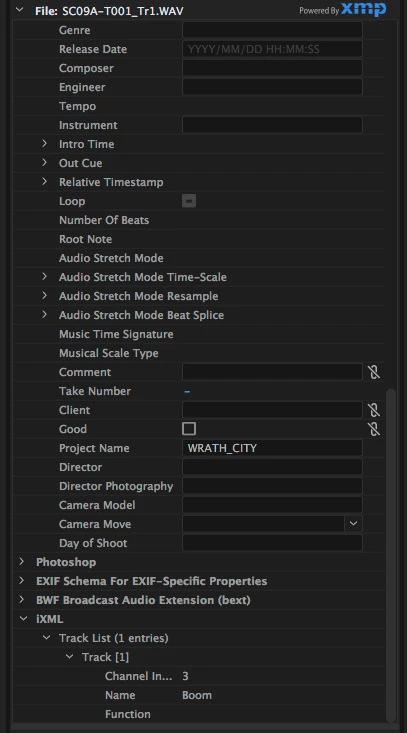
I cannot find a way to include this field in the display of metadata in the Project Panel of Premiere. Just about every other conceivable field can be inserted into that display. Is there a way to create a custom field and link this entry to it?

    Dieses Thema wurde für Antworten geschlossen.

    2 Antworten

    Legend
    October 5, 2021

    Wav metadata is still a shambles on PP, right? This article is several years old but I don't think anything has changed...


    https://www.provideocoalition.com/adobe-and-avid-need-to-support-ixml-metadata-for-audio-channels-in-the-timeline/

    R Neil Haugen
    Legend
    October 5, 2021

    Unfortunately, they've not upgraged the metadata options in any notable way. And yes I've complained among others. So always happy to see others post on this topic.


    There are quite a few metadata options you can choose to display from the massive list of metadata bar options ... however, it's useless to do so. PrPro will not actually read and display the data from those fields.


    And when I've compained to engineers either on forums or in person at NAB, they are patient but don't see any urgency in fixing things. Which frustrates me totally.


    Time to push for more people to go over to their UserVoice system and post. Also, I put a rant on this on their public beta forum a few weeks back. You're most welcome to go there and post a reply!


    Neil

    Everyone's mileage always varies ...
    Known Participant
    November 7, 2024

    Programmers and their bosses aren't film or video editors. 

    Ric077Autor
    Participating Frequently
    February 25, 2017

    26 Views and no insights from the Adobe Staff Experts?

    Ric077Autor
    Participating Frequently
    February 25, 2017

    So here is a frame grab from my project window. I created a metadata schema that included iMXL and track list. I am now trying to get the fields to populate from my files. Any metadata experts out there that might have insight?

    Ric077Autor
    Participating Frequently
    February 26, 2017

    The Adobe staffers that appear here from time to time are on the Product Support staff, not actually the PrPro team. They know a LOT about the program but "we" can come up with things that they're not personally knowledgeable about, and sometimes they do contact the PrPro engineers for answers for us.

    Neil


    Neil,

    Thanks for your response. I have done quite a bit of searching on the Adobe forums here, Google, and on audio/video specific forums on DVXusers.com, the Zoom Facebook page etc. and have not gotten much of any insight. Zoom's excellent new field recorders, the F4 and F8 allow custom metadata to be written to their BWAV and WAV files that contains both info about what mics are on what tracks but also comments like "good take" "false take" etc that would be very helpful in post production in Premiere, After Effects and Audition. The high end film sound recorders from Sound Design do a similar function. The information is readable by Premiere as I have demonstrated in the screen shots above, I just can't seem to find a way to get it to display where it will be useful to anyone in a post production environment, like the properties or Project pane. It would appear that "Custom Schema" are the route to this, but there's precious little instruction on how to use the custom set-ups and how to map data to specific fields in the PrPro project window.

    If you could bring some attention to this rather obscure question to someone that might be able to take it up the chain, myself and a number of other audio professionals would be really appreciative. The current attitude in the sound forums is "Premiere just doesn't do audio metadata". I would like to correct that impression.