
ejaza7920015
Participating Frequently
October 13, 2022
Answered

How to display native alert in Adobe Premiere pro extension

  • October 13, 2022
  • 1 reply
  • 987 views

Hi i want to always show the native alert but when i do it in Javascript side it will look like this as shown below
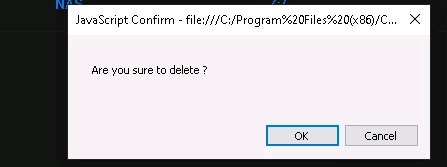


In MAC it even looks even Ugly

the above alert comes when i do something like this from Javascript side

alert('Are you sure to delete')


When i do it in jsx side , it will look something like shown below
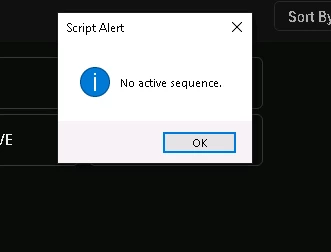
 

JSX side

alert('No active sequence');


Question: i always want to display native alert even from javascript side how can i achieve that


This topic has been closed for replies.
Correct answer Bruce Bullis

ExtendScript alerts (displayed by PPro) will display like the ScriptAlert dialog, above; JavaScript alerts (displayed by the instance of Chromium which loads your panel) will display like the JavaScript Confirm dialog, above. 


1 reply

Bruce Bullis
Bruce BullisCorrect answer
Legend
October 13, 2022

ExtendScript alerts (displayed by PPro) will display like the ScriptAlert dialog, above; JavaScript alerts (displayed by the instance of Chromium which loads your panel) will display like the JavaScript Confirm dialog, above. 


ejaza7920015
Participating Frequently
October 14, 2022

@Bruce Bullis is there any way to display native dialog from javascript side (like the 2nd image)

Bruce Bullis
Legend
October 14, 2022

As above; no. 
ExtendScript will always look 'native', JavaScript (CEP) will always look like the first image, above.