@brian_s_a
Participant
November 27, 2021
Answered

How to downgrade to Premiere Pro v 15.4.1 ?

  • November 27, 2021
  • 2 replies
  • 4606 views

I can't find any where to download and use v15.4.1 of Premirere pro.

I've sadly upgrade to v2022 and have so much problem with my older project. Color from clips are blown out and even with a “ Interpret footage and set Color Space“ it doesn't do the tricks for all my different clips. It's a nightmare to edit my movie...

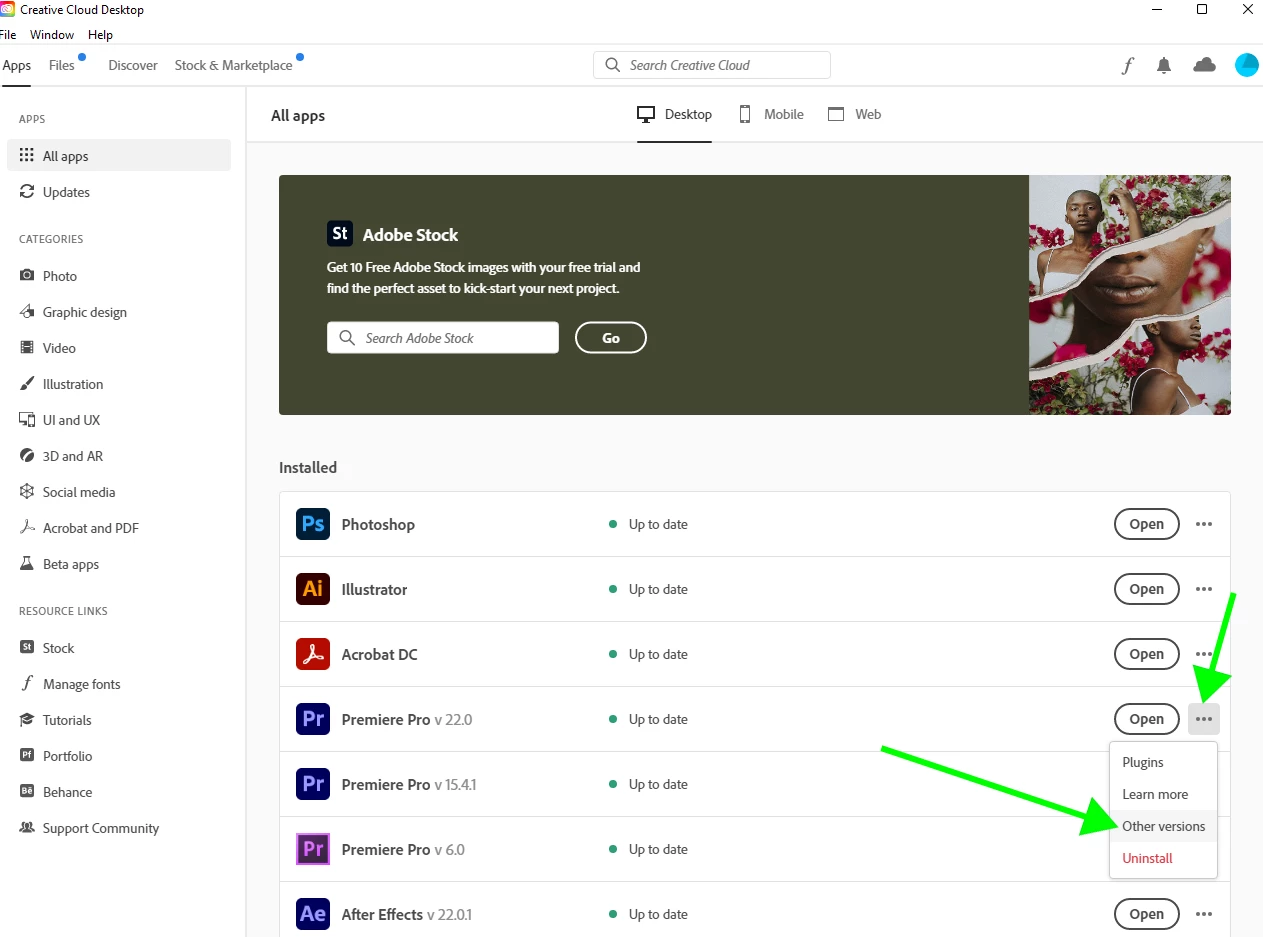
Can someone tell me how to download the older version with screen grab or links ?

Thanks

This topic has been closed for replies.
Correct answer Averdahl
quote

Can someone tell me how to download the older version with screen grab or links ?


By @@brian_s_a


Open the Creative Cloud app and click on the three dots to the right and choose Other Versions. Version 15.4.1 will be there.


2 replies

R Neil Haugen
Legend
November 27, 2021

Do check out the following post. I've worked with most of the media users are complaining about. In Pr2022 there are several major changes to color management options and to Premiere's default behavior with a number of Sony, Canon, and probably Panasonic Log media formats.


If you don't understand and follow several steps, you'll have troubles. If you do, it works except perhaps for the M1 Macs, there may be a bug there.


FAQ: PremierePro 2022 Color Managment for Log/RAW Media


And do understand ... they are moving the app forward with these color management options. They have to do so, and we users will have to adapt to having more options. Between so many cameras offering HLG or PQ recording options, which a lot of people are using, and many new phones defaulting to recording in HDR forms, the nature of the incoming media is changing rapidly.


These changes are not going away. I have a big problem with the implementation. To me it is piecemeal with options spread through too many locations for quick and accurate user workflows. But the changes are entirely necessary.


I've not had a single clip that I couldn't quickly and relatively easily get working correctly on both SDR (standard Rec.709) and HDR timelines. And I've tested "problematic" clips from quite a few other users. That supposedly could not work within Premiere no matter what they did.


There were simply a couple small but required steps they didn't know about.


And ... there are a lot more troubles with projects brought forward from 2021 simply because there are enough default changes in the way Pr treats certain media. Especially Log media. Fixable, but again, you gotta know what to fix.


Neil

Everyone's mileage always varies ...
Averdahl
Community Expert
AverdahlCommunity ExpertCorrect answer
Community Expert
November 27, 2021
quote

Can someone tell me how to download the older version with screen grab or links ?


By @@brian_s_a


Open the Creative Cloud app and click on the three dots to the right and choose Other Versions. Version 15.4.1 will be there.


@brian_s_a
Participant
November 27, 2021

Thanks a lot you're my life saver, I was on the website and the option wasn't here

https://creativecloud.adobe.com/apps/all/desktop


Now it makes more sense.

Cheers Brian 🙂

Ann Bens
Community Expert
Community Expert
November 27, 2021

For updates etc use the desktop app not the website.