
Known Participant
April 8, 2022
Answered

How to Drag and Drop Video and Audio with ease from Source Window

  • April 8, 2022
  • 6 replies
  • 14949 views

I am trying desperately to drag a video and audio sequence from my source window into my timeline and I am able to.  I have read all available help, including the use of the Shift key and it doesn't seem to work.  I am relatively known to Premiere Pro as I have come from Magix Vegas Studio and I am finding Premiere a little more difficult to do simple tasks.


Can someone please tell me how I can do this, without having to create a subclip and dragging it from the Project Window?
Correct answer Ann Bens

Post screenshot of timeline.

No, I am not referring to those icons.

Again, place your mouse in the middle of the source monitor: click and drag.

It will show a fist as in previous screenshot.

Video and audio will go into the timeline.

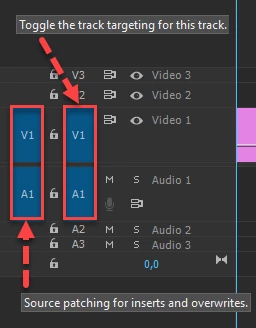
Might be that your track is not source patched.


6 replies

Participant
December 2, 2023
  1.  
Participant
March 26, 2023

Dk

R Neil Haugen
Legend
April 9, 2022

If you are dragging by the icons at the bottom of the Source monitor, those will only drag the one for that icon. If you drag from the image window itself, that will drag all ... if you have the Source targets set correctly as Ann's graphic shows.


You can also simply use keyboard shortcuts (also available as icons for the Source monitor) ... insert and overwrite. The comma and period keys. ( I forget which is which, easy to check.)


- Insert drops the clip into the timeline panel at the location of the CTI, and moves everything from there out over.

-Overwrite drops the clip 'on top' of the material on the sequence, overwriting whatever is already there.


Neil

Everyone's mileage always varies ...
Ann Bens
Community Expert
Community Expert
April 8, 2022

Place your mouse on the image itself in the Source Window and drag.

Arrow will change to a fist.


Known Participant
April 9, 2022
If you are referring to the icon image of the filmstrip which is next to the audio icon in the source window, than you are not understanding what I am asking.

What I am asking or trying to do is drag a in/out sequence from my source window not the timeline. I cannot seem to able to do this in on motion where the video and audio can be dragged at the same time to the time line. I can only seem to do it individually. Doing this means that the video and audio are not linked together in the timeline.

I know how to create sub-clip and this does what I would like, however it is extra unnecessary steps to do something that should be so simple to do.

Can someone let me know if this is actually possible.

Regards,
Steve B
Ann Bens
Community Expert
Ann BensCommunity ExpertCorrect answer
Community Expert
April 9, 2022

Post screenshot of timeline.

No, I am not referring to those icons.

Again, place your mouse in the middle of the source monitor: click and drag.

It will show a fist as in previous screenshot.

Video and audio will go into the timeline.

Might be that your track is not source patched.


nishu_kush
Community Manager
Community Manager
April 8, 2022

Hi v-4-vendetta,


Thanks for writing in.

What happens when you try to do so? Do you see any error message? Drag and drop from Source Monitor to Timeline works flawlessly at my end. Please make sure that the Source Patching is mapped correctly.

Let us know.


Thanks,

Nishu

Known Participant
April 8, 2022
You may have misunderstood what my question is. I can drag video on its own. And I can drag a portion of an audio clip to the timeline

What I would like to do is drag video and audio at the same time from the source window to the timeline.

Regards,
Steve B