
March 27, 2018
Answered

How to export the Hightest Audio Quality (16-24bit) ?

  • March 27, 2018
  • 2 replies
  • 50947 views

Hello,

What is the settings for export the best quality audio in Adobe Premiere Pro ?

I work with 16bit and 24bit FLAC files, I have to use the same settings for both?

i have already make a preset but i dont think this is completely lossless :
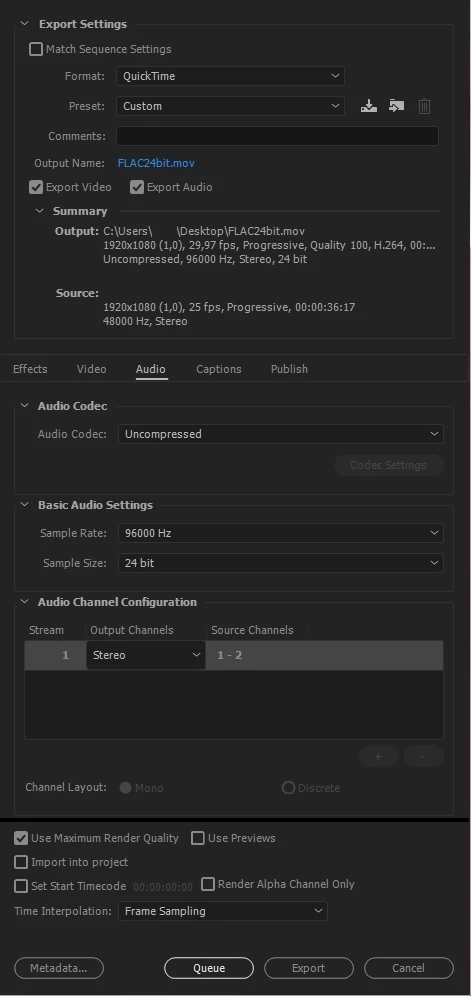
Honestly i don't think premiere pro can render audio lossless

Please Help me.

Note : i dont care if the final is 30GB, i want the maximum quality, Thank you

This topic has been closed for replies.
Correct answer excited_Genie16B8

this is for YouTube,

In that case, choose QuickTime as the Format and GoPro Cineform YUV 10 bit as the Preset.  On the Audio page, you can change from 16 to 24 bits.  (48 kHz is fine.)

2 replies

Community Expert
March 27, 2018

Hi

Based on your screenshot, you have to use Uncompressed / 96000 Hz / 32bits float, to get the best possible audio quality. But, depends on where do you go to play it to run nicely.

Regards!

Byron.
March 27, 2018

Thank you, this is for YouTube,

i try to get the best quality like audiophile and professional channels (example : Vevo)

I do not know what software these people use, but I really want to know.

excited_Genie16B8Correct answer
Legend
March 28, 2018

this is for YouTube,

In that case, choose QuickTime as the Format and GoPro Cineform YUV 10 bit as the Preset.  On the Audio page, you can change from 16 to 24 bits.  (48 kHz is fine.)

Legend
March 27, 2018

Choose Wave under Format.

March 27, 2018

Oh you mean Wave instade of Quicktime ?

Legend
March 27, 2018

Yes.