
Known Participant
September 8, 2021
Answered

How to export your custom presets?

  • September 8, 2021
  • 1 reply
  • 1432 views

Hi, I recently made some presets and saved them however I want to use them on another computer. I found a export presets button when i right-click the presets panel but its greyed out and I'm not sure if that is for exporting your custom presets. Please help me figure out to export custom presets. Thanks.
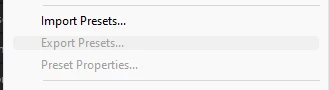
[title edited by mod]

This topic has been closed for replies.
Correct answer Ann Bens

Select the preset you want to export first.

Then open the Panel menu.........

1 reply

Ann Bens
Community Expert
Ann BensCommunity ExpertCorrect answer
Community Expert
September 8, 2021

Select the preset you want to export first.

Then open the Panel menu.........

ByTeDAuthor
Known Participant
September 9, 2021

Thanks for the answer, it had solved my problem, it seemed I had made a bin with the presets inside seperate from the original 'Presets' bin and that did not work when exporting the presets in the new bin, instead I should have clicked presets in the original bin to export. Thanks!