


Participant
October 19, 2021
Question

How to get a dark light effect ?

  • October 19, 2021
  • 4 replies
  • 780 views

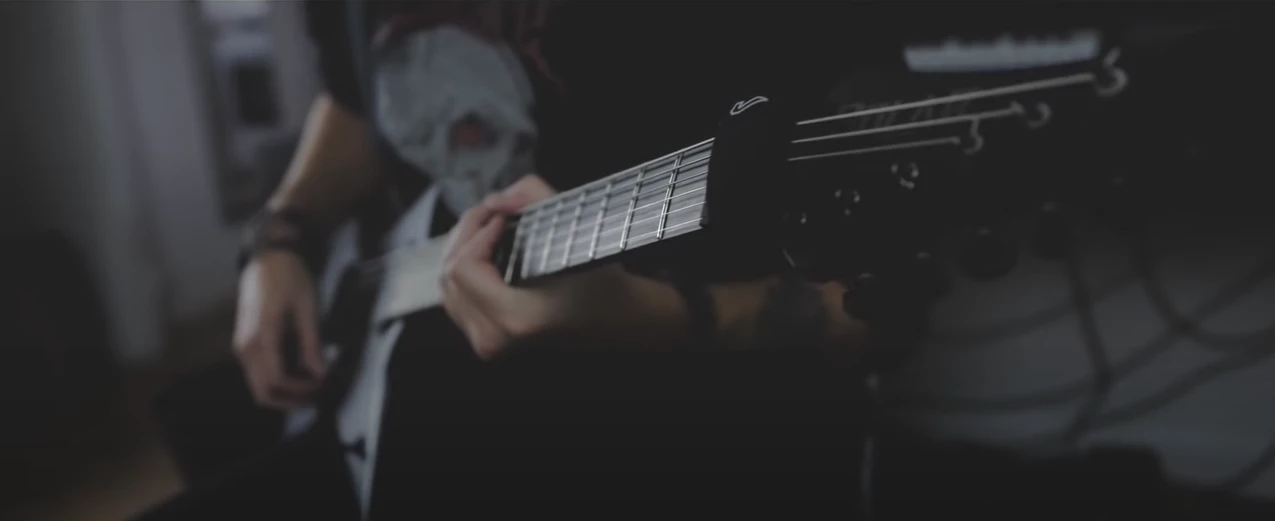
Hi everyone ! Does anybody knows how to get this dark light effect ? Obviously desaturate colors and get lower brightness of course, but I'm trying to reproduce this effect and I don't know to do it. Is there a layer, a preset, anything ?

Thanks


This topic has been closed for replies.

4 replies

R Neil Haugen
Legend
October 21, 2021

To mimic that you'd need to have the original lighting be similar and then do some work in Lumetri.


It looks like a fairly low-contrast original image. And then the whites/highlights have been brought down and the black point lifed a little, and with some lowered saturation. Almost to a 'deep' log image look.


One point not understood by many starting out in color ... to totally mimic a look from an image often requires having an original exposure/scene like unto the image you want to grab a look from.


Neil

Everyone's mileage always varies ...
Inspiring
October 19, 2021

great answers.

the thing I see with sample:

focus of eye is left hand in middle neck...most light there too due to slight vignette.

dof has head of guitar and back of guitar ( and right hand ) more out of focus.

so, the whole thing has dimension ( depth ) and it is very flat and subdued with levels.

No true white or black anywhere.


when something works to illustrate something that's great... but to think you can shove that into every shot like an 'effect' is denying yourself the freedom to be creative .


🙂


Participant
October 21, 2021

Thanks a lot, I'll give it a try ! 🙂

Kevin-Monahan
Community Manager
Community Manager
October 19, 2021

Great idea, Bob. To be more exact, after adding the Adjustment Layer to V2, create a mask on the Adjustment Layer's Opacity effect. Invert the mask, as well as, feathering it. Add a Gaussian Blur effect and blur it to taste. Finally, color grade the piece to be darker than the underlying clip. My settings are to the left.


An alternative to the above technique is to simply duplicate the clip directly above the exiting clip (achievable with a quick Alt/Option-drag upward in the Timeline). To me, that's faster and more "compact" a maneuver over having to break out a new Adjustment Layer, occupying one more line in my Project panel. Small choices like this keep a project file more manageable. Small tip, but worth considering if you use this effects technique a lot. I use it a lot myself!


I can show you the result of the

masked effect on an Adjustment Layer here. 


OP, is this what you were looking to do? If not, let us know. More questions? Come on back.


Regards,
Kevin

Kevin Monahan - Sr. Community & Engagement Strategist – Pro Video and Audio
Peru Bob
Community Expert
Community Expert
October 19, 2021

Maybe an adjustment layer with a feathered mask?