Participant
January 11, 2023
Question

how to get the same rendering quality as in my preview on my export timeline?

  • January 11, 2023
  • 3 replies
  • 497 views

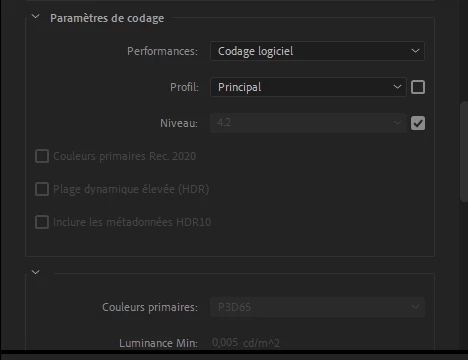
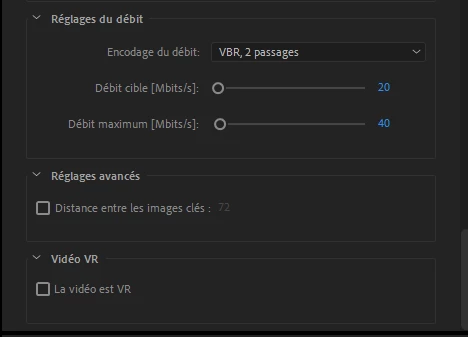
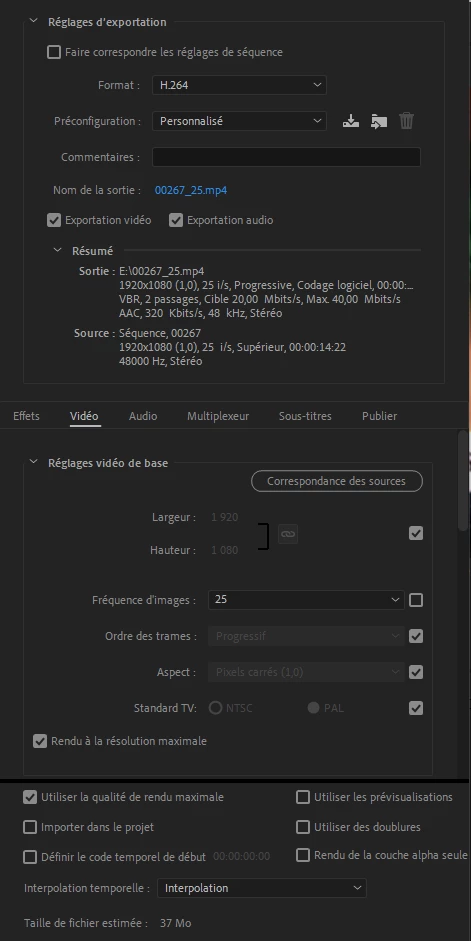
Hello here is my problem, I am working on a big project that I would like to export, however I can never get the same quality as what I can see on my timeline... I have tried everything, nothing there make my slow motions are not clean, etc... thank you in advance here are my parameters and my files.


CLIP :

Général
ID : 1 (0x1)
Nom complet : G:\00123.MTS
CompleteName_Last : G:\00236.MTS
Format : BDAV
Format/Info : Blu-ray Video
Taille du fichier : 4,06 Gio
Durée : 17s 266 ms
Type de débit global : Variable
Débit global moyen : 2 021 Mb/s
Débit global maximum : 18,0 Mb/s
Date d'enregistrement : 2022-01-02 16:13:04+00:00

Vidéo
ID : 4113 (0x1011)
ID de menu : 1 (0x1)
Format : AVC
Format/Info : Advanced Video Codec
Profil du format : High@L4
Paramètres du format : CABAC / 4 Ref Frames
Paramètres du format, CABAC : Oui
Paramètres du format, RefFrames : 4 images
Paramètres du format, GOP : M=3, N=12
Identifiant du codec : 27
Durée : 17s 199 ms
Type de débit : Variable
Débit : 1 940 Mb/s
Débit maximum : 16,8 Mb/s
Largeur : 1 920 pixels
Hauteur : 1 080 pixels
Format à l'écran : 16/9
Images par seconde : 25,000 Im/s
Espace de couleurs : YUV
Sous-échantillonnage de la chrominance : 4:2:0
Profondeur des couleurs : 8 bits
Type de balayage : Entrelacé
Ordre de balayage, mode d'enregistrement : Trames séparées
Ordre de balayage : Ligne du haut d'abord
Bits/(Pixel*Image) : 37.428
Taille du flux : 3,89 Gio (96%)

Audio
ID : 4352 (0x1100)
ID de menu : 1 (0x1)
Format : AC-3
Format/Info : Audio Coding 3
Nom commercial : Dolby Digital
Identifiant du codec : 129
Durée : 17s 311 ms
Type de débit : Constant
Débit : 256 kb/s
Canaux : 2 canaux
Channel layout : L R
Echantillonnage : 48,0 kHz
Images par seconde : 31,250 Im/s (1536 SPF)
Mode de compression : Avec perte
Délai par rapport Vidéo : -80 ms
Taille du flux : 541 Kio (0%)
Service kind : Complete Main


EXPORT :
This topic has been closed for replies.

3 replies

Ann Bens
Community Expert
Community Expert
January 11, 2023

Bitrate is way too low. Target at least 40.

R Neil Haugen
Legend
January 11, 2023

That's a pretty low bitrate if you have much fine detail you are trying to see. For 1920x1080, maybe try upping the bitrate to target of 30mpbs at least.


Neil

Everyone's mileage always varies ...
Participant
January 11, 2023

ok perfect my quality problem is solved! thank you very much, however I still have a color rendering problem (see the answer above)

Ishan Y
Inspiring
January 11, 2023

Hey Benjamin,


Welcome to the community! Which version of Premiere Pro you're currently working on? (Here's how to check). Could you let us know the differences between your preview and exported files? A comparison screenshot might help us understand the issue better. You can try increasing the minimum and maximum bitrate to see if the image quality improves or try exporting in another codec, such as Quicktime Prores 422 LT. Let us know how it goes.


Thanks,

Ishan

Participant
January 11, 2023

here are my problems:

- a color problem, when I render the sequence to preview my clips and thus be able to export (otherwise my media encoder freezes) I have a saturation problem that sets in. I use on all my clips a "magic bullet looks" effect which allows me to obtain a color composition that I really like. Here is an example of my problem:


good one :

bad one :


I have already tried to apply a LUT corrector, etc ... nothing helps


- 2nd problem, I can't get the same quality as the one I have on my timeline, my exported video is not clear, and the slow motions seem much less smooth than on my timeline...
it is difficult for me to send you an example (since I failed to export correctly...)


I'm on this problem for 1 week I spend 5 hours a day I'm starting to despair haha..
Thanks in advance