
December 4, 2019
Answered

How to Hide an unhide parts of picture

  • December 4, 2019
  • 1 reply
  • 3080 views
How to hide part of an image
 

hey there,  There are someone youtube videos I have been looking at, I have a similar idea, but I don't know how to execute in PP.

https://www.youtube.com/watch?v=KckQbSVO8TM


I just don't know how they cover the words then show them.

I know its a screenshot. so how do I hide, then unhide everything?

would i have to send it to photoshop?
This topic has been closed for replies.
Correct answer Kristian Gabriel

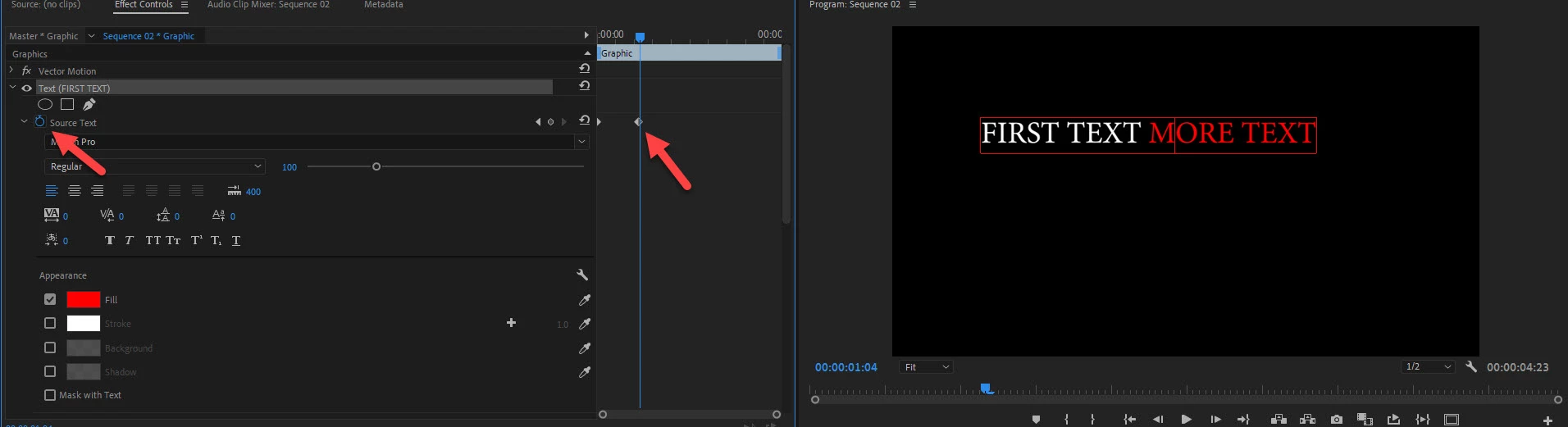
You are looking at animating the property called SOURCE TEXT in your effects panel. Type the first part of your text and turn on keyframes for SOURCE TEXT in your EFFECTS PANEL. Then move your playhead forward to the point you want the additional text to be revealed and type more text into your text box. This will add an additional keyframe automatically. When you play your animation, the first part of the text will play until the second keyframe where the second part of your text will appear. Images or parts of images can be hidden and revealed by animating MASK PROPERTIES under OPACITY or by using Premiere effects like LINEAR TRANSITIONS, etc. If you have additional questions happy to provide more information!


1 reply

Kristian Gabriel
Kristian GabrielCorrect answer
Participating Frequently
December 4, 2019

You are looking at animating the property called SOURCE TEXT in your effects panel. Type the first part of your text and turn on keyframes for SOURCE TEXT in your EFFECTS PANEL. Then move your playhead forward to the point you want the additional text to be revealed and type more text into your text box. This will add an additional keyframe automatically. When you play your animation, the first part of the text will play until the second keyframe where the second part of your text will appear. Images or parts of images can be hidden and revealed by animating MASK PROPERTIES under OPACITY or by using Premiere effects like LINEAR TRANSITIONS, etc. If you have additional questions happy to provide more information!


December 4, 2019

Thank you very much